Navigator area
258 MPR-e and MSS-1c User Manual 3DB19901EFAA Edition 01
See T1-2 in the Figure 4.78
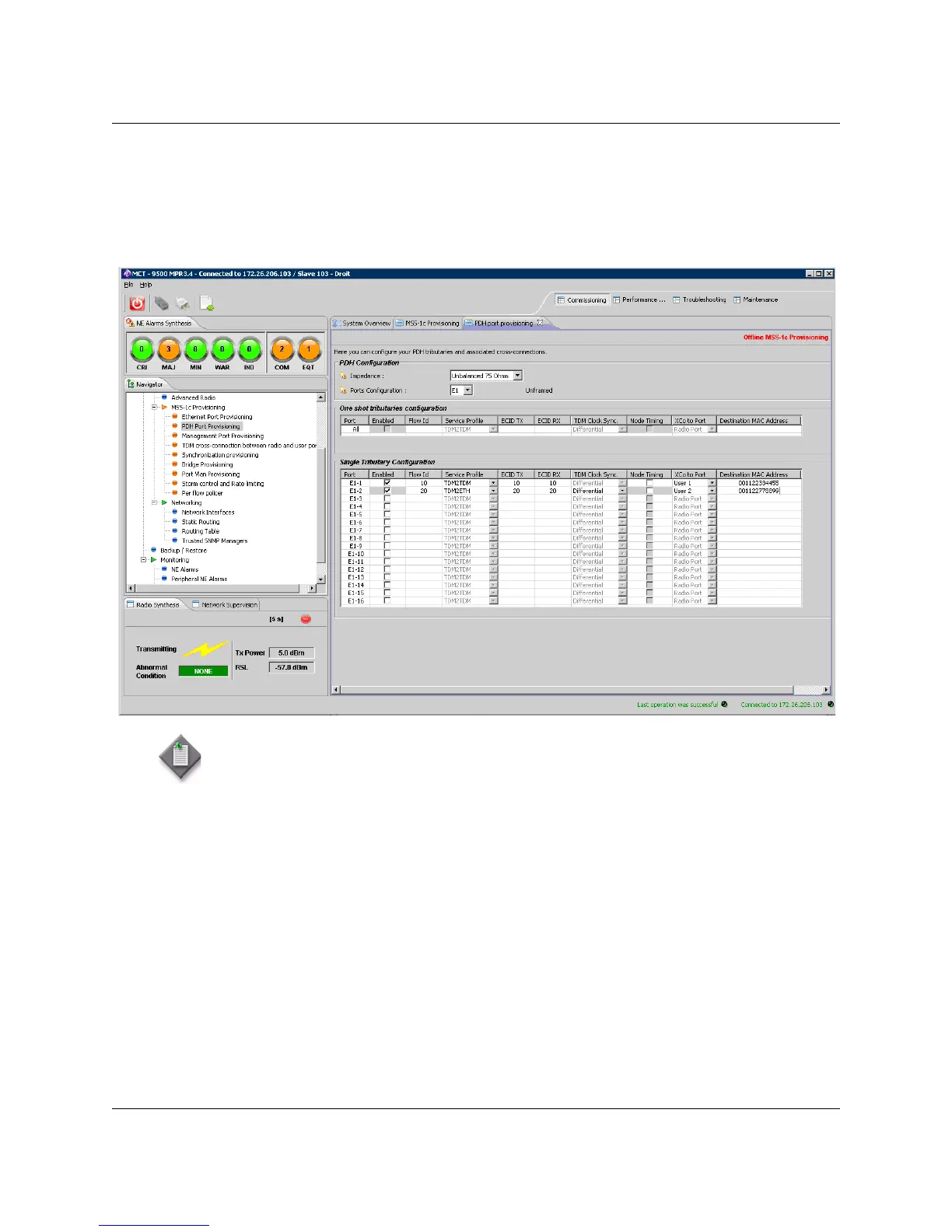
4.9.1.4.9.3.5 — E) Cross connection to user Ethernet port
Figure 4.79 — Cross connection to user Ethernet port
To configure a cross connection between an E1/T1 port and a user port:
• First, enter the parameters as explained in the previous paragraphs, then
• In column Service Profile: Select TDM2TDM or TDM2Eth. If TDM2TDM has been
selected the Ethernet user port must be connected to an Ethernet user port of another
MSS-c.
• In column XCO to Port: Select a user port (user 1 to user 4) in the list
• In column MAC Addr: Enter the External IWF MAC address which is used as
Destination Address in Ethernet frames built to carry TDM information in MPR
network
Note: In case of the "One shot tributary configuration" is not fully displayed, check that
you have selected "classic window" setting, if you are using Windows Vista or Windows 7.



 To Next Page