250
7.1.2.2. IPv6
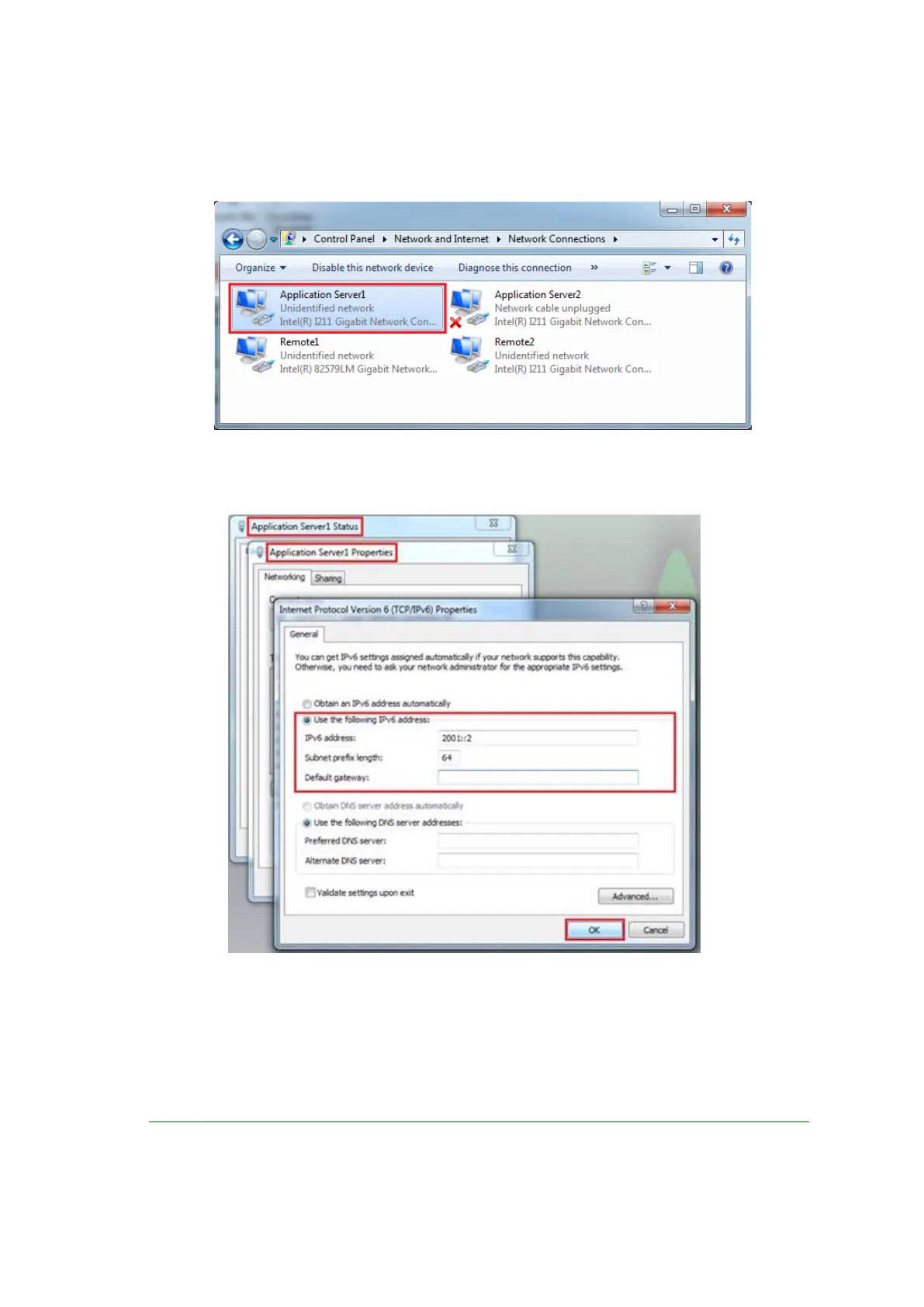
Setting TCP/IP of Application Server 1.
1. Open the Control Panel – Network and Sharing Center – Change adapter setting, and double-click the
Application Server1.
Figure 7.1.2.2-1 Change Adapter Setting Window (MT8821C)
2. Double-click Properties of the Application Server1 Status window, and double-click Internet Protocol
(TCP/IPv6) to open the Internet Protocol (TCP/IP) Properties window.
Figure 7.1.2.2-2 Internet Protocol (TCP/IPv6) Properties Window (MT8821C)
3. Choose Use the following IPv6 address and set IP address and Subnet mask as follows:
IPv6 address: 2001::2
Subnet prefix length: 64
NOTES:
Places with contiguous 0s in the IPv6 Server IP Address captured at Index No IP Address of step 4 ‘netsh
int ipv6 set’ are abbreviated as::. For example IPv6 Server IP Address
2001:0000:0000:0000:0000:0000:0000:0002 displayed in the following screen is abbreviated to 2001::2.
Set the Smae IP address as the IPv6 Server IP Address setting which can be found in the Packet settings
of the Call Processing Parameters.














 To Next Page