194
TCP/UDP Throughput 5.1.6.
5.1.6.1. IPv4
This chapter explains TCP/UDP throughput measurement using the Iperf software for downlink throughput tests.
Uplink throughput measurement is supported by switching the application server and client PCs.
1. Open the Command Prompt window on the client PC and run [cd c:¥] to change to the directory with
Iperf.exe.
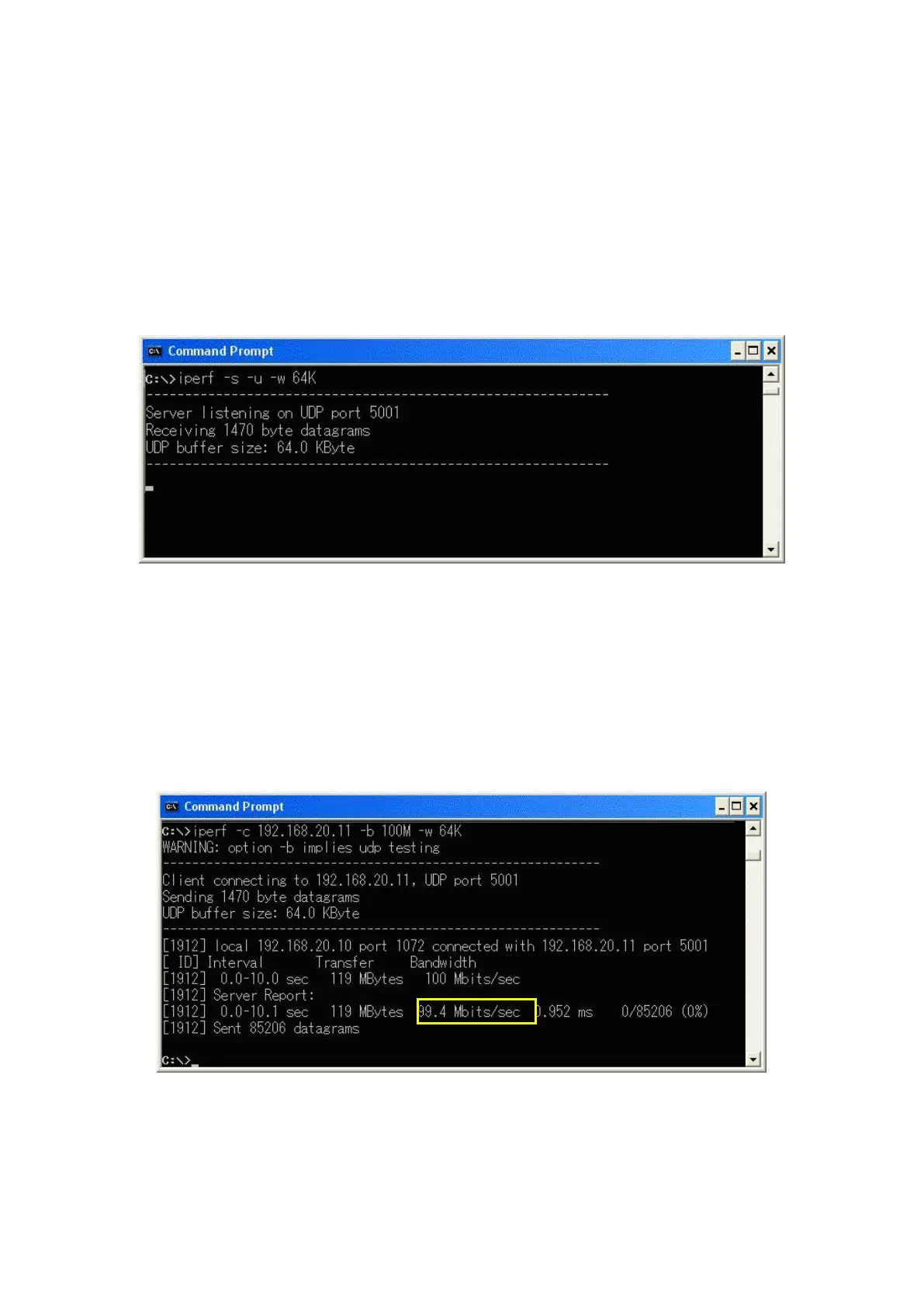
2. Run the following command to put the client PC into the wait status.
- UDP: [iperf -s -u -w 64K]
- TCP: [iperf -s -w 64K]
Figure 5.1.6.1-1 Screen after Running Iperf Command on Client PC
3. Open the Command Prompt window on the server PC and run [cd c:¥] to change to the directory with
Iperf.exe.
4. Run the following command to send data from the application server.
- UDP: [iperf -c 192.168.20.11 -b 100M -w -64K]
- TCP: [iperf -c 192.168.20.11 -w 64K]
100M in the above command is determined by the measurement results of the previously mentioned UE
Category 3 Throughput. For UE Category 4, use 150M.
5. The result is displayed in about 10 seconds.
Figure 5.1.6.1-2 Screen after Running Iperf Command on Application Server and Result of UDP at UE Category 3














 To Next Page