253
Initial Condition Setting 7.1.3.
The following shows how to set-up the test condition for VoLTE Echoback .
1. Execute Preset to Initialize.
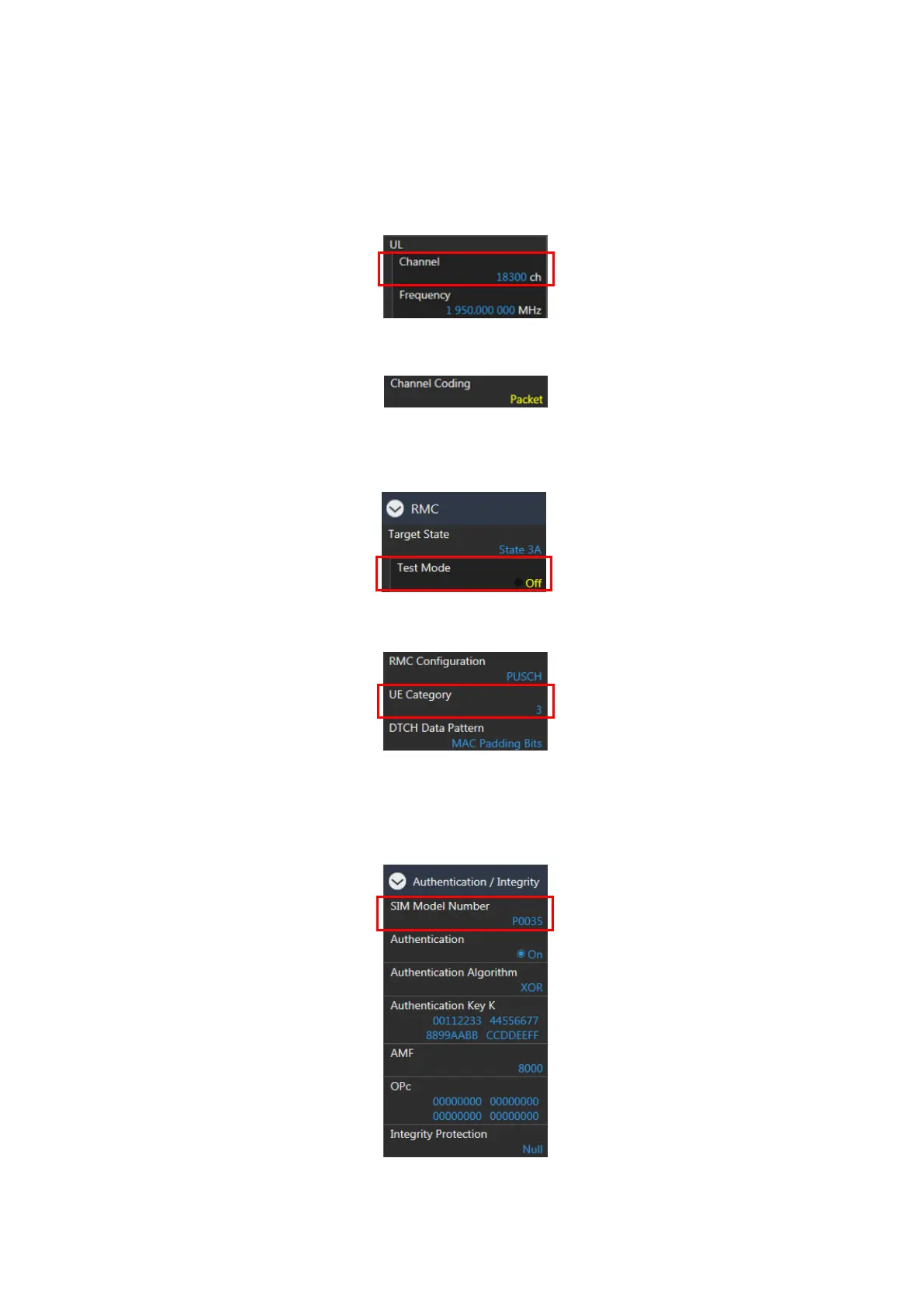
2. Set UL Channel to 18300.
Figure 7.1.3-1 UL Channel Setting at Common Parameter Screen (MT8821C)
3. Set Channel Coding to Packet.
Figure 7.1.3-2 Channel Coding Setting at Common Parameter Screen (MT8821C)
NOTE: If the MX882112C/13C-006 IP Data Transfer option is not installed, set Channel Coding to RMC
and Set Test Mode to Off at the Call Processing Parameter screen..
Figure 7.1.3-3 Test Mode Setting at Call Processing Parameter Screen (MT8821C)
4. Set a UE Category.
Figure 7.1.3-4 UE Category Setting at Common Parameter Screen (MT8821C)
5. Set SIM Model Number to match the IMS Authentication Parameter with the SIM in use.
NOTE: When using a SIM with a model number that is not included in the available SIM Model
Numbers , the settings for Authentication Algorithm, Authentication Key K, AMF, OPc must be
set accordingly.
Figure 7.1.3-5 SIM Model Number Setting at Call Processing Parameter Screen (MT8821C)














 To Next Page