IMPORTANT! Do not change electronic signature seings during calibration.
1.
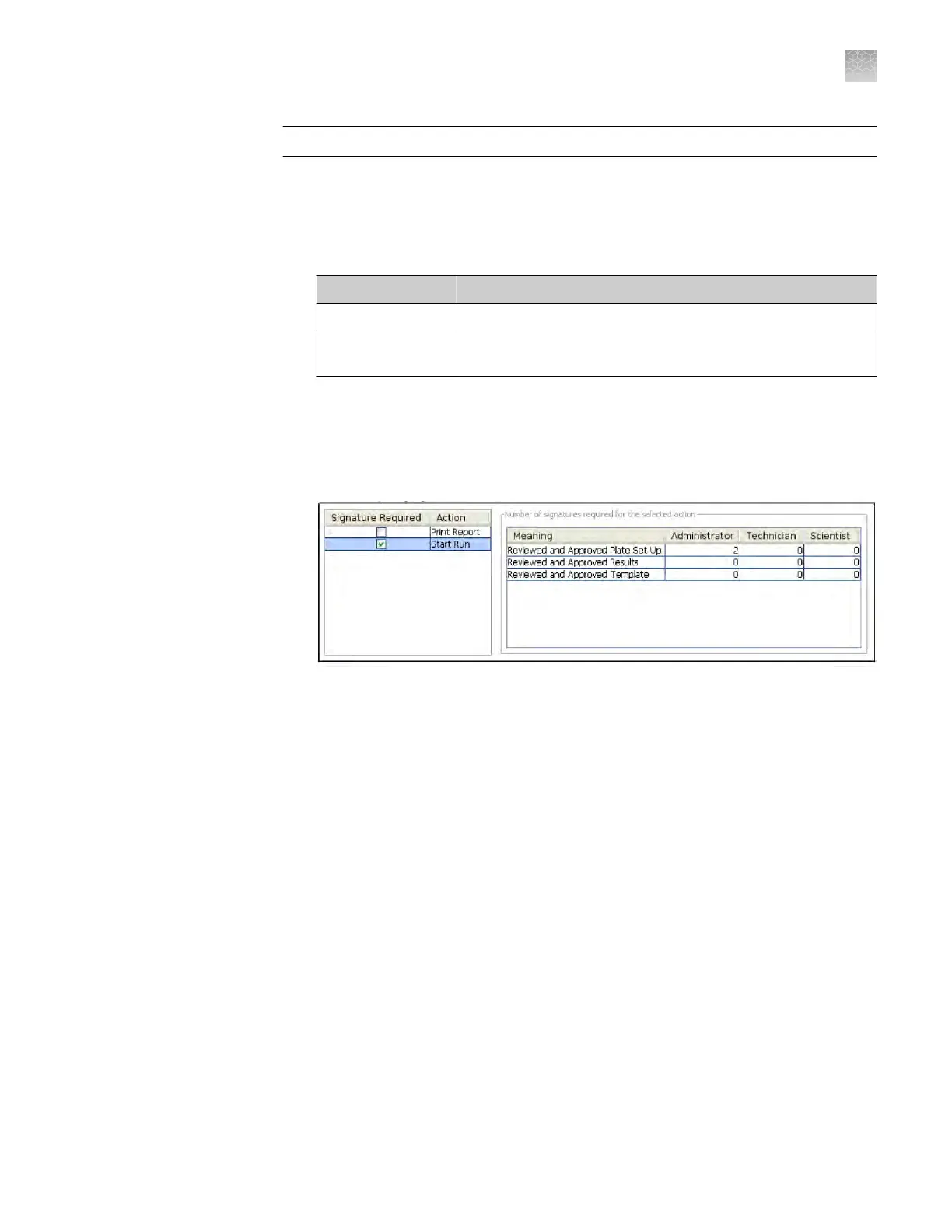
In the Signature Required column, select the check box next to each action for
which y
ou want to require electronic signatures (see Figure 8 on page 145). This
selection causes the software to present an e-sig prompt if a user performs the
action on a data le that does not have the required signatures. The data must be
signed before the user can perform the action.
Action The software requires e-signatures when a user.
Print Report Prints a report from an experiment or study.
Start Run
Initiates a run from the QuantStudio
™
Real‑Time PCR
Softwar
e.
2.
For each meaning of each selected action, enter the number of e-signatures from
each user role that are required before the softw
are can execute the associated
action. For example, in the following gure, at least two users from the
Administrator user role must sign an experiment using the “Reviewed and
Approved Plate Set Up” meaning before a user can start the associated run.
Figure 8 Actions r
equiring signatures
3.
Click Apply Seings.
Select the actions
that require
signature
Appendix E Security
, audit, and electronic signature
Manage electronic signature
E
QuantStudio
™
6 and 7 Flex Real-Time PCR Systems v1.6 Maintenance and Administration Guide
145












 To Next Page