Syntax:
show snmpv3 user
Display of the management stations configured on VLAN 1 on page 149 displays information about the
management stations configured on VLAN 1 to access the switch.
Display of the management stations configured on VLAN 1
switch# configure terminal
switch(config)# vlan 1
switch(vlan-1)# show snmpv3 user
Status and Counters - SNMPv3 Global Configuration Information
User Name Auth. Protocol Privacy Protocol
----------- -------------- -----------------
initial MD5 CFB AES-128
NetworkAdmin MD5 CBC-DES
Assigning users to groups (CLI)
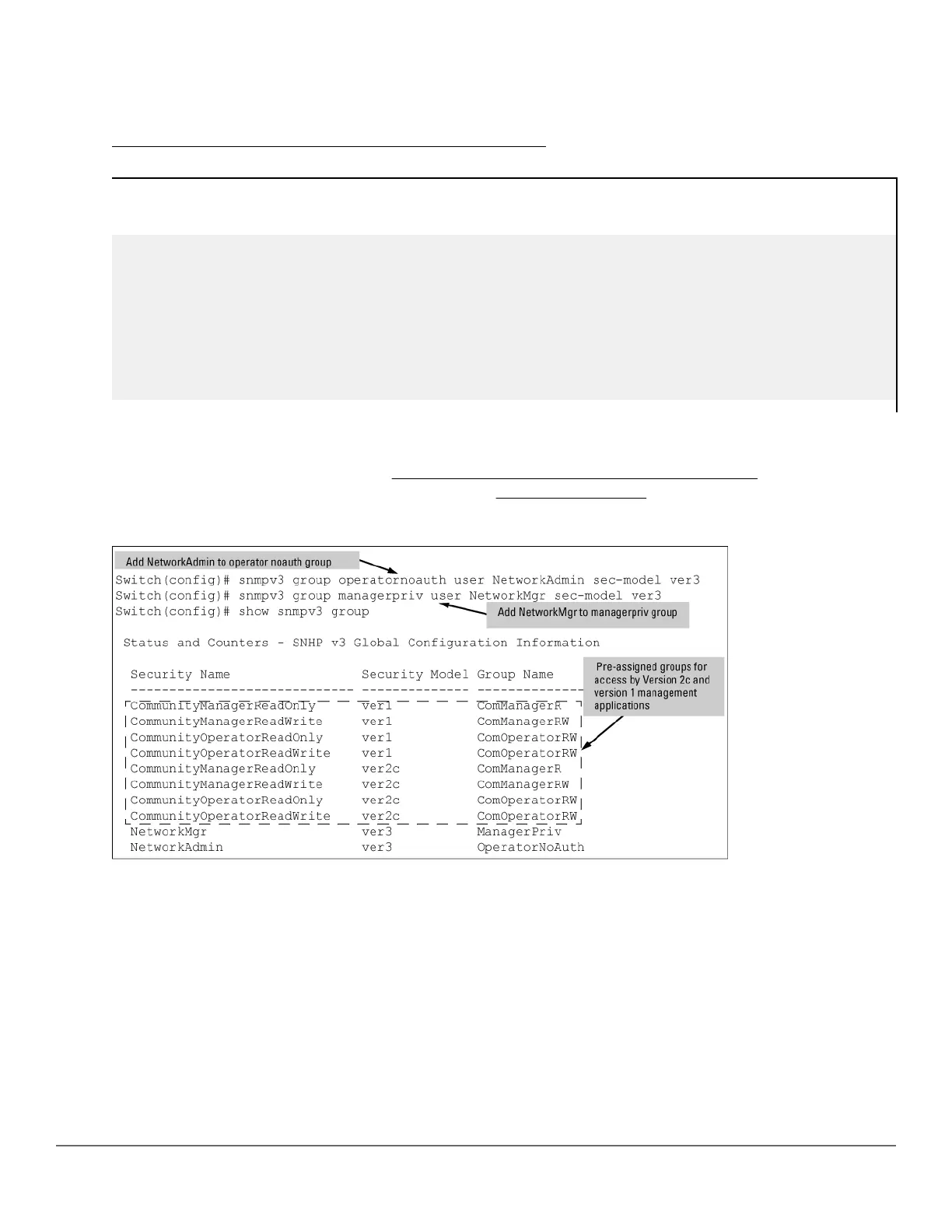
Next you must set the group access level for the user by assigning the user to a group. This is done with the
snmpv3 group command, as shown in
Figure 27: Example: of assigning users to groups on page 149. For
more details on the MIBs access for a given group, see Group access levels on page 150.
Figure 27: Example: of assigning users to groups
Syntax:
[no] snmpv3 group
Assigns or removes a user to a security group for access rights to the switch. To delete an entry, all of the
following three parameters must be included in the command:
Chapter 8 Configuring for Network Management Applications 149














 To Next Page