182 CONFIGURA TION
13.5.3 DIGIT AL INPUTS / RUN INPUT SETUP
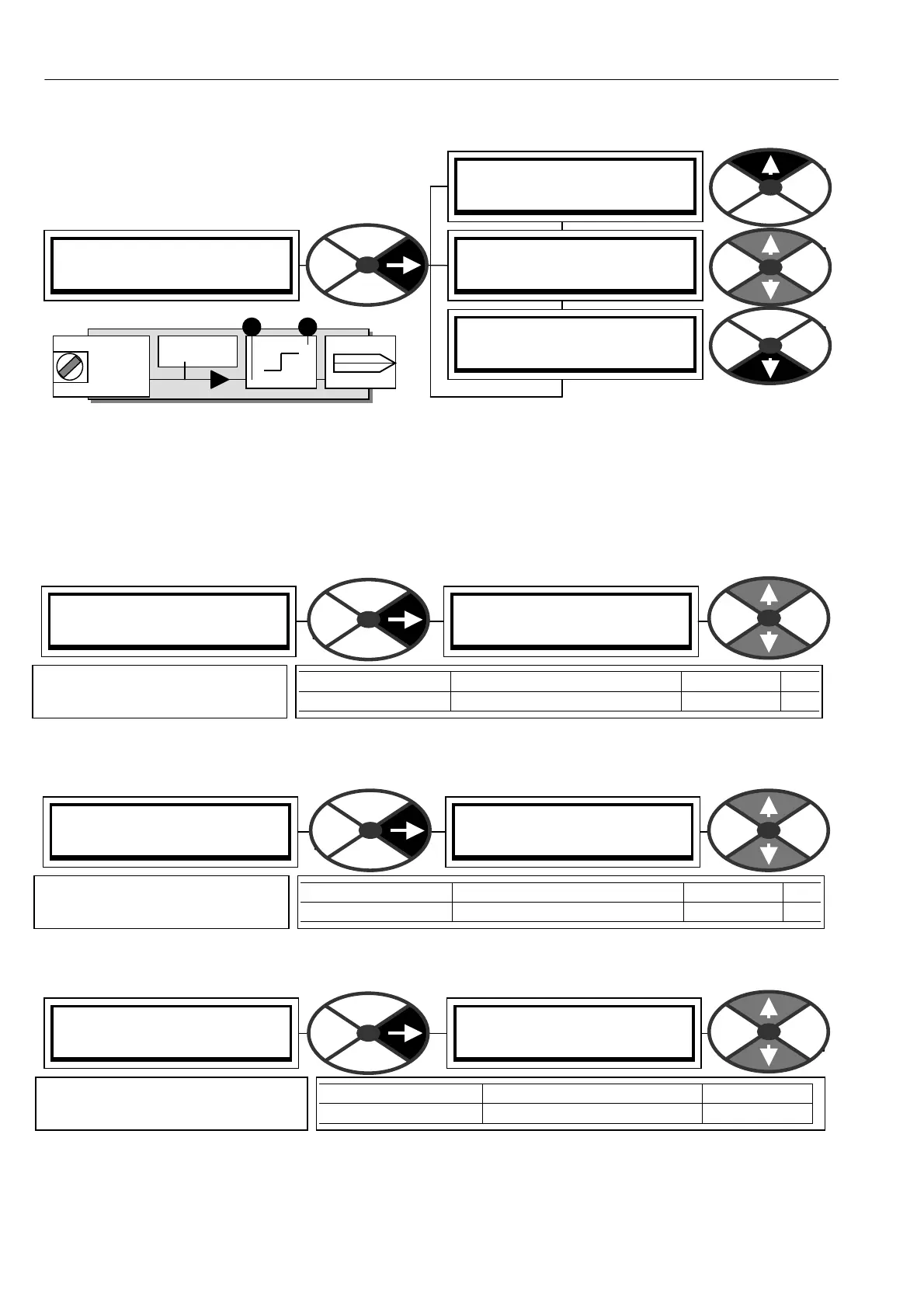
Pins 318 and 319
In the unlikely event that there is a shortage of digital inputs, the RUN input may be used.
The default G OT O PIN normally used by the RUN input is called 308)INTERNAL RUN IP, and must be set to a
logic high when the RUN input terminal is disconnected.
See 13.9.4 SOFTW ARE TERMIN ALS / Internal run input PIN 3 08.
13.5.3.1 RUN INPU T SETUP / RUN input HI value PIN 318
Note. You can make a simple A ND gate by selecting this as the target PIN of a logical GOTO.
13.5.3.2 RUN INPUT SETUP / RUN input LO value PIN 319
Note. You can make a simple OR gate by selecting this as the target PIN of a logical GO TO.
13.5.3.3 RUN INPU T SETUP / Make input value GO TO destination connection
RUN INPUT SETUP 4
318)RUN IP HI V ALUE
318)RUN IP HI V ALUE
0.01%
PARA METER RA NGE DEFAULT PIN
RUN IP HI V ALUE + /- 300.0 0% 0.01% 318
Sets the level of the value
selected by a high RUN input.
DIGIT AL INPUTS 3
RUN INPUT SETUP 4
PIN 318
PIN 319
T 3 1 RUN
Digital
Input
Terminal
RUN IP
High value
Low value
GO TO
RUN monitor
PIN 16 4 (CIP)
RUN INPUT SETUP 4
GO TO
RUN INPUT SETUP 4
318)RUN IP HI V ALUE
RUN INPUT SETUP 4
319)RUN IP LO V ALUE
RUN INPUT SETUP 4
GO TO
GO TO
PIN) Description of function
PARA METER RANGE DEF AULT
GO T O PIN 000 to 720 308
Defines the target PIN for the
connection to RUN IP
RUN INPUT SETUP 4
319)RUN IP LO V ALUE
319)RUN IP LO V ALUE
0.00%
PARA METER RA NGE DEFAULT PIN
RUN IP LO V ALUE + /- 300.00% 0.00% 319
Sets the level of the value
selected by a low RUN input.



 To Next Page