Chapter 9: The Touchscreen program
9/32
Operators & Maintenance Manual GENIUS Compact Version UK 0.1 © BESTnv
BESTnv Industrial Research BV, Marinus van Meelweg 20, 5657 EN, EINDHOVEN, THE NETHERLANDS
General tel. +31 (40) 292 2622 - Service tel. +31 (40) 292 2620 - Fax. +31 (40) 292 2633 - Email: service.BESTnv@bestnv.com
9.8. Warnings and Errors Menu
This menu contains all functions concerning the consultation and management of all error, warning and
information messages encountered by the POLLUX software:
If a menu starts fl ashing red, there is a new error message displayed which may have direct infl uence on
the functioning of the software and/or the sorting process. It is advisable to check this out immediately
and take the appropriate measures to solve the problem or contact BESTnv.
To consult this menu, please press the Warning button in the top bar of every menu.
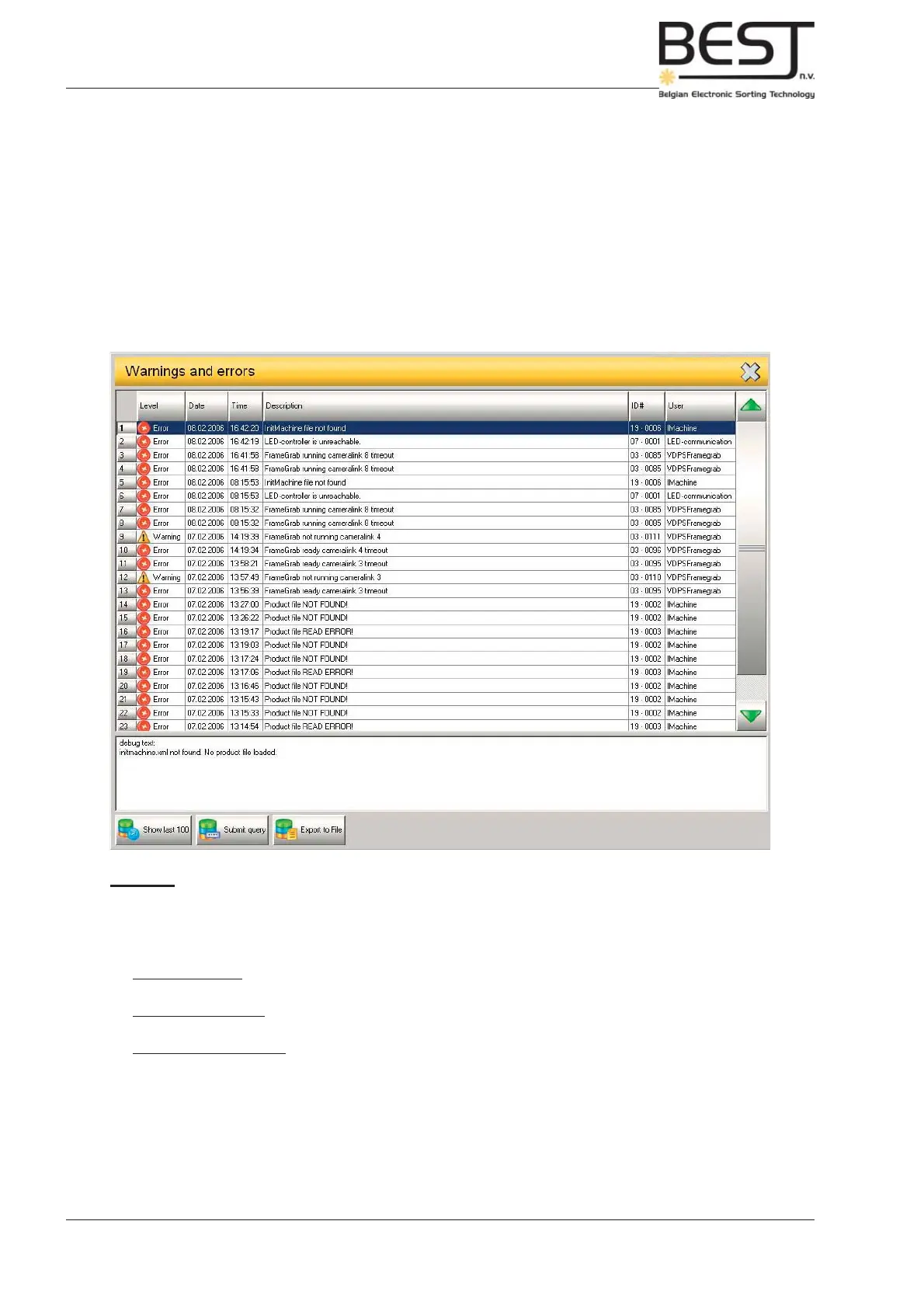
The following menu will appear showing the 25 last Warning and Error messages:
Features:
- Messages table:
For every message the following data will be displayed: type, date, time, a short description, an ID
number and the User that was logged in at the time the message was created.
There are three basic message types:
- Error messages are preceded by a red circle with a white cross: these generally indicate problems
that hinder the proper functioning of the software and/or the sorting process.
- Warning messages are preceded by an yellow triangle with an exclamation mark: indicate
problems that may infl uence the sorting process.
- Information messages are preceded by a green circle: general info messages on the functioning of
the sorter and the software.
- Text screen: underneath the message table. Here some explanation may be given about the nature
of the message selected in the table.
- Show Last 100 button: Pressing this button will display the last 100 messages in the message table.



 To Next Page