3/1
Chapter 3: Theory
Operators & Maintenance Manual GENIUS Compact Version UK 0.1 © BESTnv
BESTnv Industrial Research BV, Marinus van Meelweg 20, 5657 EN, EINDHOVEN, THE NETHERLANDS
General tel. +31 (40) 292 2622 - Service tel. +31 (40) 292 2620 - Fax. +31 (40) 292 2633 - Email: service.BESTnv@bestnv.com
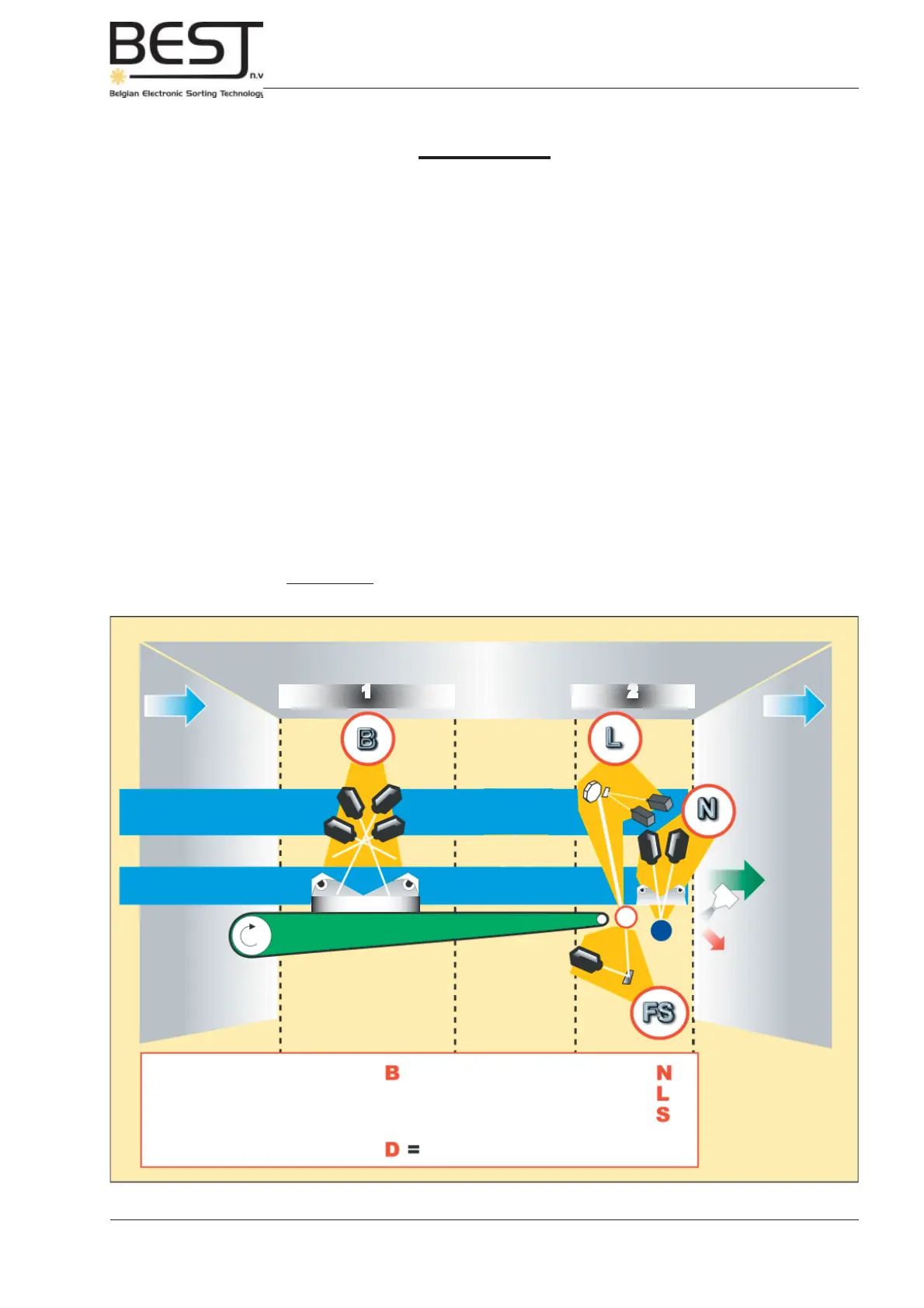
Picture 3.1.a: Overview GENIUS Compact confi gurations
1 2
Scan Zones
INFEED
Cameras
and /or Lasers
Illumination
OUTPUT
ACCEPT
REJECT
DETECTION BELT
HF, UV, IR or LED
GENIUS
Compact
TM
TYPES
GENIUS C-
GENIUS C-
GENIUS C-
GENIUS C-
GENIUS C-
B+L
: combination of camera and laser
GENIUS C-
T
=
B+L+FS
: all options
III. Theory
3.0. Introduction
This chapter contains a complete overview of the different optical GENIUS Compact confi gurations
and their advantages. A short explanation will be given of the different technologies and techniques that
are being used. For an explanation of the laser technology used in the laser box option, please check
chapter 7.
3.1. The Different Optical Confi gurations
To give the user a clear picture of the different possibilities, 2 different scan zones are defi ned on the
sorter. The fi rst scan zone (zone 1) is located on the belt, the second zone (zone 2) is located just after
the belt, in the so-called free fall zone.
In every scan zone the number of cameras can vary (from 1 to 4 + laser box), and many of the different
options can be combined. In general, one can say that all options can be combined in any number of
different confi gurations, as long as only 8 camera signals are needed (a laser box will occupy one or two
signals depending on the number of lasers). The only exception of the L and the N option in the upper
part of the second scan zone, for these two cannot be present at the same time, due to lack of space.



 To Next Page