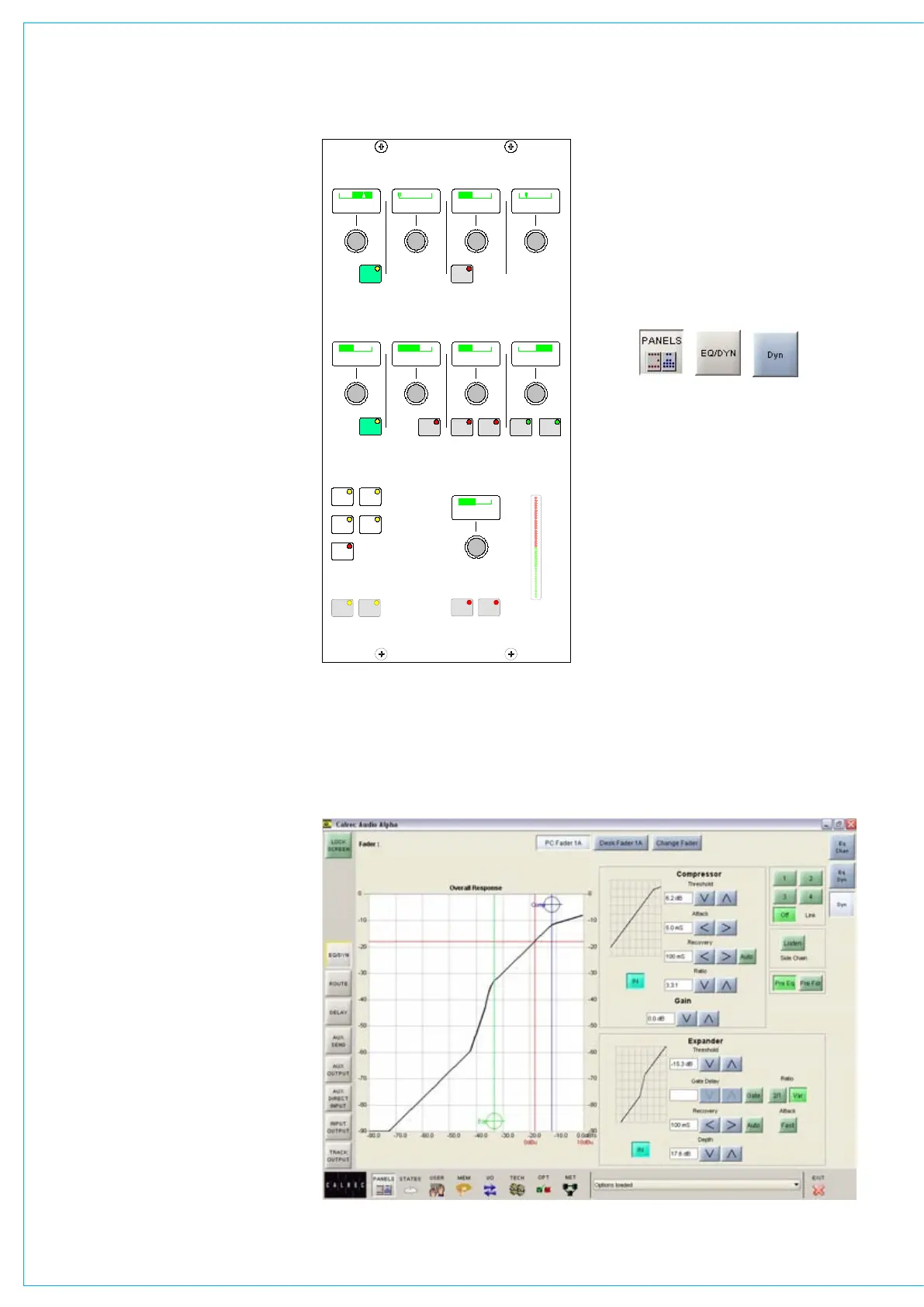
Compressor
Threshold +20dB to -20dB
Recovery 75ms to 4 sec + AUTO
Ratio 1 to 50
Attack 50µs to 30ms
Soft knee (on channel paths only)
Sidechain Listen
The sidechain listen facility allows the
user to listen to the signal driving the
compressor sidechain. This allows the
effect of sidechain EQ to be “previewed”.
Expander
Threshold +10dB to -40dB
Recovery 75ms to 4 sec + AUTO
Depth 0dB to 40dB
Fast attack 300µs (normal 16ms)
Ratio 2/1 and VAR (variable - according
to level)
Gate
Threshold 0dB to -40dB
Recovery 75ms to 4 sec + AUTO
Depth 0dB to 40dB
Fast attack 300µs (normal 16ms)
Gate delay 0 to 1 sec in addition to 6dB
hysteresis
Gain
Make up gain is adjustable from 0dB to
+20dB.
Dynamics linking
It is possible to have the dynamics of
many channels linked by assigning them
to one of four available link busses. This
is useful for when the same dynamics
settings need to be applied to more than
one channel. With the channel selected,
press 1, 2, 3 or 4 to assign the channel to
the bus. The link button LEDs show which
user dynamics link the currently assigned
path is routed to. The OFF button’s LED is
lit when the path is not linked to any of the
four user busses.
Each surround channel or group has
its own dynamic link bus to which the
20
0
10
10
20
IN
2/1
EQ
PRE
KEY
1 2
3 4
OFF
THRESHOLD RECOVERY DEPTHGATE DELAY
THRESHOLD RECOVERY RATIO
GAIN
ATTACK RATIO
EXPANDER
COMPRESSOR
GAIN
REDUCTION
DF4726
ATTACK
FDR
PRE
AUTO
DYNAMICS
LINK
LISTEN
SIDE CHAIN
-10.5 dB ms0.05 s0.5 2.0:1
dB-27.0 0.4 s 20.00.5 s dB
+ 8.0 dB
IN
AUTO FASTGATE
VAR
DyNAMICS
surround master and all its spills (except
the LFE) are associated when the
surround channel is created.
Pre EQ or pre fader
The dynamics can be applied Pre EQ or
Pre Fader. The Pre EQ button will not
function on group and main paths.
A 0dB setting on the dynamics equates to
the chosen reference level for the console.
Panels - dynamics screen
The user can view and manipulate the
dynamic response, using the Panels-
Dynamics screen.
All of the controls available on the
dynamics panel are also available on this
screen. In addition, the user can choose
whether to control the dynamics of the
currently assigned fader path, or to select
a different fader, known as the “PC Fader”
to which dynamics settings can be applied
independently of the current assignment.
Compression or expansion settings can
be adjusted using the touch screen,
or trackball, by selecting the required
crosshair and moving it around within the
editable area. As it moves, the values will
change. Nudge buttons to the right of
the editable response window can also be
used to make adjustments.
The dynamics response is only visible
if dynamics is switched into the path.
Otherwise, it remains flat.



 To Next Page