CALREC Putting Sound in the Picture 43
Condition switching
The Options - TX REH screen allows
the condition switching for the system
to be set up. Functions can be set to be
active, or not, in any of the three states.
This can significantly reduce the risk of
human error, making the whole system a
more robust, less stressful, user friendly
environment for operators to work in.
Console reset
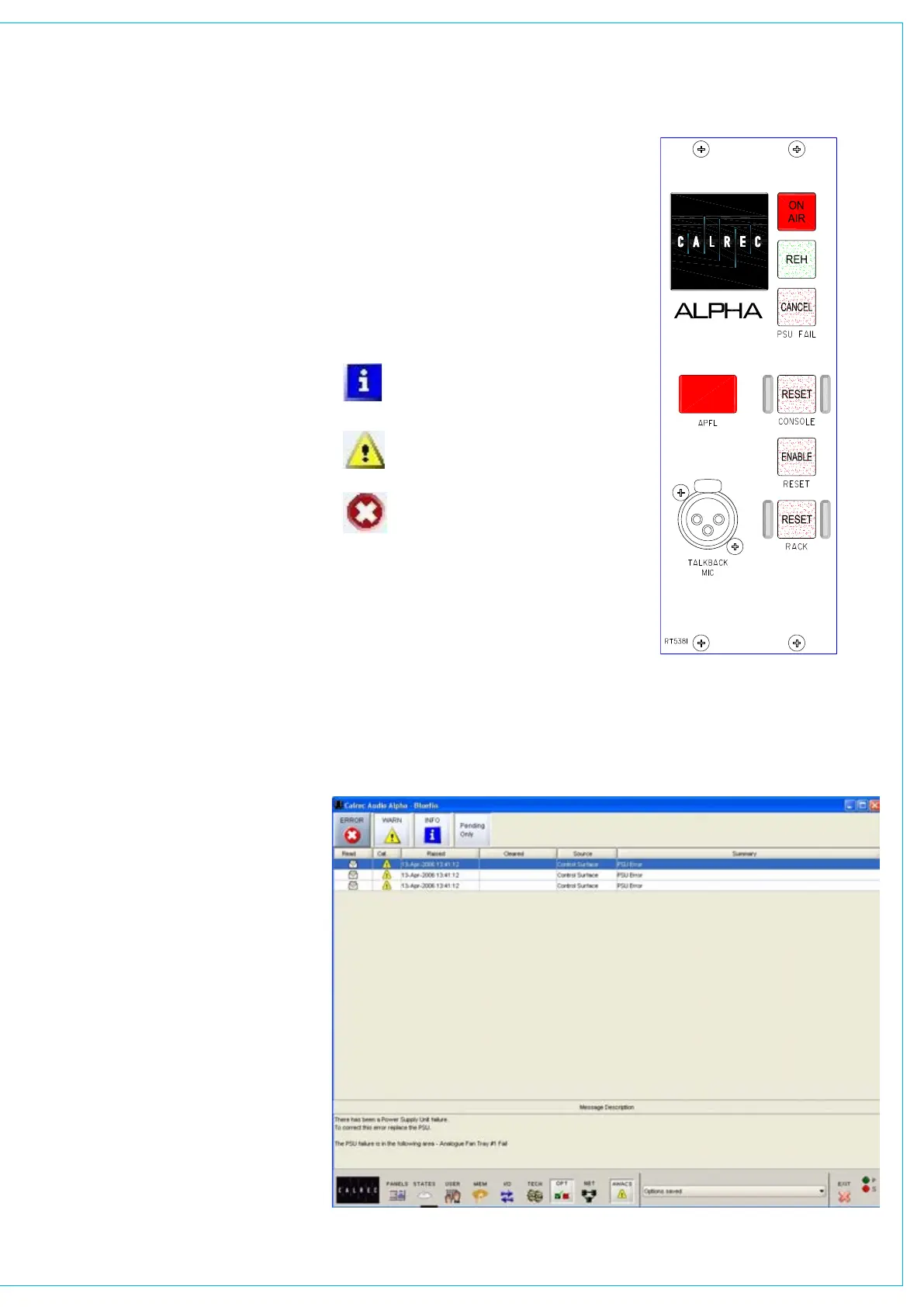
Pressing the CONSOLE RESET
button resets the control system only.
Independent DSP operation ensures
audio continuity during console reset. The
most recent console settings will be fully
restored in less than 15 seconds.
As the console operates independently of
the PC, rebooting or failure of the PC will
affect neither the audio nor the operation
of the console.
Rack reset
Pressing the ENABLE and RACK RESET
button resets the racks only, the control
surface is unaffected.
Please Note: Resetting the racks will
result in a brief audio interruption.
Power supply monitoring
The rack mounted bulk power supply
and distribution module monitors the
power supplies and ensures automatic
changeover to the spare in the event of a
failure.
The PSU FAIL Indicator/Cancel button on
this panel will flash if any one PSU fails
(the hot spare PSU would prevent the
desk from being affected). Pressing this
button will change the flashing to a steady
lit condition. In this mode, in the unlikely
event of a second PSU failing, the light will
begin to flash again.
AWACS
If a problem does develop, messages will
be delivered on the Automatic Warning
and Correction System (AWACS) screen.
bROADCAST fACILITIES
The AWACS button at the bottom of the
screen will flash to alert the user that a
message has been reported.
Selection of this button will open the
AWACS page, where messages can be
viewed. Selecting a message will reveal
a more detailed description. Message
history is saved to the PC’s hard disk for
future analysis. Three types of messages
are reported:
Information messages, e.g. “Control
Surface UN4806 processor started
successfully”
Warning messages, where the
system back-up has taken over
Fatal Error messages, where the
system cannot recover by itself
(perhaps because the back-up is
already in use)
Because the system has many back-
up features, it is possible to continue
operating after errors are reported. If
un-cleared errors are still present, an icon
will flash in the AWACS button. Selecting
this button at any time will switch back to
the AWACS screen. Information messages
can be cleared by selecting them and then
leaving the AWACS screen. Warning and
Fatal Error messages can only be cleared
by clearing the error and restoring the
system to its normal operational state. It
is possible to set the PSU Fail Indicator
button on the Broadcast Facilities panel, to
flash when an error message is reported.
This is set up on the Options - GPO screen.



 To Next Page