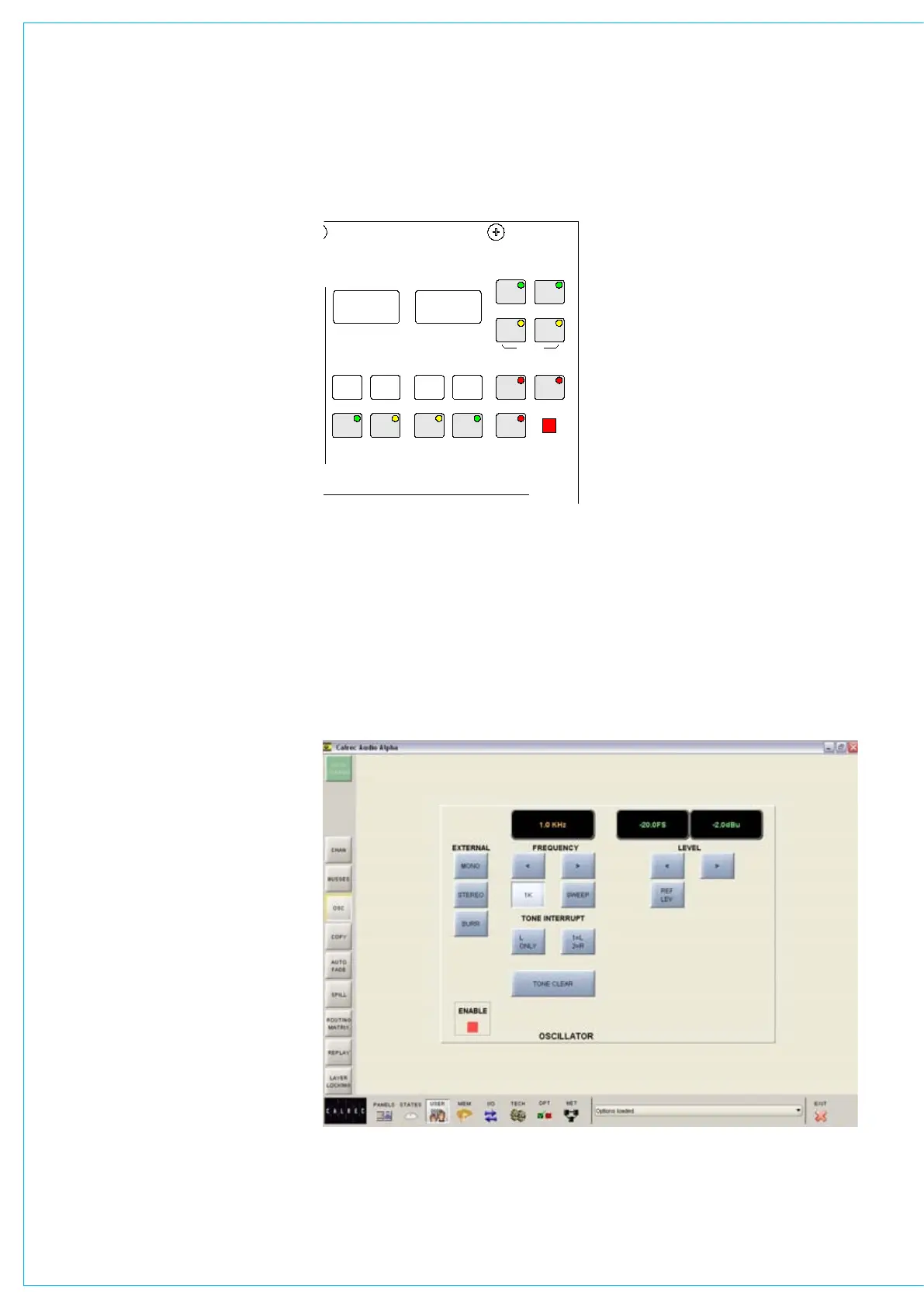
The Enable LED lights to show that the
Oscillator controls are enabled.
Frequency
The frequency of the tone can be adjusted
from 20Hz to 20KHz in in incremental
steps using the nudge buttons, or set to
1KHz using the 1K button. Alternatively,
the sweep button will set the oscillator to
sweep through all frequencies.
Level
The level of the test tone can be adjusted
from -60dBFS to 0dBFS using the nudge
buttons, or set to the reference level using
the REF LEV button.
Tone interrupt
The Tone Interrupt buttons are useful for
testing stereo paths. They allow the tone
to be interrupted on the left side only, or
on the left and right sides in an alternating
pattern.
External tone
EXT MONO, EXT STEREO or EXT SURR
replace the tone with a mono, stereo or
surround external source of your choice.
This allows external oscillators to be
used. The ports for this are set up on the
OPT-MON TB TONE - Talkback and Tone
screen.
I/PS
FLTR
EQ
DYN
ALL
FDR
AUXRTG
ALL
A
ALL
B
WILD ASSIGN
4
3
2
1
CLR
ALL
CHANNEL COPY
ALLDYN
FADER
BARGRAPH
I/P
OFF
HOLD
PAN
FUNCTIONS
CA4724
O/P
DIR
STEREO
EXT
TEST TONE
><
ENABLE
MONO
EXT
INTERRUPT
TONE
LEVEL
L
2=R
1=L
SWEEP
FREQUENCY
1k
< >
OSCILLATOR
A
<
B
>
EXEC
FADER
FADERSCONTROLS
DEFAULT
REPLAY
CLEAR
C ON SO LE
CLEAR
SET UPCLEAR
AUX
CHANNEL GLOBAL
WILDS
ON
MIX MINUS BUS
DIRECT INPUT
COPY
FADER
TO
-11. dB
1012Hz + 1. dB
FDR19A
Drums
LEV
REF
CLEAR
TONE
SURR
EXT
WILD
ALT
EXEC
ONLY
0
0
OSCILLATOR CONTROLS
Tone clear
TONE CLEAR clears all oscillator routes
made, providing an easy way of removing
test tones from signal paths.
User - oscillator screen
Oscillator controls are accompanied by a
supporting screen. This screen provides
controls for the oscillator in addition to
those already available on the control
surface.



 To Next Page