120 A L P H A with Bluefin
Power
Fault
hp Procurve
Switch 4104gl
1 2 3 4 5 6
1 2 3 4 5 6
Power
Fault
hp Procurve
Switch 4104gl
1 2 3 4 5 6
1 2 3 4 5 6
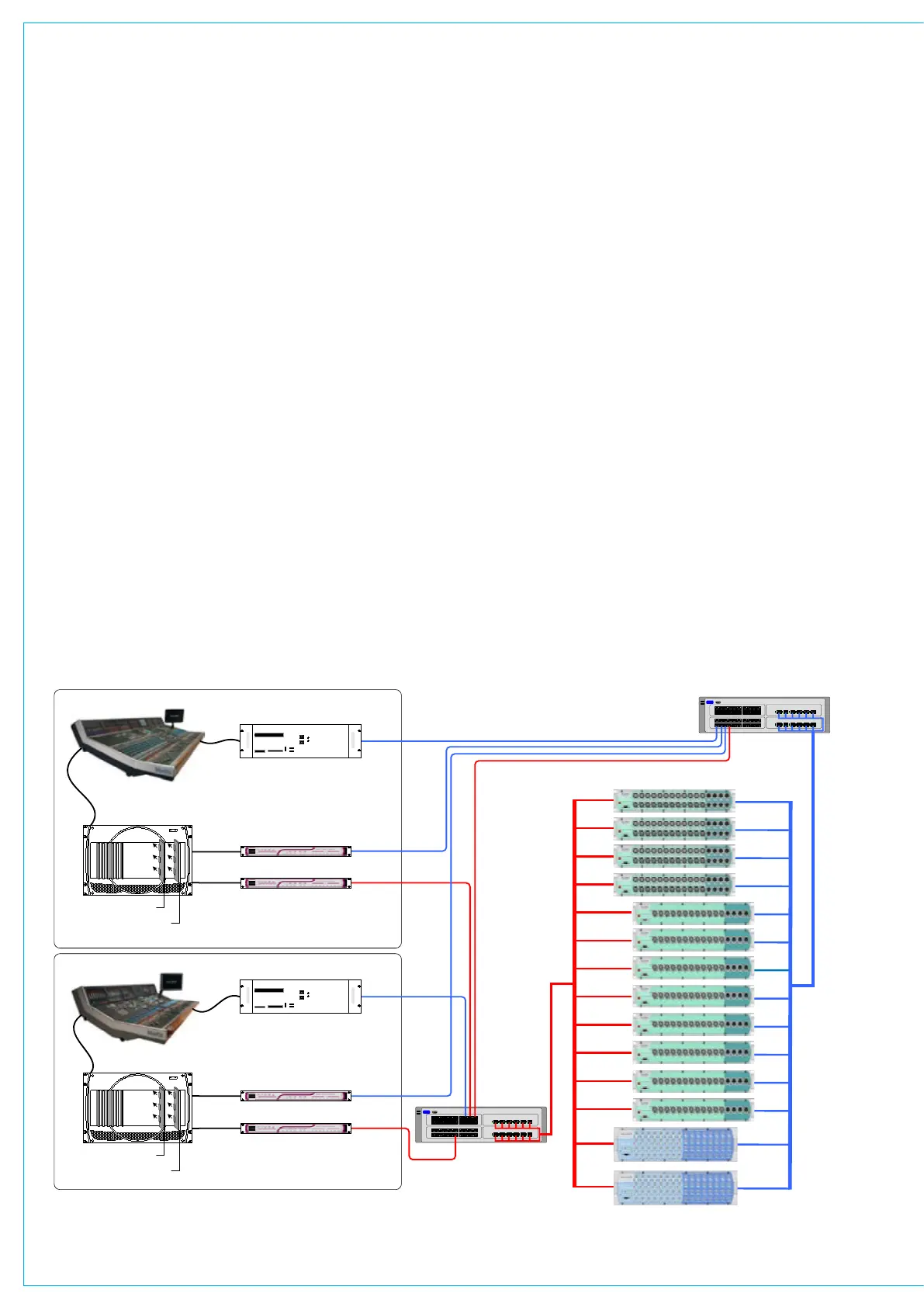
CONSOLE 1
Connection
from WAB 1
Connection
from WAB 2
Console’s PC
Gigabit Switch 1
Gigabit Switch 2
CONSOLE 2
Connection
from WAB 1
Connection
from WAB 2
Console’s PC
Hydra Gigabit Interface Unit 1
Hydra Gigabit Interface Unit 2
Hydra Gigabit Interface Unit 1
Hydra Gigabit Interface Unit 2
128 mono signals to and from the
network (with 128 for redundancy)
128 mono signals to and from the
network (with 128 for redundancy)
GIG-E
GIG-E
GIG-E
GIG-E
GIG-E
GIG-E
Wide Area Bulk Card 1
Console’s Rack
POWER FAN FAIL
Wide Area Bulk Card 2
Wide Area Bulk Card 1
Console’s Rack
POWER FAN FAIL
Wide Area Bulk Card 2
Sigma Control
Surface
Fibre Links
Fibre Links
3051-22-2A3
Hydra System
10/08/07
JC
Title:
Issue date:
Drawn:
Calrec Audio Ltd
Nutclough Mill
Hebden Bridge
West Yorkshire
HX7 8EZ
Tel: 01422 842159
Fax: 01422 845244
www.calrec.com
enquiries@calrec.com
Hydra
Project:
Alpha Control
Surface
24 MIC-LINE IN / 8 LINE OUT
24 MIC-LINE IN / 8 LINE OUT
24 MIC-LINE IN / 8 LINE OUT
12 MIC-LINE IN / 4 LINE OUT
24 MIC-LINE IN / 8 LINE OUT
12 MIC-LINE IN / 4 LINE OUT
12 MIC-LINE IN / 4 LINE OUT
12 MIC-LINE IN / 4 LINE OUT
12 MIC-LINE IN / 4 LINE OUT
12 MIC-LINE IN / 4 LINE OUT
12 MIC-LINE IN / 4 LINE OUT
32 AES INPUTS & 32 AES OUTPUTS
12 MIC-LINE IN / 4 LINE OUT
192.168.X.XXX
192.168.X.XXX
192.168.X.XXX
192.168.X.XXX
192.168.X.XXX
192.168.X.XXX
192.168.X.XXX
192.168.X.XXX
192.168.X.XXX
192.168.X.XXX
192.168.X.XXX
192.168.X.XXX
192.168.X.XXX
192.168.X.XXX
192.168.X.XXX
192.168.X.XXX
192.168.X.XXX
192.168.X.XXX
192.168.X.XXX
192.168.X.XXX
192.168.X.XXX
192.168.X.XXX
192.168.X.XXX
192.168.X.XXX
192.168.X.XXX
192.168.X.XXX
192.168.X.XXX
192.168.X.XXX
192.168.X.XXX
192.168.X.XXX
192.168.X.XXX
192.168.X.XXX
192.168.X.XXX
192.168.X.XXX
192.168.X.XXX
192.168.X.XXX
MS CF / MD
USB
Power
Power
Reset
I O
DVD ROM
HDD
USB
USB
MS CF / MD
USB
Power
Power
Reset
I O
DVD ROM
HDD
USB
USB
32 AES INPUTS & 32 AES OUTPUTS
Status LEDs
The following indicative LEDs are visible
from the front panel:
PSU OK (green)
Fan Fail (red)
Port 1 connected (yellow)
Port 1 active (green)
Port 2 connected (yellow)
Port 2 active (green)
Status (x8 red)
In addition, each input connector has
its own tricolour LED to indicate signal
presence. The incoming signal will cause
the LED to light green when the signal is
between -60dBFS and -38dBFS, amber
when between -38dBFS and -2dBFS,
and red when the signal clips at -2dBFS
or above.
Each output connector has a green LED
to indicate that there is a route established
to it from a console on the network.
Synchronization
Units are frequency synchronized using
synchronization packets received from the
Hydra network.
Diagnostics
The units support remote FPGA firmware
and software updates across the network
via the Ethernet ports. In addition, an
RS232 port is provided, such that system
diagnostics can be performed by a Calrec
approved engineer. Connection to the
port is via a front-mounted 9 pin D-Sub
connector.
IP Addresses
Calrec will supply each device in your
system with its own unique IP address,
which the system uses to identify each
network connection. On the front of each
Hydra I/O box, there is a label showing
the IP address. The secondary port will
use the address of the primary port + 100
decimal. For example:
Primary Port 192.168.0.050
Secondary Port 192.168.0.150
In an installation, the first 3 bytes (shown
HyDRA I/O bOxES
in red) are fixed. The 4th byte or least
significant byte is the part of the address
which is unique to that port on the device.
For mobile installations, the 3rd byte
of the IP address will be unique to that
installation, such that it is possible for
different installations to connect their
networks together.
If a Hydra I/O box needs to be swapped
out, the replacement unit must be
programmed with the correct IP address.
The 8-way switch on the rear of the unit
allows the least significant byte of the IP
address of the primary port to be set in
binary.
Surround Signals
It is not recommended that ports on
a modular Hydra I/O box should be
combined with ports on a fixed Hydra I/O
box to create a 5.1 surround signal.



 To Next Page