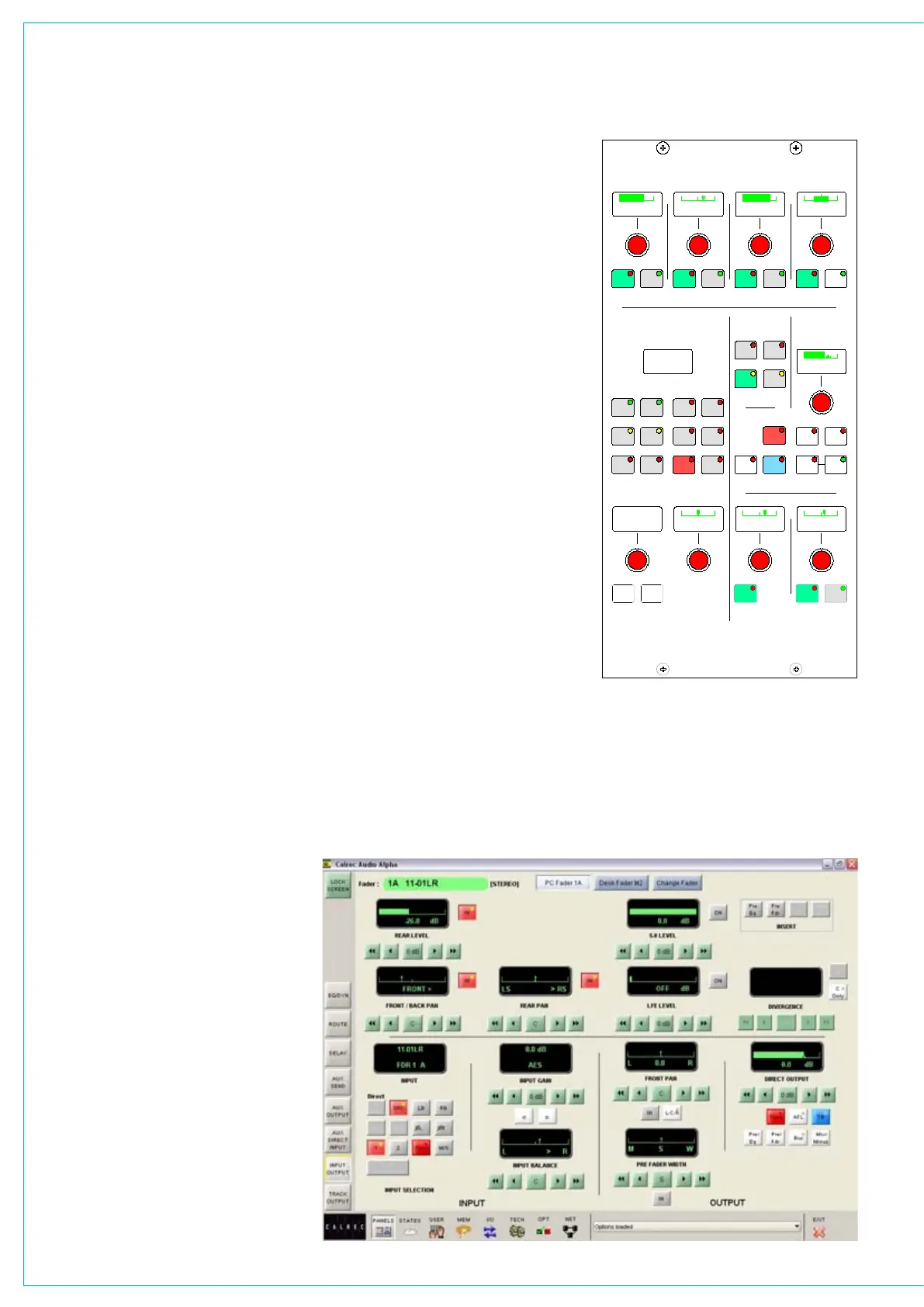
Input Settings
•
Gain Adjustment•
Balance Control•
Width Control•
Inserts•
Direct Output and Mix Minu• s
Stereo and Surround Pannin
• g
Input Selection Controls
Each channel path can switch between
two input ports using buttons 1 and 2.
Optionally, each fader can have dedicated
selection buttons for inputs 1 and 2 on its
channel control panel.
SRC switches the sample rate converter
on AES inputs.
48L and 48R switch phantom power on
mic/line channel inputs. 48L is used for
mono channels.
LB and RB provide Left to Both and Right
to Both
on stereo channels and groups.
M/S converts a sum and difference
(mono/stereo) input to L and R on stereo
channels.
ØL and ØR buttons reverse the phase of
the channel input. ØL is used for mono
channels.
TONE switches tone to the input of the
currently assigned channel or group.
Gain Adjustment
Comprises 2 buttons for coarse ranging,
and a rotary control for fine adjustment.
Pressing both buttons at the same time
sets the gain to 0 dB. For a group or
main path, the controls set the gain of the
direct input. Gain is adjustable from -18dB
to +78dB for mic/line inputs, -18dB to
+24dB for digital inputs, and ∞ to +10dB
for direct inputs.
The gains of inputs 1 and 2 can be linked
such that the change in gain of one input
is applied to both inputs. The lower and
upper level endstops still apply, and are
dependent upon the input type. If one
<< >>
LB RB
OL
/ /
OR
2
48L 48R
TONE M/S
IN
EQ
PRE
EQ
PRE
BUS
TONE
TB
MIX
MINUS
IN IN
GAIN
INPUT SELECTION
STEREO WIDTH
FRONT/BACK PAN REAR PAN DIVERGENCE
FRONT PAN
BALANCE
DIRECT OUTPUT
SURROUND SOUND
ININ
REAR
LEVEL
1
LFE
L-C-R
ON
INPUT
INSERT
FDR
PRE
FDR
PRE
INPUT
PY4885
OUTPUT
DIRECT OUTPUT
AFL
SRC
MAIN
GP
DIRECT
C
ONLY
- 9.0 dB LS >RS - 7.5 dB L 4 R
FDR19A
Drums
- 4.6 dB
+56.0 dB
MIC L R M S >W L C >R
5.0
LEVEL
IN
AUTO
FDR
INPUT/OUTPUT CONTROLS
of the inputs reaches an endstop during
adjustment, this will stop both gains going
any lower or higher. The gains are linked
by pressing the input 1 and 2 buttons
simultaneously. This behaviour is enabled
using the STATES screen.
Balance Control
Operates as a balance control on stereo
channels only. With LB or RB selected,
this control acts as an input pan control.
With a surround master selected, this
control acts as an input gain trim control.
Width Control
Operates pre fader on stereo channels
and groups. The rotary control adjusts the
width from mono, through stereo, to wide.
The control is switched in and out of the
path using the IN button.
Inserts
Assignable inserts can be patched in
and out of the channel path, using the IN
button. The buttons allow the insert to be
patched post fader, pre fader or pre EQ.
Assignable inserts must first be set up
using the I/O Matrix or I/O screens.
Enable Auto Fader
With AUTO FDR selected, the Insert IN
button is used to enable or disable the
currently attached auto fader.
Panels - Input Output Screen
The Panels - Input Output screen
duplicates some of the controls on the
Input/Output panel. In addition, the
user can choose whether to control
the currently assigned fader path, or to
select a different fader, known as the “PC
Fader” to which settings can be applied
independently of the current assignment.
Control is chosen using the selection
buttons “PC Fader” and “Desk Fader”



 To Next Page