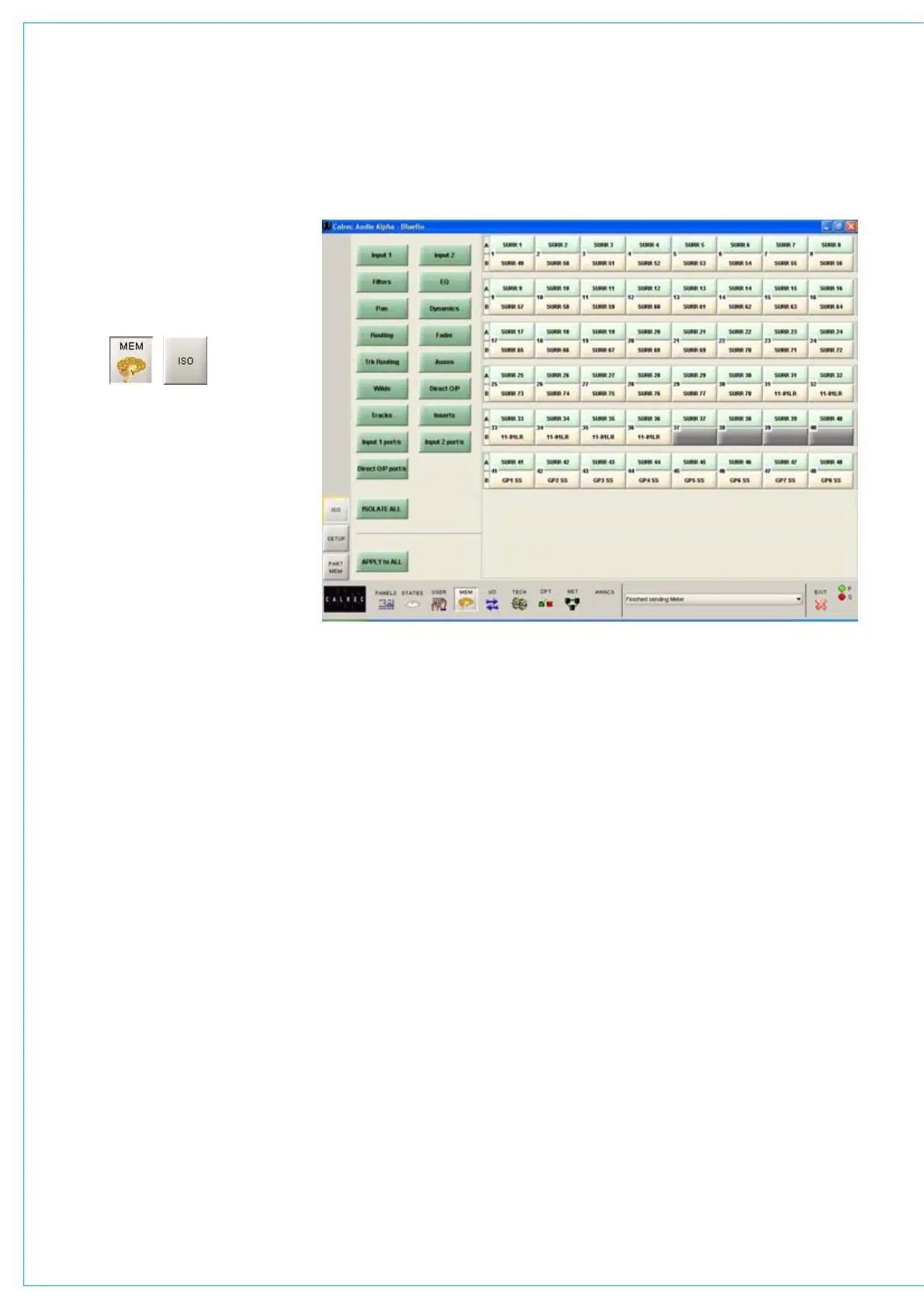
The right side of the screen shows all
fader paths. Paths can be selected from
here or by pressing the fader assign
button. A surround master can be part of
a memory isolation selection, but its spill
paths cannot be individually isolated from
memory recall.
The buttons on the left side of the screen
allow settings for the selected path to
be chosen for isolation. ISOLATE ALL
selects all the settings to be isolated for
the selected channel or group.
APPLY TO ALL applies the selected
isolation settings to all channels and
groups. To clear all isolation settings
from all channels and groups, ensure
all settings are de-selected, and select
APPLY TO ALL.
MEMORy ISOLATION
When an input is isolated or de-isolated,
its port will also be isolated or de-
isolated. However, the I/O screens
allow port isolation to be turned on and
off independently. Isolated ports are
highlighted in brown on the I/O screens.
If an isolated port connection is changed,
any isolation setting will be cleared, unless
one of the console-wide isolation options
is selected and contains that port.
If an output connection in the memory
cannot be made because it needs to use
an isolated port, this will be reported via
AWACS.
Please note that Hydra output ports
cannot be isolated from memory recall.



 To Next Page