3
46
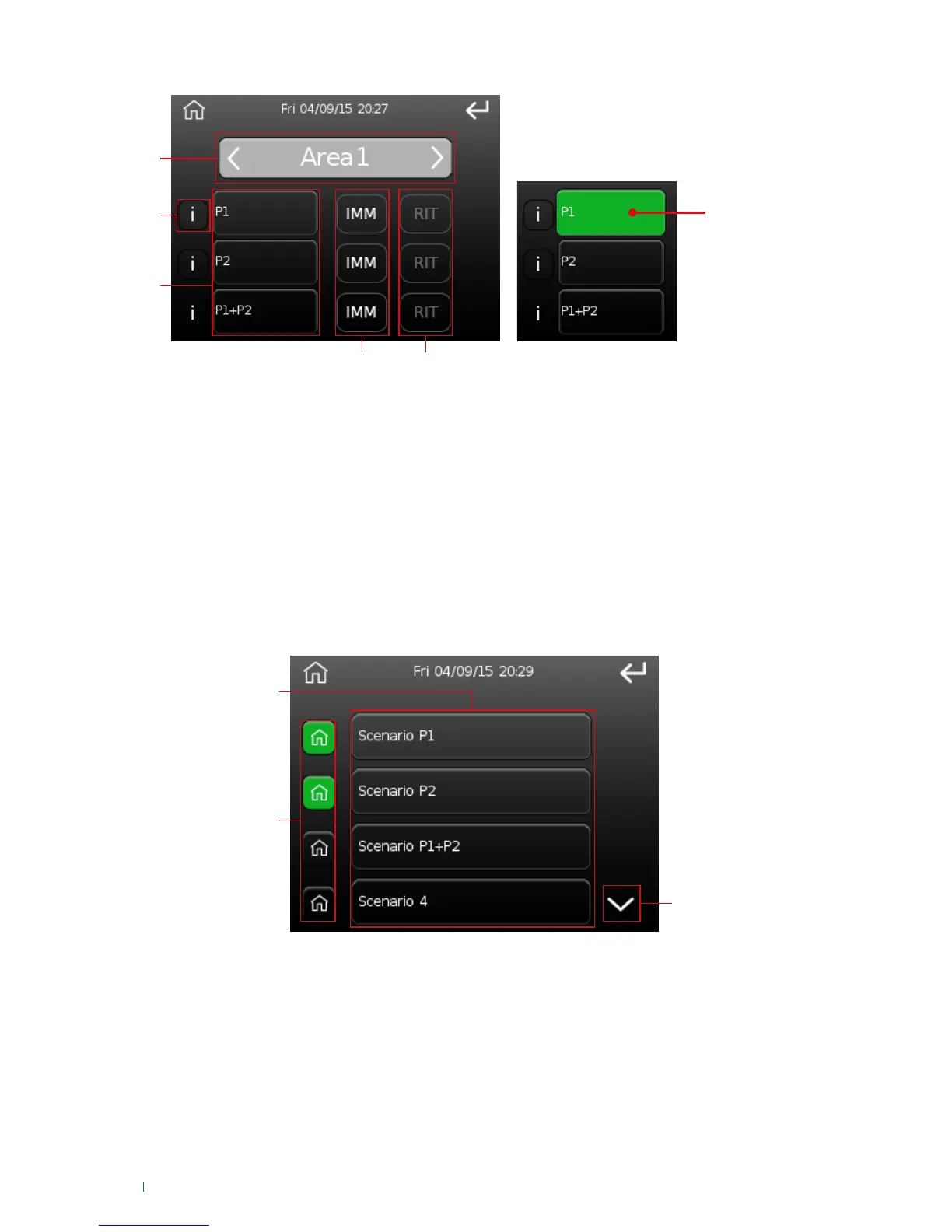
After the partial activation button is pressed, the following appears:
Area activated
3B
1. Area selected (press the arrows to change area).
2. Information (press "i" to view the zones that will be activated with that type of activation; if no zones are
displayed, this means that it is not possible to perform that type activation).
3. Available activation types (green if the area is activated in this mode, see fig. 3B).
4. Instant activation command (ignoring exit time).
5. Delayed activation command (with exit time).
To activate the selected area press button 4 or 5 (depending on the desired time scale) corresponding
to the activation type to be executed. For example: to instantly activate the area in P1 press IMM
alongside P1.
Activation control
1. This option can be used to select which scenarios to move onto the 'main screen' and to execute a
scenario chosen from the programmed options.
2. Scenario selection buttons on the main screen. Press these to activate/deactivate scenario key
presence on the main screen. If green, the button is present on the main screen; if grey it is not.
3. Scroll through the screen.
» To confirm activation/deactivation of a button on the main screen, the 'action executed' screen will
appear.
1. Scenario execution buttons. Press the key to execute the corresponding scenario.
» The System Analysis screen will appear to confirm activation of the scenario, this will be followed by
the 'Activation Executed’ screen.












 To Next Page