4
3
1
2
Total activ.
Total deactiv.
58
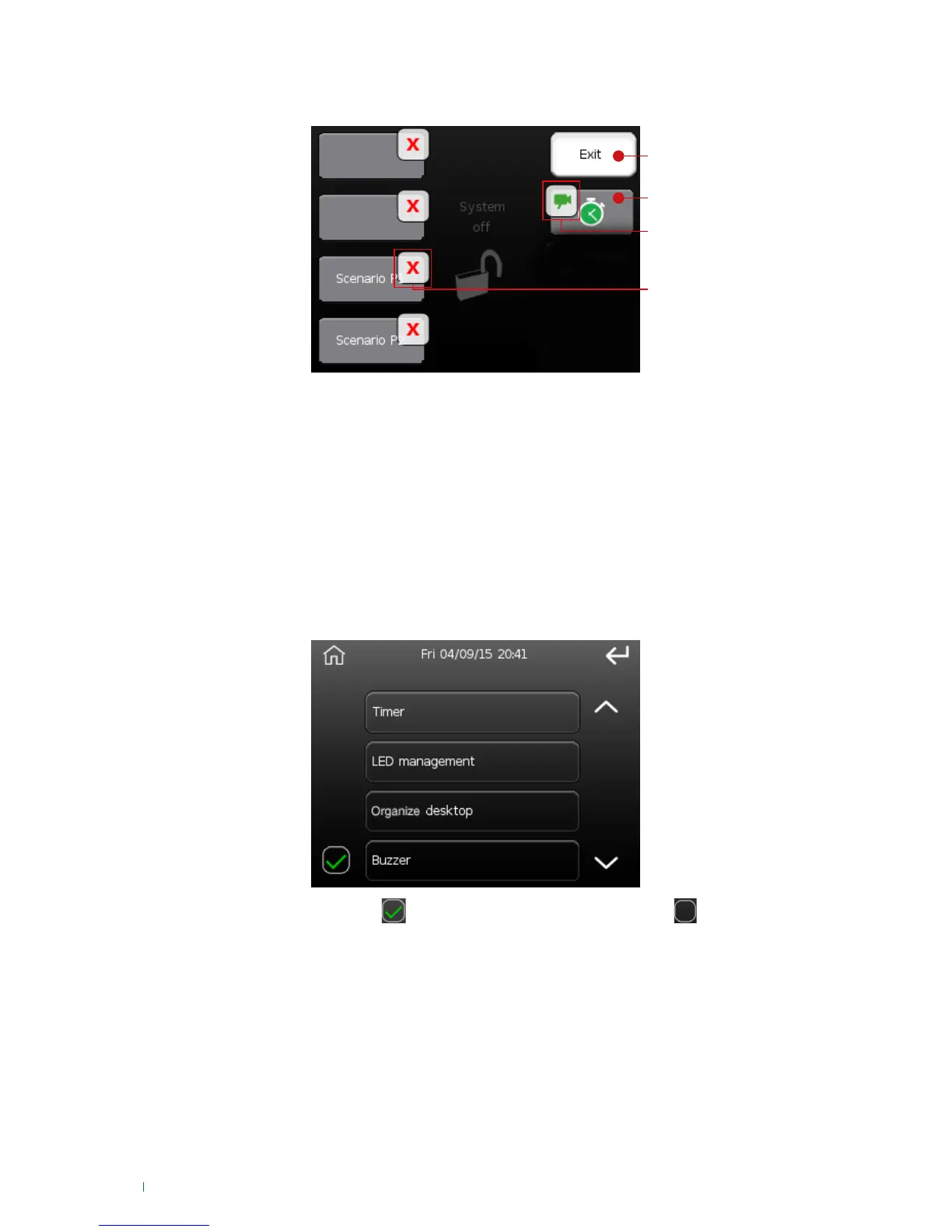
Organize desktop
This option can be used to remove some of the icons from the main screen (desktop).
1. Exit button, to exit the 'organize desktop' option
2. Symbol: 'Timed activations' to enable (ON) /disable (OFF) auto-activation controlled by timer.*
3. 'Change button function to view cameras' symbol; changes the function of the button on the home
page to a shortcut to the cameras menu.*
4. 'Remove icon' symbol, present for all icons
To remove an icon press the corresponding 'Remove icon' symbol.
* Press the symbol in the box described in point 3 to change the function of the button described in point
2, choosing between the 2 functions "customised activations" and "view cameras".
Buzzer
This option can be used to enable or disable the keypad buzzer, either completely or just in certain specific
cases. It can be fully enabled or disabled from the 'Set-up/Options' menu.
The available cases are:
To disable the buzzer press the
if already active, or enable it by pressing if it is disabled.
Press the 'Buzzer' button to access the selection menu for cases where the buzzer is active.
• Entry: for entry times
• Exit: for exit times
• Alarm: for alarm indications
• Chime: for chime zones
• Pre-alarm: during pre-alarm time
• Pre-alert: automatic activation pre-alert
• Keys: sound when the display is pressed
• Activation/Deactivation: confirms activation/deactivation
• Failed activation: signals failed activation












 To Next Page