4
47
Events log
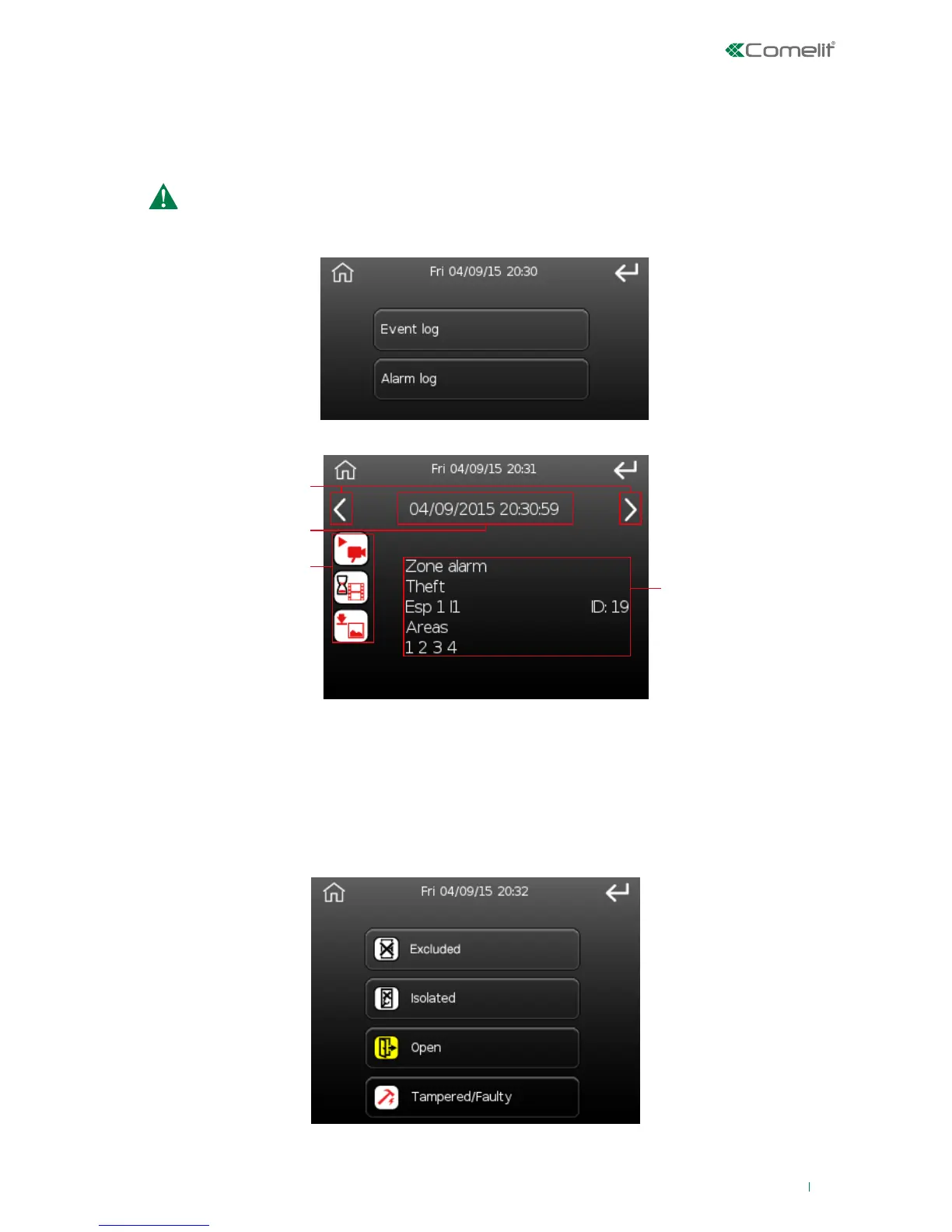
This option can be used to view the events memorised in the LOG.
There are two event groups in the Events Log:
Alarm events are visible (within the alarms memory) only for the current activation cycle. In other
words, the alarms memory will be cleared at the next system activation (the events will only be
visible in the events memory)
To select one of the two groups press the corresponding button, shown on the screen below.
• Events memory: to view all events
• Alarm memory: to view alarm events only
After selecting the group of events a screen similar to the one below will appear:
1. Scroll through events
2. Event ID and date/time at which it took place
3. Image and video display icons (see page 39)
4. Event description (type of event, an indication of the area in which it occurred, etc.)
Zone and area status
Option used to analyse the area and zone status.
The first menu screen can be used to select the status you wish to check.
Press one of the buttons; the following screen will appear showing the list of zones in the selected
status, grouped by the area to which they belong. 'Open' zones are listed on the following screen.












 To Next Page