6
USING THE KEYPAD
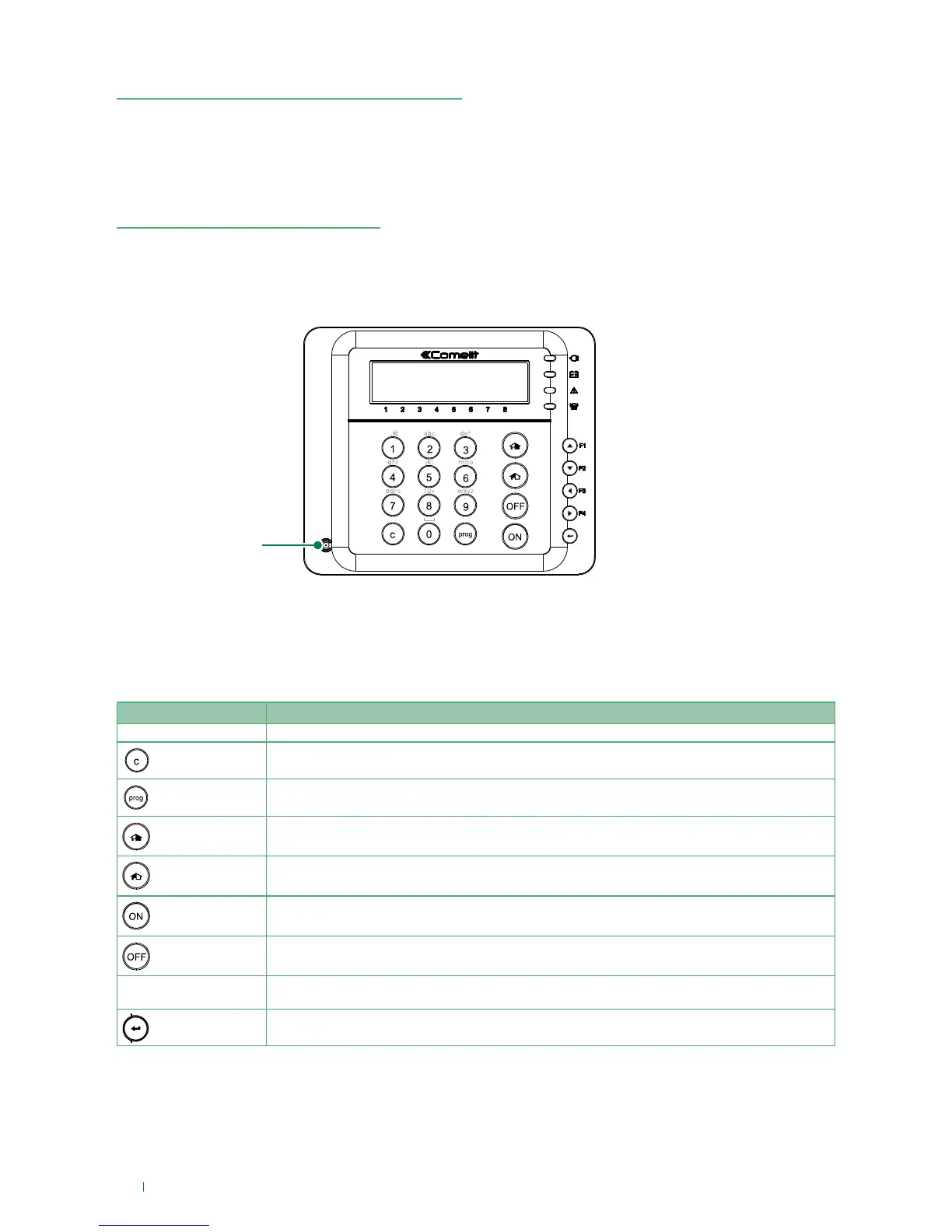
The LCD keypad allows an authorised user to enable and disable the system, to check the system status
and manage its general features, to check the event log history and to perform functional tests. A more
complete version of the User manual for Art. VEDOLCD, VEDOLCDPROX is available for download from www.
comelitgroup.com.
Keypad buttons
The keypad is used to operate the system via menu navigation and the entry of numeric and alphanumeric
parameters.
The table of button functions is shown below:
Key Function
0-9 Number keys for entering codes, or alphanumeric keys for entering characters
C (canc)
Cancel key for menus
Prog
Press after entering the user code to enter the user menu
P1-Partial1
Press after the code for Partial 1 activation
P2-Partial2
Press after the code for Partial 2 activation
ON
Total activation
OFF
Deactivation (press after the code is entered)
Arrows (F1, F2, F3, F4)
Menu navigation (when used as arrow keys), or can be used as function keys (when held pressed or
pressed after entering the code)
ENTER
Confirm operation to carry out or enter menus
RFID reader
GENERAL INTRODUCTION
The modern and functional VEDO system offers the best possible response to the technical and performance-
related demands of modern security systems.
This manual provides information regarding the day-to-day use of the VEDO system. Please refer to the
Glossary if you wish to check the meaning of the terms used in this manual.












 To Next Page