Adding SC200/220 Enclosures
Dell Compellent 189
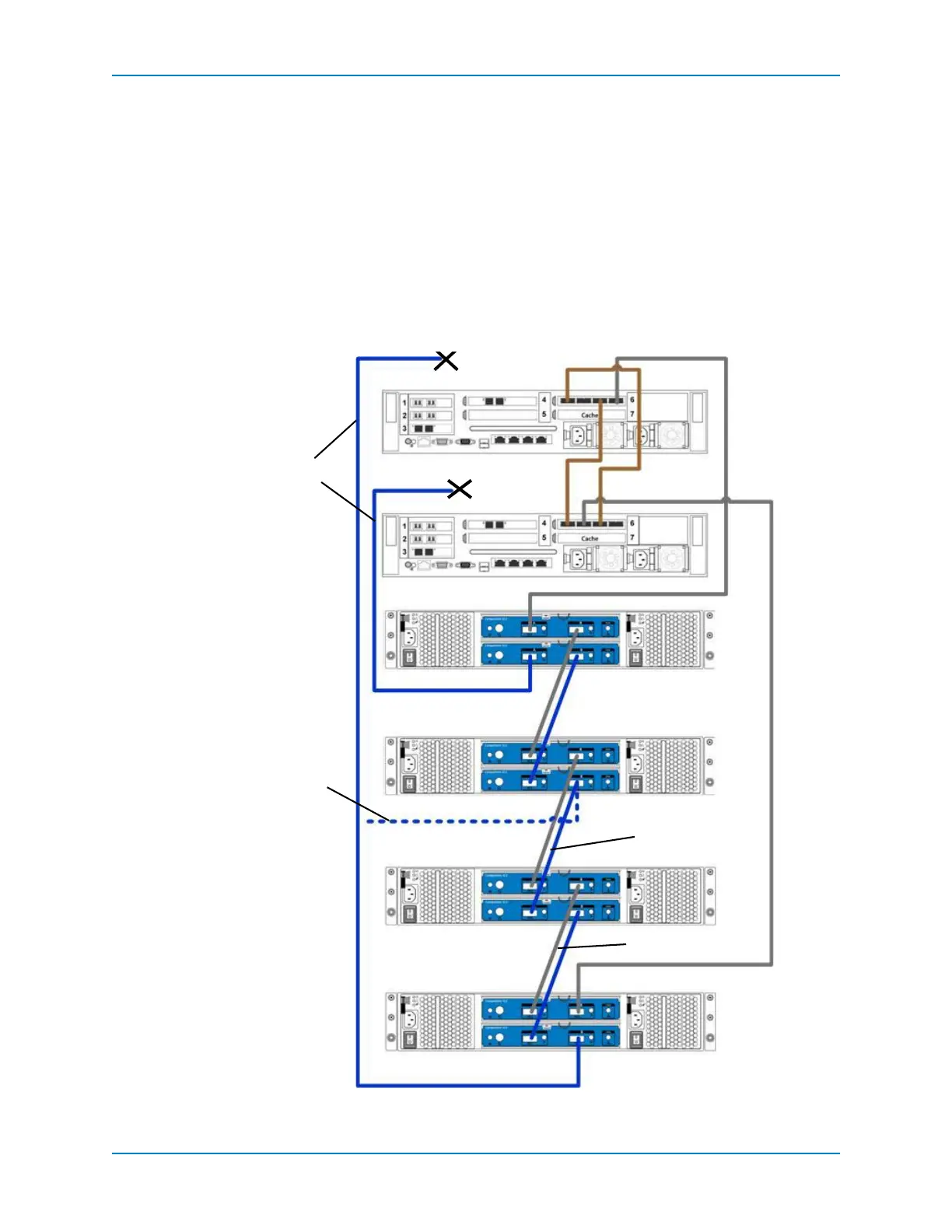
8 DisconnecttheB‐sidecablesfromthecontrollersasshowninFigure 120:
ControllerA:slot6port3.
ControllerB,slot6port1.
IOcontinuesthroughtheA‐sidecables.
9 MovethecablefromEnclosure2:bottom,portB→Enclosure4:bottom,port B.
10 Usenewcablestoconnectthenewenclosurestotheexistingenclosures(Bside):
Enclosure2:bottom,portB→Enclosure3:bottom,portA.
Enclosure3:bottomportB→toEnclosure4:bottomportA.
Enclosures3and4arenowpartoftheB‐sidechainandcanbeconnectedtoControllers
AandB.
Figure 120. Connect SC200/220 Enclosures to B Side
Disconnect B side
Connect
Enclosures
(B side)
Move Cable from
Enclosure 2
Enclosure 1
Enclosure 2
Enclosure 3
Enclosure 4
Controller A
Controller B
Add cable
Add cable



 To Next Page