Install IO Cards the Controller(s)
Dell Compellent 39
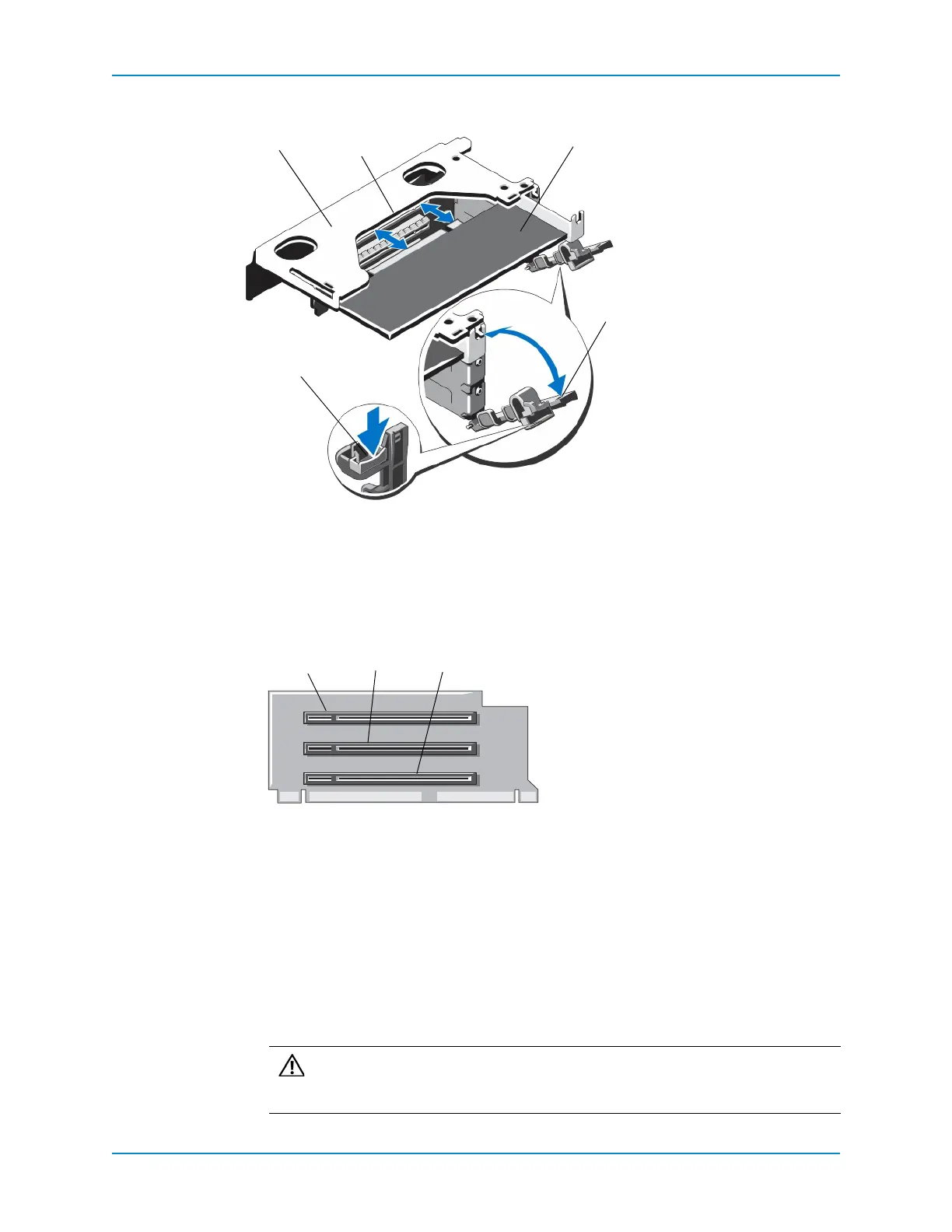
2 OpentheIOcardlatchbypressingthelatchtabandrotating thelatchdown.
Figure 34. Installing an IO Card in Riser 1
3 Installeachlow‐profileIOcard.
a Locate theslotwheretheIOcardisinstalled.
Figure 35. Identifying Connectors on Riser 1
b UnpackthereplacementIOcardandprepareitforinstallation.Forinstructions,see
thedocumentationaccompanyingtheIOcard.
c
HoldingtheIOcardbyitsedges,positionthecardsothatthecard‐edgeconnector
alignswiththeIOcardconnectorontheriser.
d Insertthecard‐edgeconnectorfirmlyintotheIOcardconnectoruntilthecardis
fullyseated.
e ClosetheIOcardlatch.
1 Riser 1 cage 4 IO card latch
2 IO card connector 5 IO card latch tab
3 IO card
1 IO card slot 1
2 IO card slot 2
3 IO card slot 3
Caution: MakesurethattheIOcardisfullyseatedintheIOcardconnector.
IOcardsthatarenotinfullcontactwiththeconnectorcauseunpredictable
failuresintheStorage Center.



 To Next Page