Chapter 4 Parameters
4-103
This parameter is used to select the terminals to be internal terminal or external terminal. You
can activate internal terminals by Pr.04.28. A terminal cannot be both internal terminal and
external terminal at the same time.
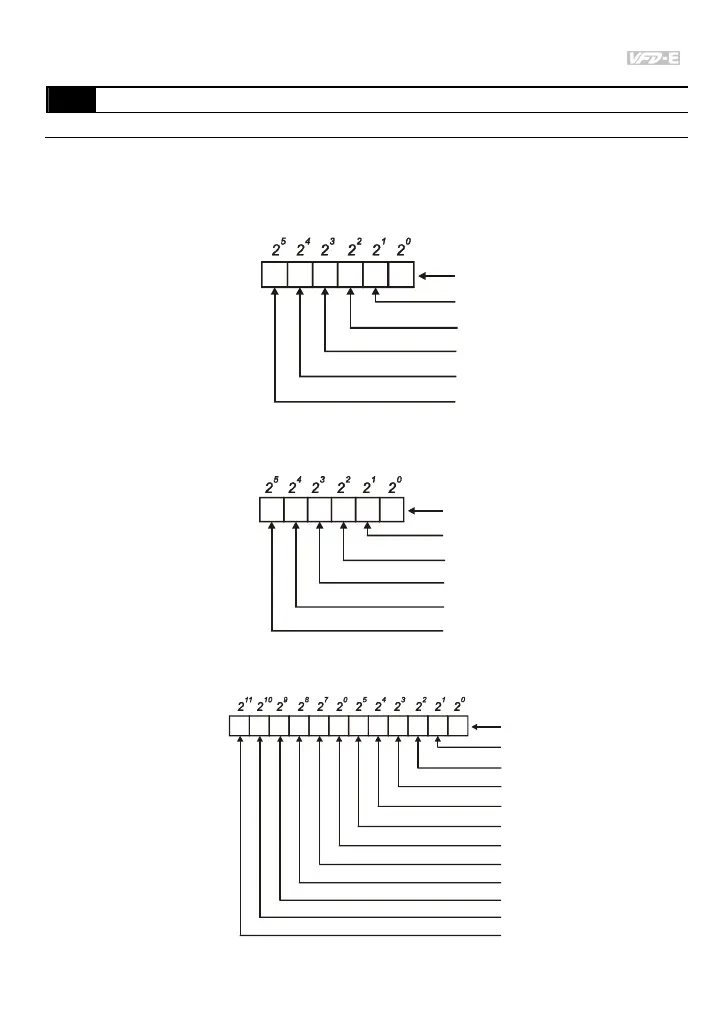
For standard AC motor drive (without extension card), the multi-function input terminals are
MI1 to MI6 as shown in the following.
12345 0
0=external terminal
1=internal terminal
MI1
MI2
MI3
MI4
MI5
MI6
Weights
Bit
The Setting method is convert binary number to decimal number for input.
For example: if setting MI3, MI5, MI6 to be internal terminals and MI1, MI2, MI4 to be external
terminals. The setting value should be bit5X2
5
+bit4X2
4
+bit2X2
2
= 1X2
5
+1X2
4
+1X2
2
=
32+16+4=52 as shown in the following.
01011 0
Weights
Bit
0=external terminal
1=internal terminal
MI1
MI2
MI3
MI4
MI5
MI6
When extension card is installed, the number of the multi-function input terminals will increase
according to the extension card. The maximum number of the multi-function input terminals is
shown as follows.
12
3
4
5
0
MI1
MI2
MI3
MI4
MI5
MI6
Weights
Bit
78
9
10
11
6
MI7
MI8
MI9
MI10
MI11
MI12
0=external terminal
1=internal terminal
04.27
Internal/External Multi-function Input Terminals Selection
Settings
0 to 4095
Factory Setting: 0



 To Next Page