Service Manual_AVA1_ENG-20220922_I 198
ROUTINE PRINTER CLEANING
Recommended cleaning cycle: After each ribbon/film replacement ore every 1000 cards.
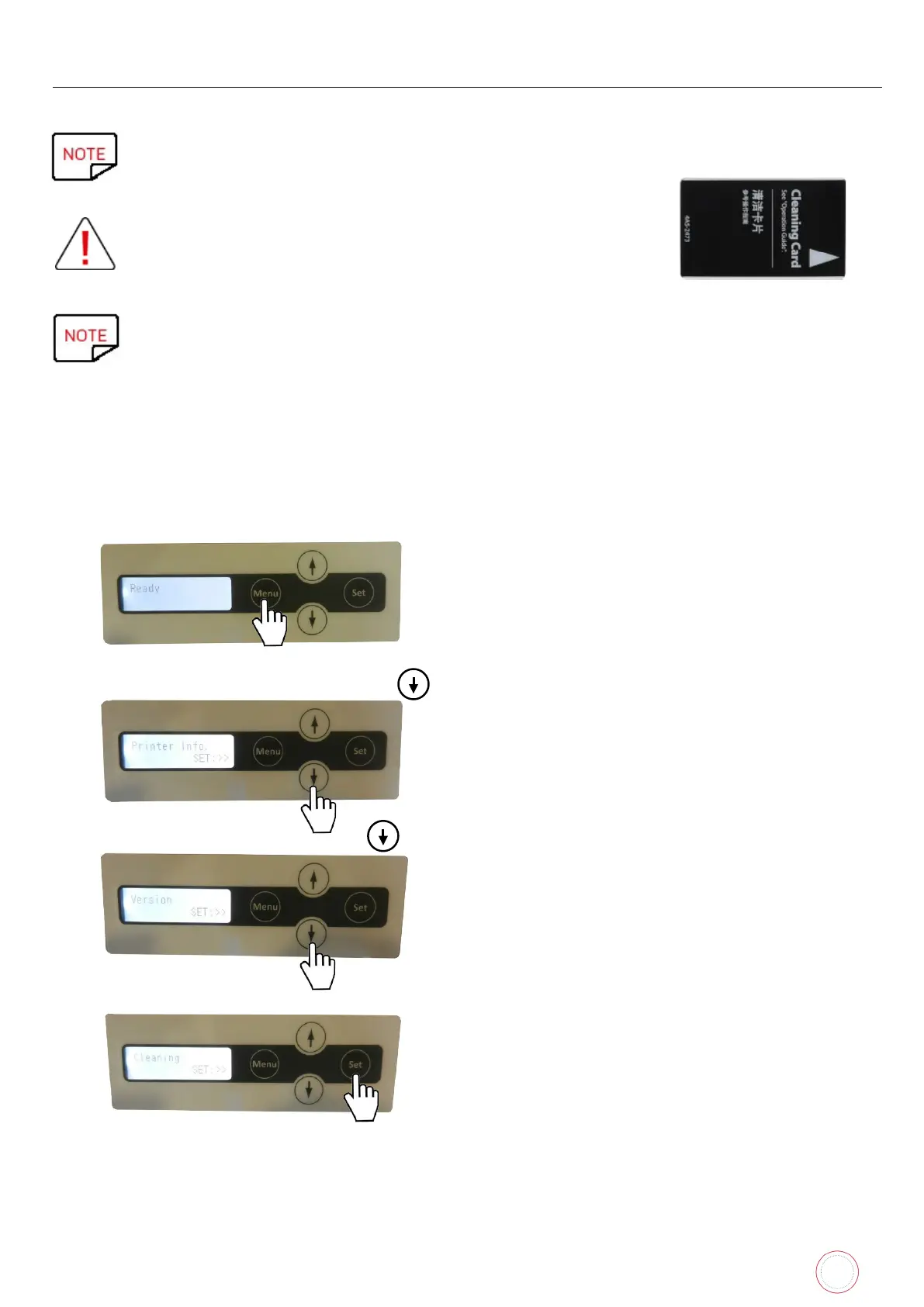
Servicing accessory: Evolis Avansia Adhesive cleaning card.
Before cleaning, remove cards from the printer.
Evolis Avansia cleaning cards can only be used once.
The frequency and quality of cleaning are determining factors to prolong the life of the print
head, printer, prevent printing, transport and feeding issue. Special care should be taken for
this operation.
Follow the procedure below:
Access to User mode:
When the power starts and the printer turns on in Normal Mode, and [Ready] appears on the LCD Panel.
1. Press once on “Menu“.
2. “Printer info” is displayed: Press on
3. “Version” is displayed: Press on
4. “Cleaning” is displayed: Press on Set


 To Next Page
 Loading...












