Getting Started
16 FTBx-88000 Series
Inserting and Removing Transceiver System
FTBx-88460
The following procedures describe the insertion and removal of a
transceiver system for FTBx-88460 modules.
To insert a transceiver system into the FTBx-88460 module:
1. Position the FTBx-88460 module so that its faceplate is facing you.
When the FTBx-88460 module is already inserted into an FTB-4 Pro
platform, position the FTB-4 Pro so that its display is facing down and
the module is oriented as shown in the following picture.
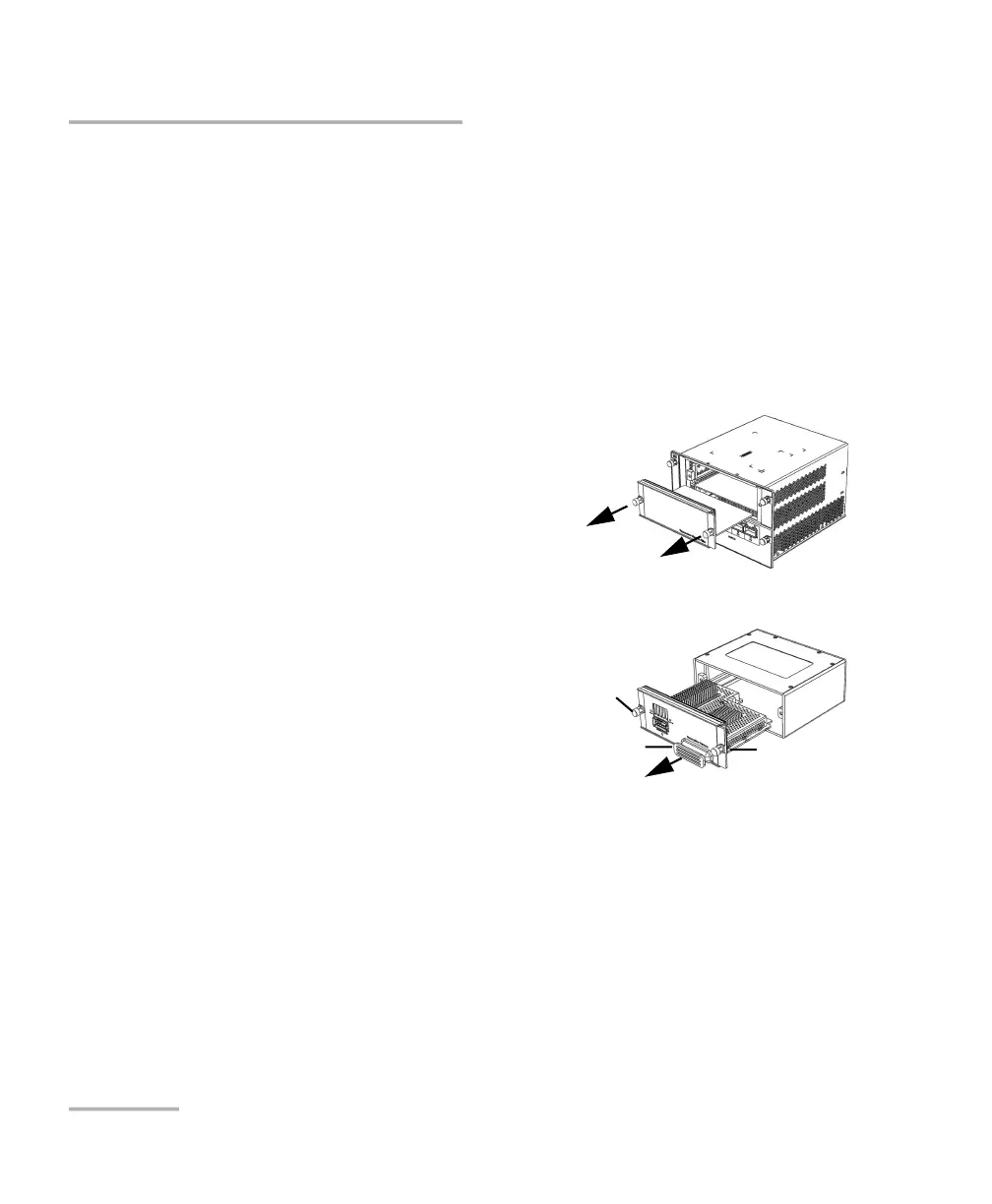
2. Remove the FILLER (protective
cover) from the FTBx-88460.
Turn the two retaining screws
counterclockwise until they are
loose.
Hold the FILLER by the retaining
screws and pull it out.
3. Remove the transceiver system from
its packaging:
3a. Turn the two retaining screws
counterclockwise until they are
loose.
3b. Hold the transceiver system by
the handle (NOT by the connectors) and pull it out. Do not throw
away the transceiver system packaging. It is recommended to
insert the transceiver system into its packaging when removing it
from the FTBx-88460 module.
Screw
Handle
Screw
Screw












 To Next Page