53
EN
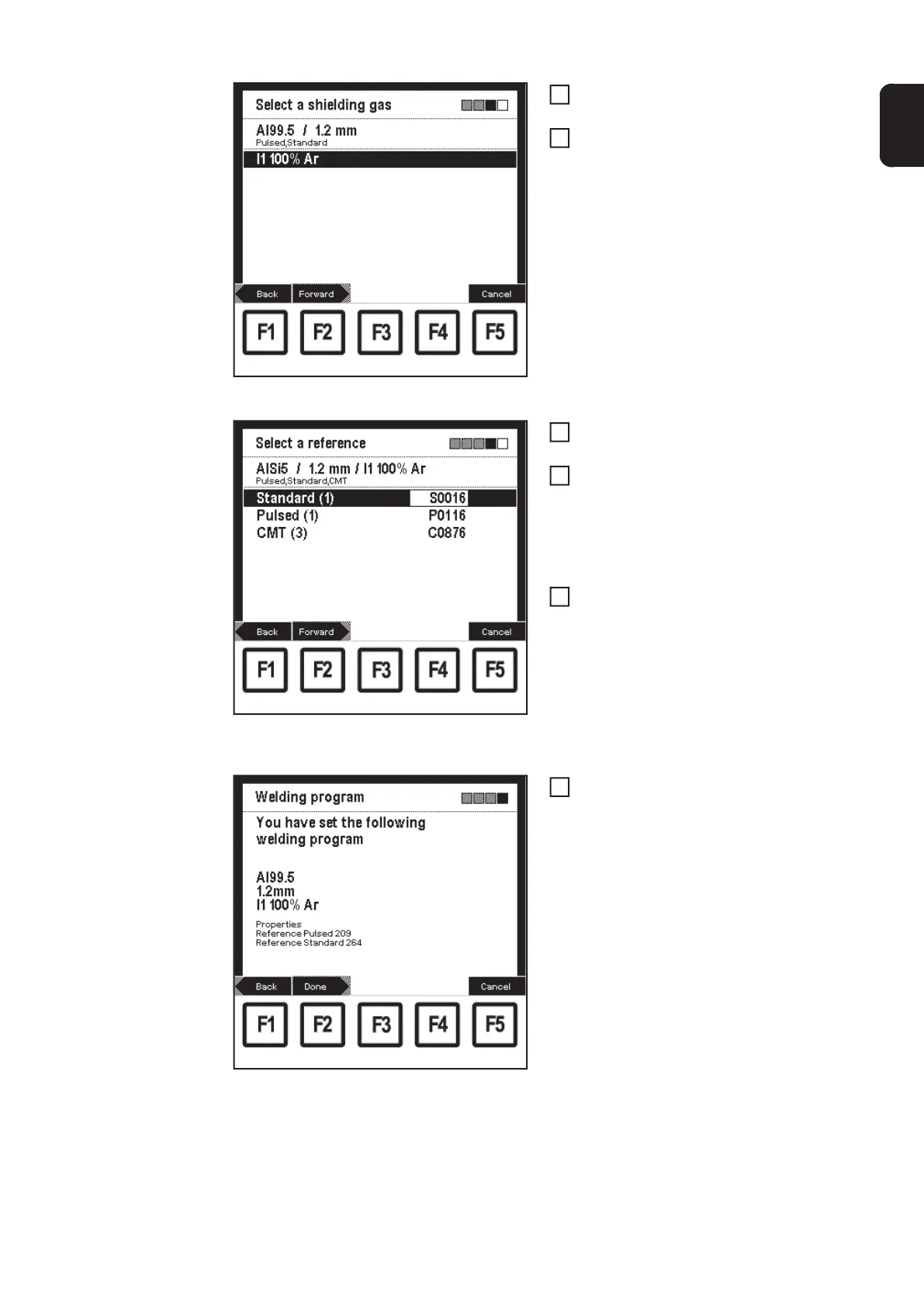
"Select a shielding gas" screen: I1 100% Ar selected
Select corresponding gas using the ad-
justing dial (18)
Press F2 "Forward":
– The "Select a reference" screen
only appears if there are several
characteristics for the selected fil-
ler metal, wire diameter and shiel-
ding gas.
– The value given in brackets after
the process indicates how many
characteristics there are for this
process.
Example: AlSi 5 / 1.2 mm / I1 100% Ar screen "Select
a reference": Characteristic S0016 selected
Select the corresponding process
using the down (6) or up (7) keys
Select the corresponding characteri-
stic reference number using the adjus-
ting dial (18)
– E.g.:
Characteristic C0876 is only suita-
ble for CMT.
Press F2 "Forward"
– The last screen in the wizard
("Welding program") is shown as a
confirmation
– By pressing F1 "Back", the
screens of the steps already per-
formed can be displayed again.
Changes can be made.
"Welding program" screen: Confirmation
Press F2 "Done"
– The set welding program is accep-
ted, the last "Data" screen display-
ed appears
6
7
8
9
10
11


 To Next Page