66
Switching to ex-
tra-large display
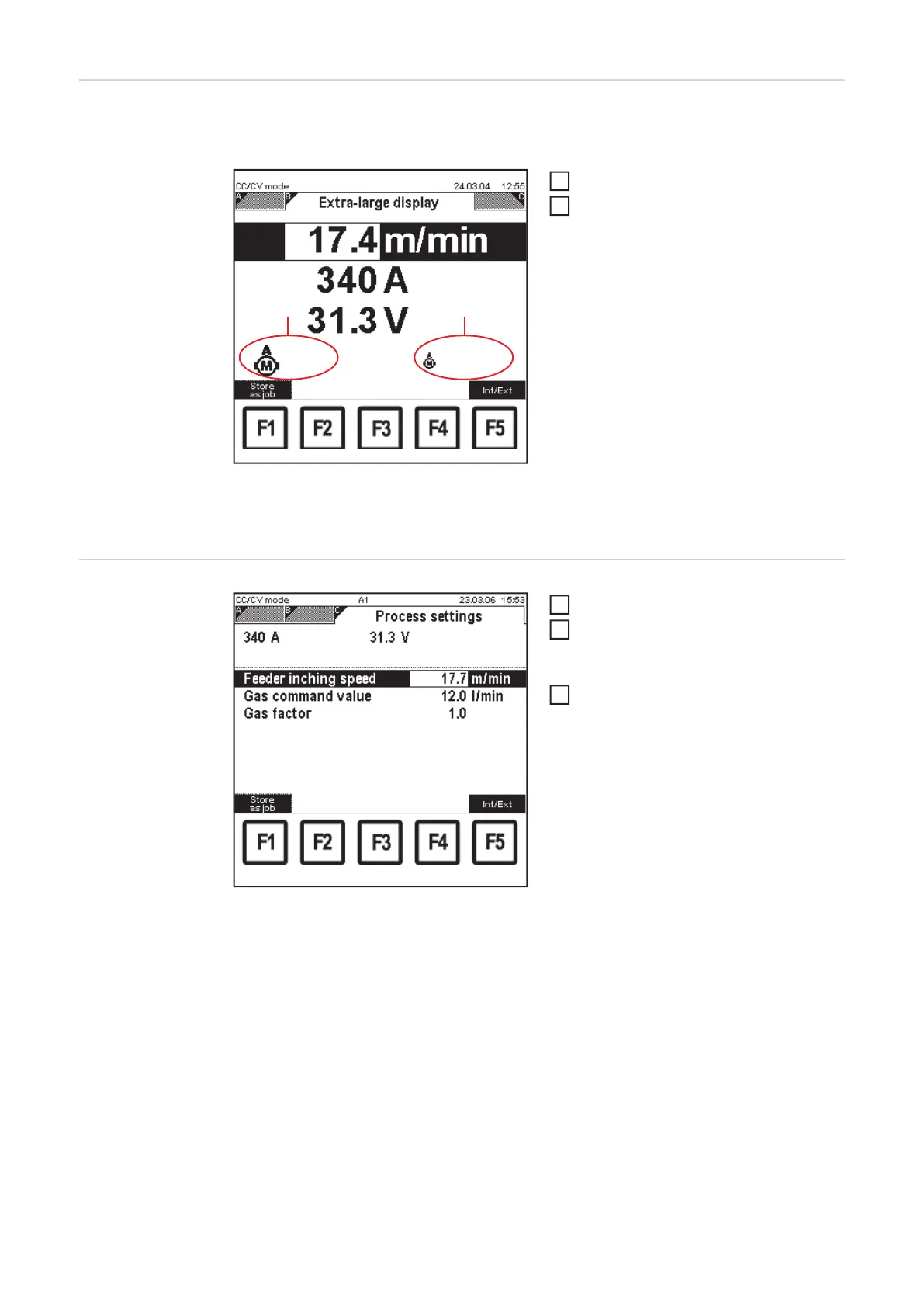
The wirefeed speed, voltage command value and current command value parameters can
be displayed in extra-large format:
CC/CV mode: "Extra-large display" screen
Call up "CC/CV mode"
Select "Extra-large display" screen by
pressing the right arrow key (8)
– "Extra-large display" screen appe-
ars
– The values for wirefeed speed,
voltage command value and cur-
rent command value can be alte-
red in the "Extra-large display"
screen using the adjusting dial
(18).
– Welding voltage is a display value:
- during welding
... actual value
- following welding
... hold value
(1) Wire-feed unit motor current
(2) Push-pull unit motor current
Setting process
settings parame-
ters
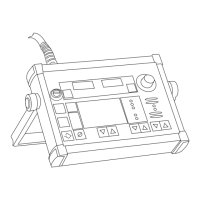
CC/CV mode: "Process settings" screen
Call up "CC/CV mode"
Select "Process settings" screen by
pressing the right arrow key (8).
– "Process settings" screen appears
Use the adjusting dial (18) to alter the
parameter value
– The parameter value can only be
altered within the defined setting
range. The setting range is high-
lighted.
(2)(1)
0.6 A
0.35 A
1
2
1
2
3


 To Next Page