4-31
Chapter 4 Connection to the External Devices Connection with the Laser Printer
3Specify the central ID of the central monitor to perform the printing.
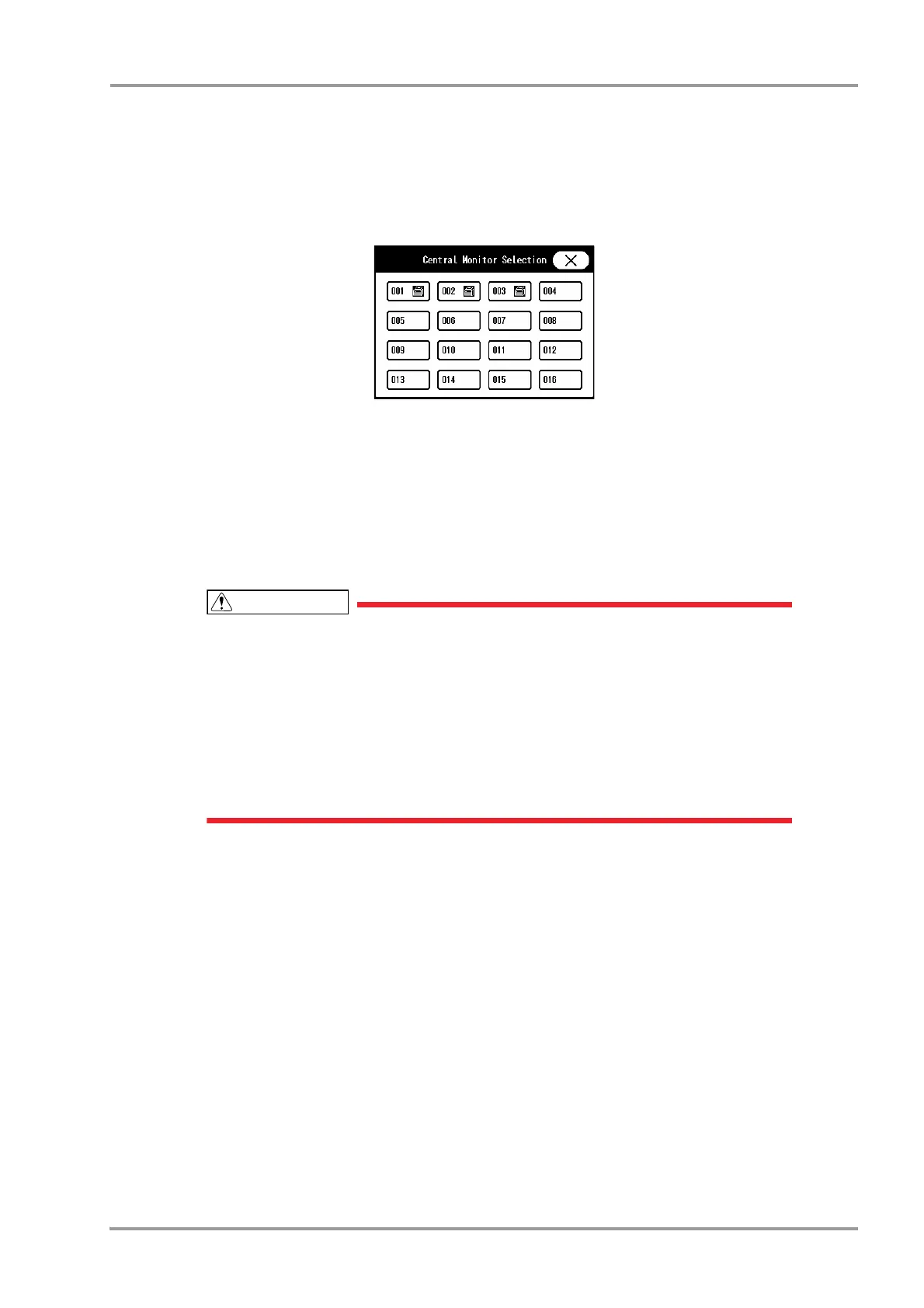
1 Press the key for "Central Monitor".
The "Central Monitor Selection" window will be displayed.
The central ID with the printer icon displayed can be selected.
2 Select the central ID.
4Press the [Regist] key, and then press the [OK] key on the displayed confirmation window.
It is necessary to press the [OK] key to validate the setting.
5Perform test printing.
Verify that the printing is properly performed.
If the output characters are garbled, printer specification may be incorrectly set on the
central monitor. Refer to the operation manual of the printer and check the printer
specification.
On the central monitor, central monitor printer output will be prioritized over the laser
printer output. If the central monitor printer output is started during the laser printer output,
the laser printer output will resume after the central monitor printer output.
[DS-LAN] can be selected only when [DS-LANIII] is set for "DS-LAN Setup". If the "DS-
LAN Setup" setting is changed to [DS-LANII], the "Network Printer" setting will change
from [DS-LAN] to [OFF].



 To Next Page