3-3
Chapter 3 Using the CF card Data Backup/Copy Using the CF Card
in the patient monitor.The erased patient data cannot be restored.
When reading the patient data from the CF card, make sure that the time/date setting
on the patient monitor is correct. Otherwise, the time/date of the trend data and recall
data will not be correctly reflected.
The time/date can be verified on the RTC Setup ([Menu]>[Maint.]>[Test Menu]>[RTC
Setup]) screen.
If Read/Write is incorrectly selected, the data on the CF card may be unintentionally
overwritten with the data on the patient monitor. Make sure to check that the selection
is correct before pressing the [Yes] key.
When the data reading procedure is complete, the display will return to the home
display.
4Format the CF card.
1 Verify the CF card is inserted in the CF card slot.
2 Press the [CF Card] key to display the "CF Card Format" screen.
3 Check the slot location which the CF card was inserted, and select the data type.
[Full Disc. Wave]: The CF card will be formatted for the full disclosure waveform data.
[Data Transfer]: The CF card will be formatted for data transfer.
4 Press the [Format] key and start the format process.
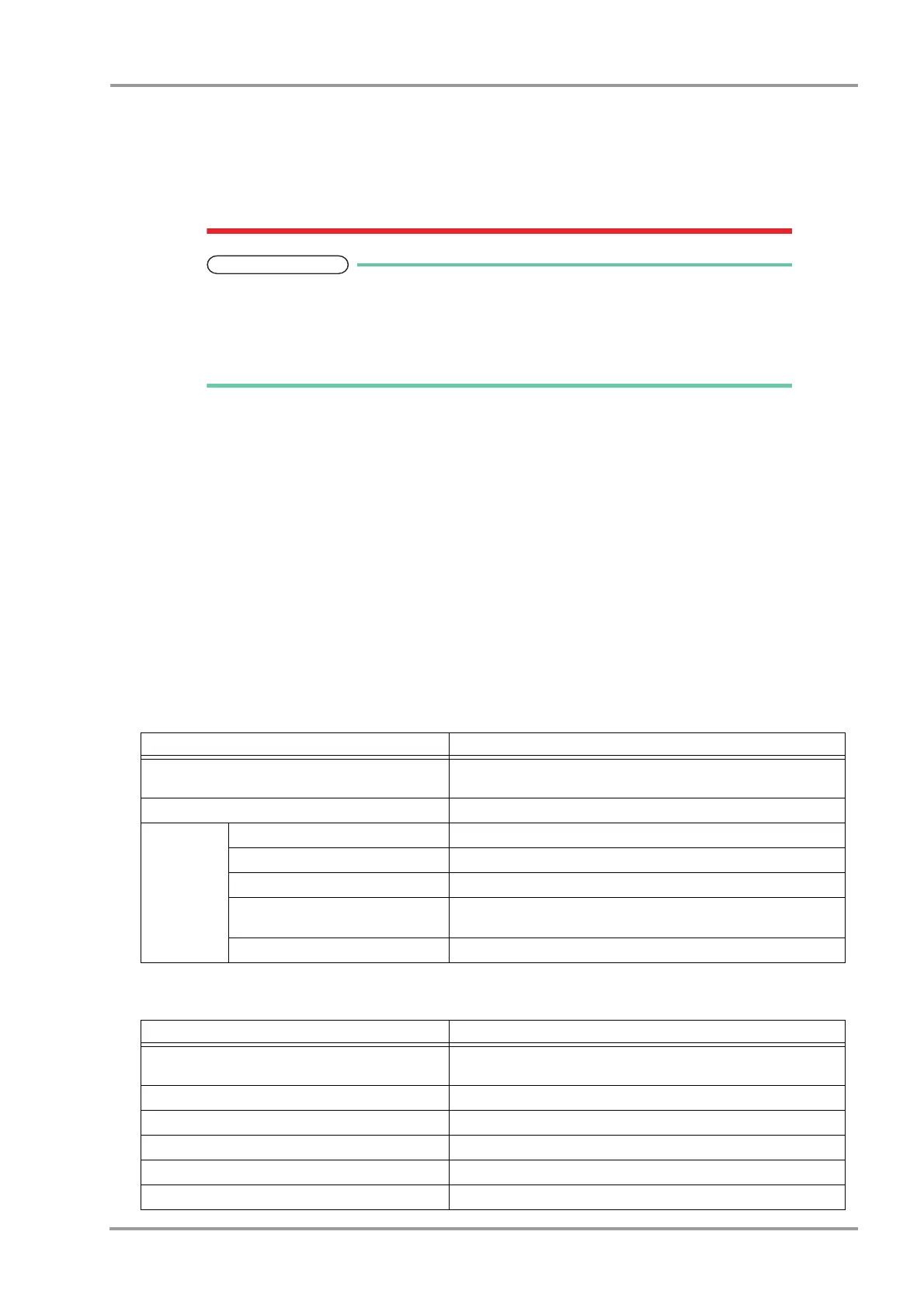
Data that can be Backed Up/Copied
The setup data such as monitoring condition, alarm setting, and patient data such as graphic trend and tabular trend
can be backed up/copied.
By selecting [All Data], setup data and patient data can be both backed up/copied.
Setup Data
Data Details
Parameter Setup
Stores the monitoring condition (size, lead, etc.) for all the monitoring
parameters.
Alarm Stores the alarm threshold level.
Setup Data
Basic Setup Stores the current setup.
Alarm Stores the alarm ON/OFF and alarm limit settings.
Parameter Setup Stores the monitoring condition (size, lead, etc.) for the parameter.
Data Review/Waveform Review/
Calculation
Stores the settings for each review data.
Initial Settings Stores the current setup.
Patient Data
Data Details
Patient Information
Stores the patient information such as name, ID, age, sex, pacemaker
usage, patient classification.
Graphic Trend Data Stores 24 hours of graphic trend data.
Tabular Trend Data Stores 24 hours of tabular trend data.
Recall Stores 200 recall data.
Hemodynamic Data Stores 10 measurement data.
Lung Function Data Stores 256 measurement data.



 To Next Page