GE MEDICAL SYSTEMS
DIRECTION 5184024-100, REVISION 5 LOGIQWORKS BASIC SERVICE MANUAL
3-122 Section 3-5 - Configuration
3-5-3-12 TripleMonitors for LOGIQworks FX and LOGIQworks SoftwareOnly (cont’d)
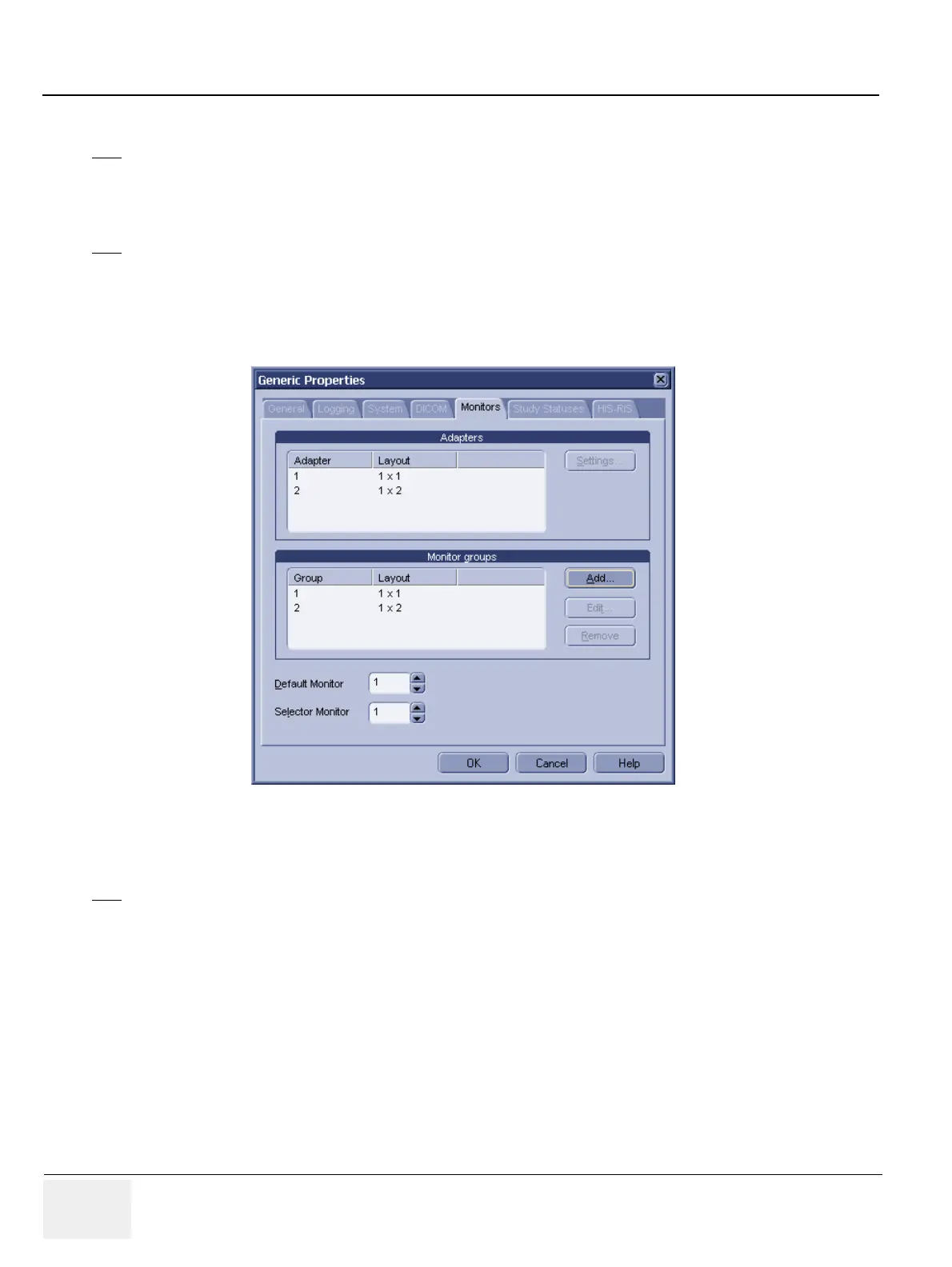
4.) Reconfigure your Monitor groups section so that you have two entries here; the 1st entry with a "1
x 1" layout, and the 2nd entry with a "1 x 2" layout.
5.) After this, the dialog should look like this:
Figure 3-108 TripleMonitor Generic Properties
6.) Quit and restart RA600 / CA1000 as prompted.
7.) Click the Configuration -> Viewing menu, and click the General tab.
NOTE
Your Adapters section may have three entries with "1 x 1". This is fine.
NOTE
Your Monitor groups section may have two entries, each with "1 x 1". This is fine.
NOTE
Your Adapters section may just have one entry with "1 x 3". This is fine.



 To Next Page