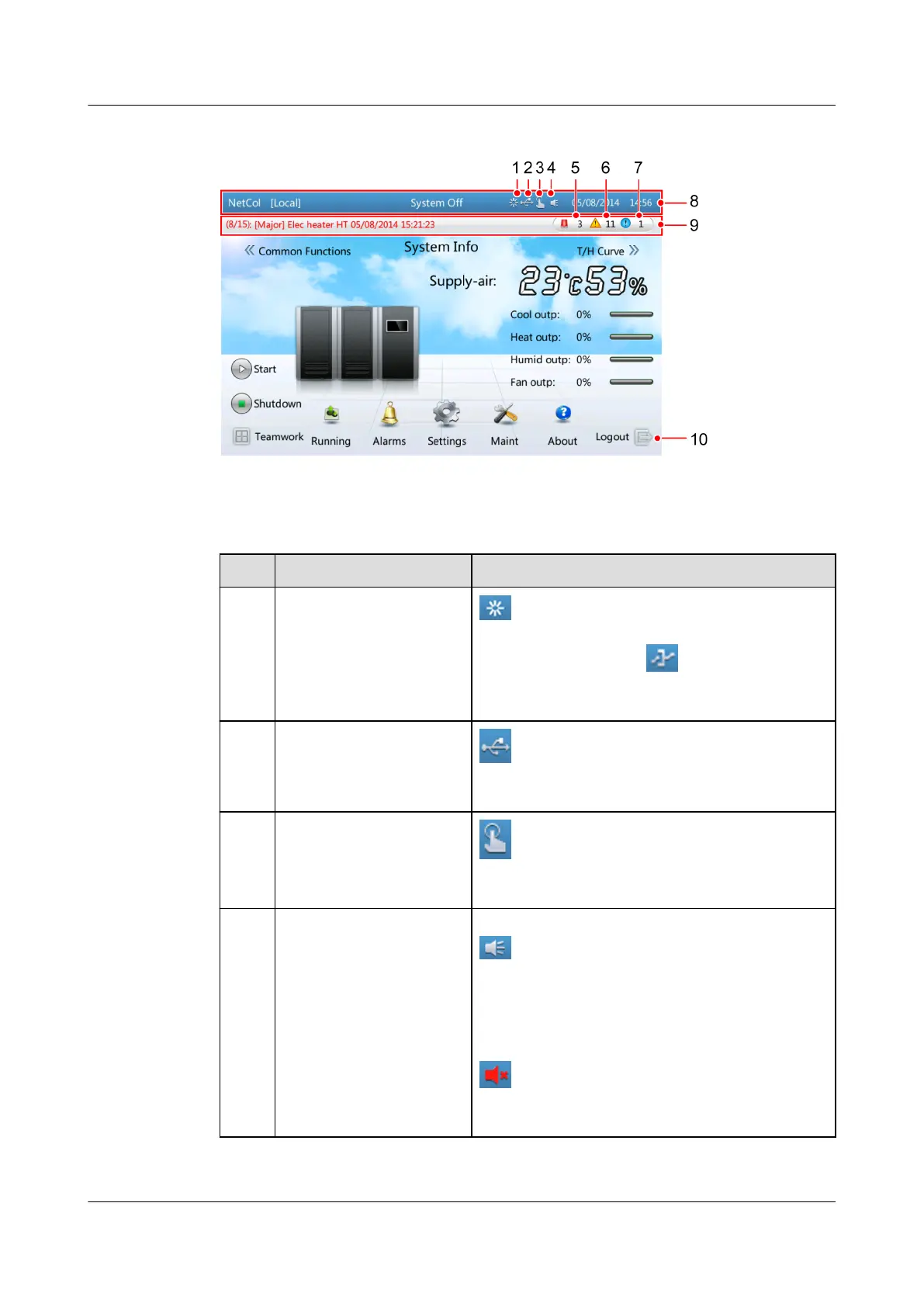
Figure 4-6 Home screen
Table 4-5 Note for the page
No. Items Note
1 Communication status
between the display
panel and the main
control board
in the status bar indicates that the
display panel communicates properly with the
main control board. If
is displayed in this
position in the status bar, the communication
fails.
2 USB status
in the status bar indicates that the USB
ash drive is successfully connected to the
display panel.
3 Diagnostic mode
in the status bar indicates that the smart
cooling product is in diagnostic mode. Click to
icon to exit from the diagnostic mode.
4 The buzzer status The buzzer status can be set to On or O. The
icon indicates that the buzzer is on. When
the buzzer is on, it buzzes when an alarm is
generated. When the buzzer is buzzing, you
can tap anywhere on the screen to mute the
buzzer. After the buzzer is muted, it still
buzzes when a new alarm is generated. The
icon indicates that the buzzer is o
(silenced). After the buzzer is silenced, it does
not buzz when a new alarm is generated.
NetCol5000-A025 In-row Air Cooled Smart Cooling
Product
User Manual (300 mm Width) 4 Power-On Commissioning
Issue 15 (2020-12-10) Copyright © Huawei Technologies Co., Ltd. 109







 To Next Page