● The Version Info screen displays version details of the display board, control board, and
temperature and humidity collection board. The E-label screen displays electronic labels
of the entire system, control board, display board, and temperature and humidity
collection board.
● When some T/H boards of the cold or hot aisles are enabled, T/H Board on the About >
Version Info screen, or T/H Board on the About > E-label screen shows the
information of these T/H boards.
● When some T/H boards of the cold or hot aisles are disabled, T/H Board on the About
> Version Info screen, or T/H Board on the About > E-label screen does not show the
information of these T/H boards.
----End
7.1.6 How to View Teamwork Control Information
Procedure
Step 1 On the home screen, choose
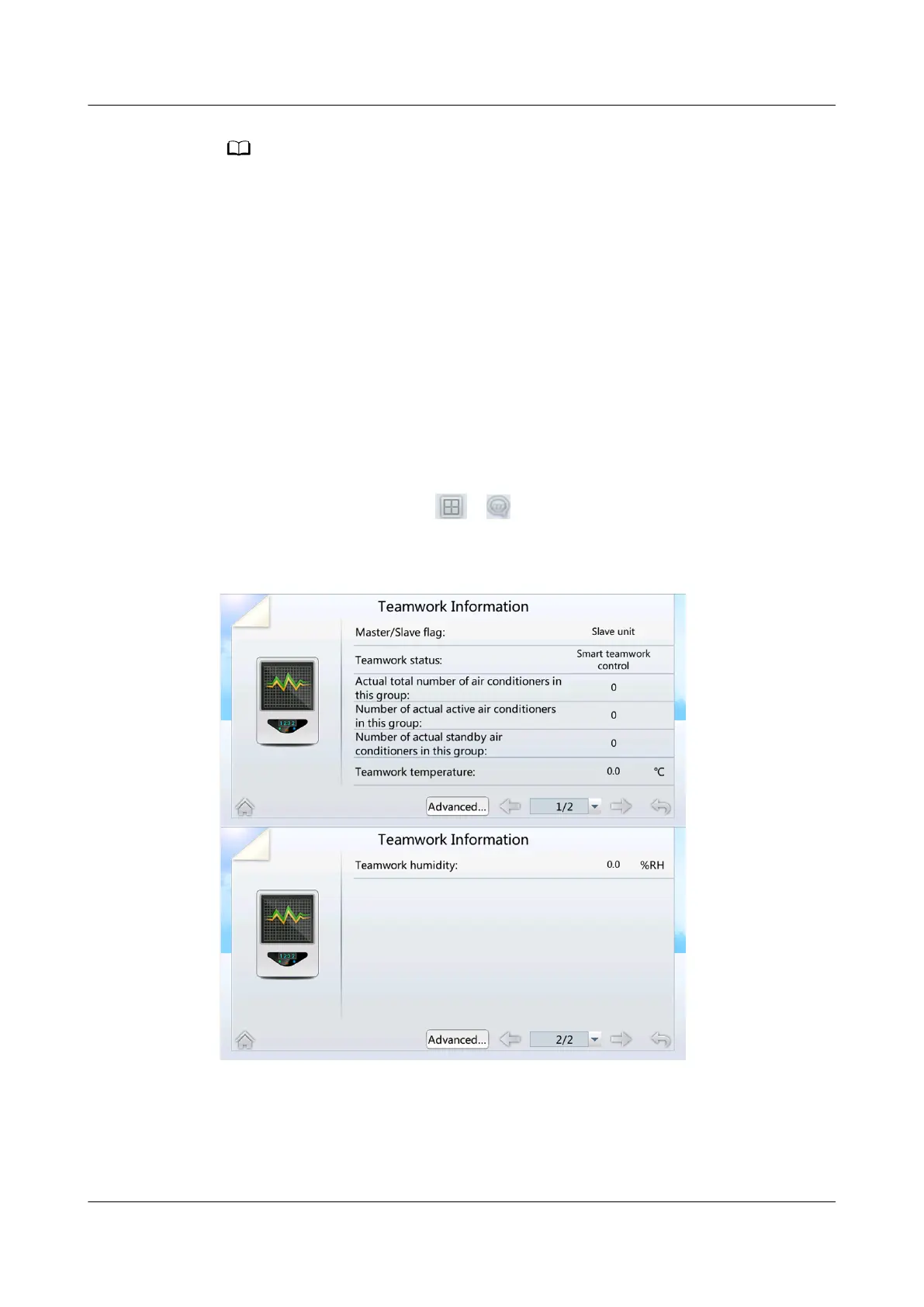
> . The teamwork control information is
displayed, as shown in Figure 7-7.
Figure 7-7 Teamwork control information screen
NetCol5000-A025 In-row Air Cooled Smart Cooling
Product
User Manual (300 mm Width) 7 FAQ
Issue 15 (2020-12-10) Copyright © Huawei Technologies Co., Ltd. 270







 To Next Page