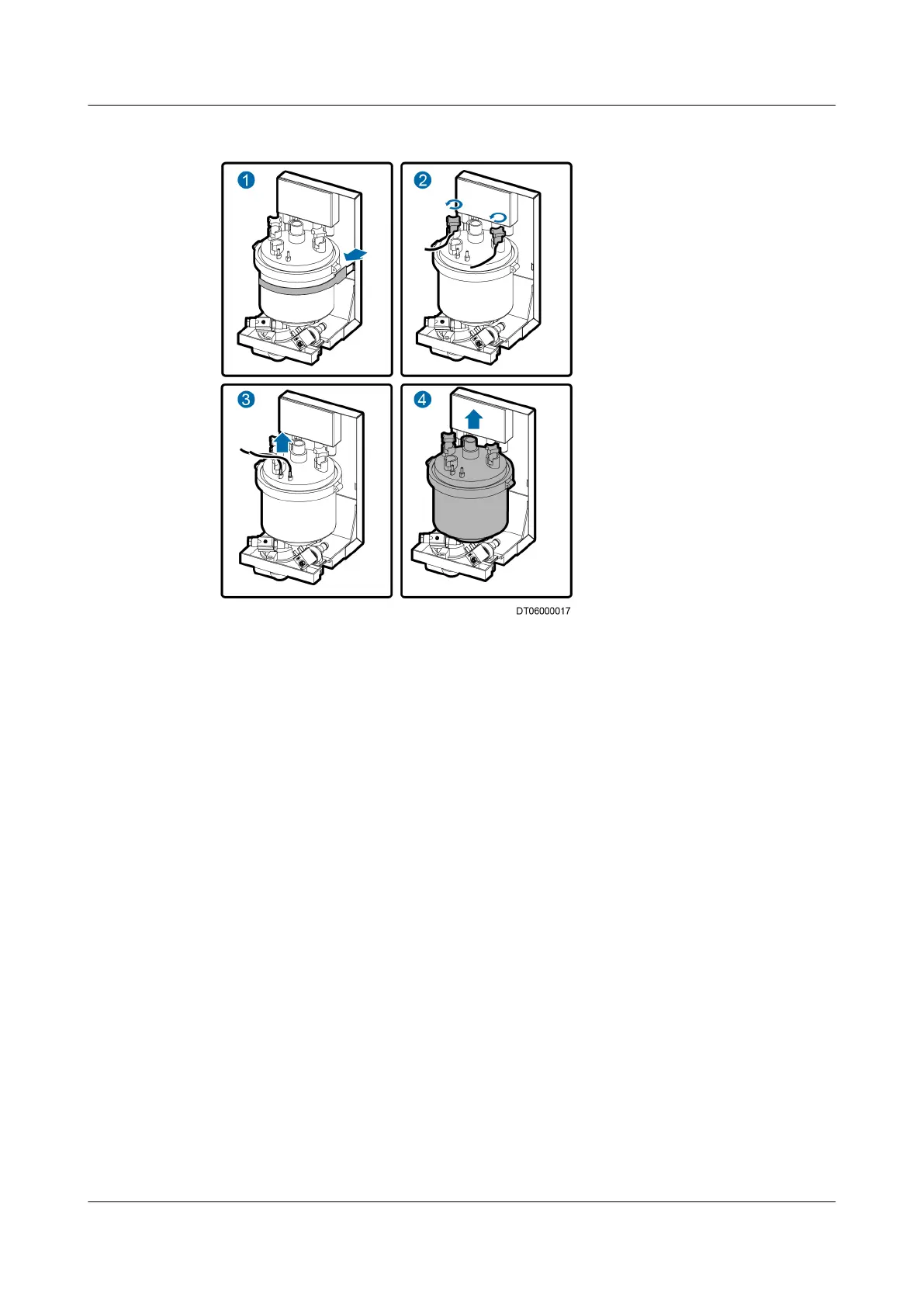
Figure 6-21 Removing a humidier cylinder
Step 7 Remove the sensor cable and take out the humidier cylinder, as shown by (3)
and (4) in Figure 6-21.
Step 8 Install the new
humidier cylinder, and start the humidier.
Step 9 Power on the NetCol5000-A and choose Maint > Diagnostic Mode on the LCD
home screen to enter the Diagnostic Mode screen. Set the value for the
humidier to 100% and check that the humidier runs properly. Then exit from
the diagnostic mode.
Step 10 Install the air lter and close the rear door.
----End
Follow-up Procedure
Choose Maint > Performance Maint on the home screen and then clear the
humidier runtime.
6.5.10 Replacing the Electric Control Box
Prerequisites
● A component inside the electric control box needs to be replaced.
● A spare component of the same model is available and functional.
● Tool: Phillips screwdriver
NetCol5000-A025 In-row Air Cooled Smart Cooling
Product
User Manual (300 mm Width) 6 System Operation and Maintenance
Issue 15 (2020-12-10) Copyright © Huawei Technologies Co., Ltd. 250







 To Next Page