Procedure
Step 1 Tap Shutdown on the LCD home screen. Turn o the smart cooling product switch
in the PDC, and check whether the port is
electried. (Use a multimeter to check
that the AC voltage of the port is 0 V.)
Exercise caution because the NetCol5000-A is still energized when it is being shut
down over the LCD.
Step 2 Open the rear door and remove the air lter.
Step 3 Remove all cables and terminals connected to the electric control box.
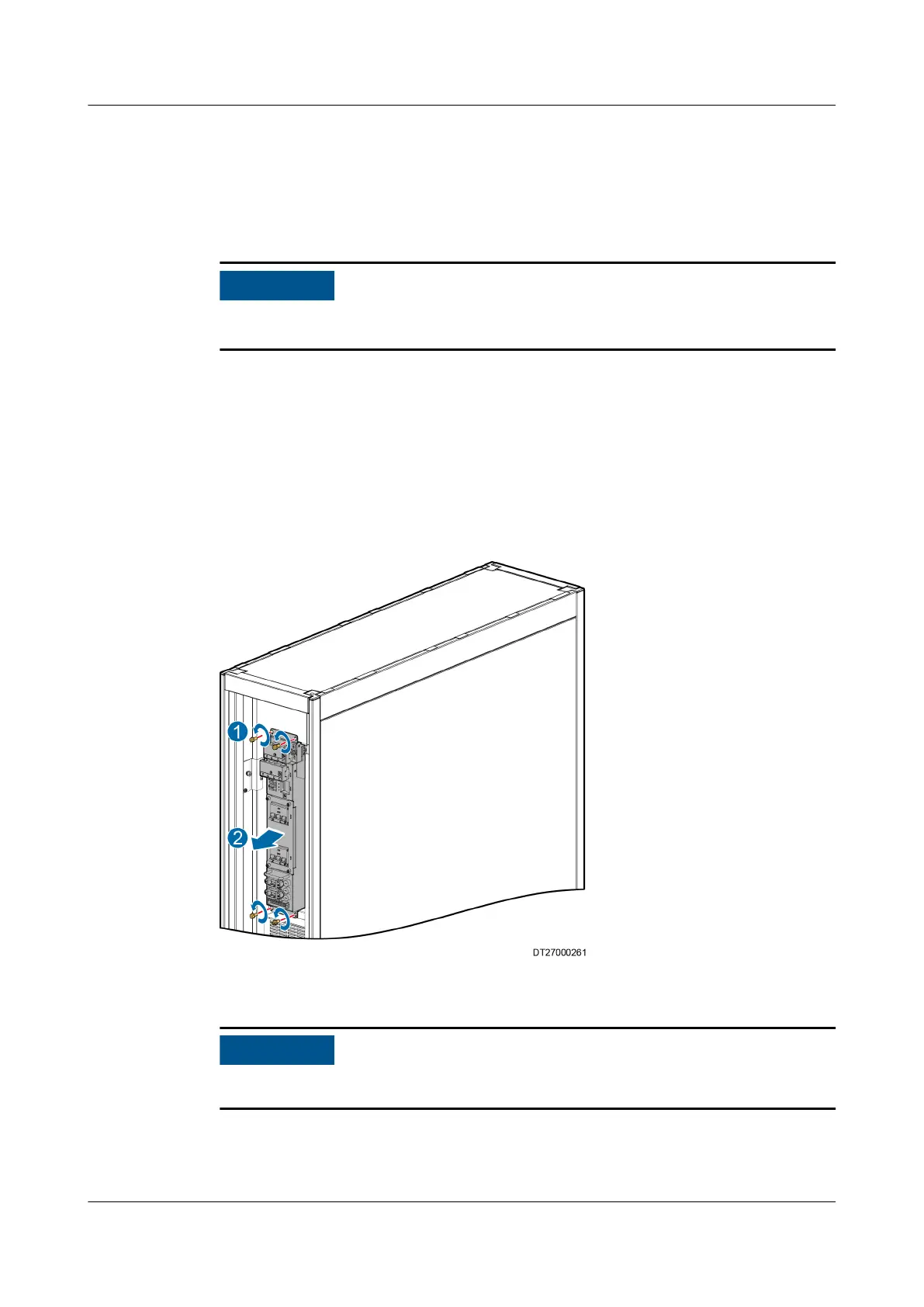
Step 4 Use a Phillips screwdriver to remove the four screws in front of the electric control
box, as shown by (1) in Figure 6-22. Pull the electric control box along the guide
rail by the handle, as shown by (2) in Figure 6-22, and take out the electric
control box.
Figure 6-22 Removing an electric control box
Step 5 Replace the electric control box.
Ensure that the four screws are tightened when installing the electric control box.
Step 6 Place the new electric control box in the original position and secure it.
Step 7 Reconnect cables and terminals.
NetCol5000-A025 In-row Air Cooled Smart Cooling
Product
User Manual (300 mm Width) 6 System Operation and Maintenance
Issue 15 (2020-12-10) Copyright © Huawei Technologies Co., Ltd. 251







 To Next Page