● The address of a T/H sensor provided by Huawei is 1 by default.
● The last RS485_R toggle switch remains OFF.
● After setting communications addresses for T/H sensors, choose Settings > System
Settings > T/H Sensor from the main menu and set the T/H sensor in the aisle to
Enable. Otherwise, the T/H sensor does not work.
----End
3.12 Verication After Installation
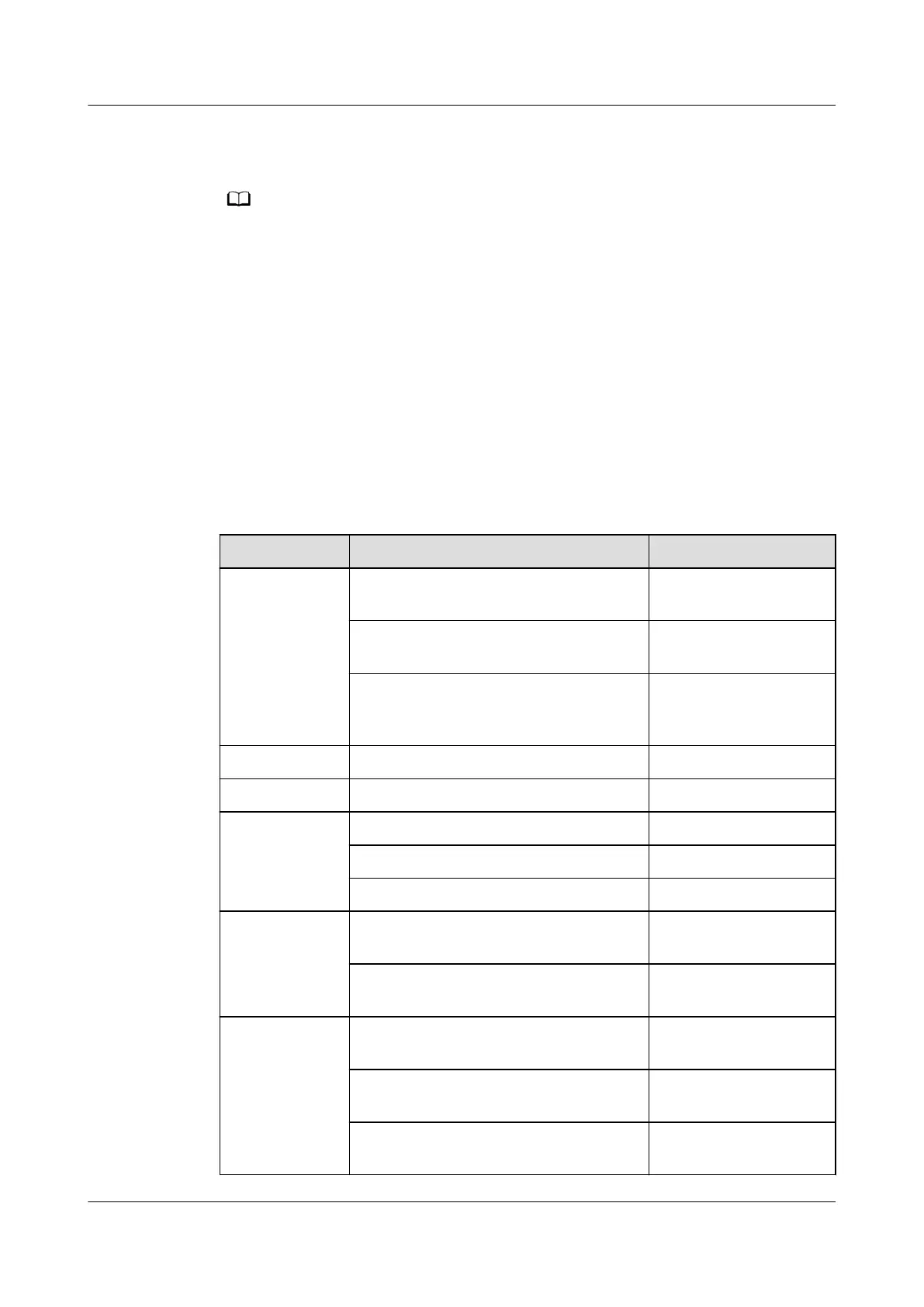
Table 3-17, Table 3-18 and Table 3-19 list the items for the verication after
installation. Record results in the table after verication.
Table 3-17 Check items on the cabinet installation
Check Item Expected Result Check Result
Cabinet The cabinet is installed properly,
without any tilt.
□ Passed □ Failed
The cabinet is secured to the base
using bolts.
□ Passed □ Failed
The foreign matter inside the cabinet
such as cable ties and stubs is
cleaned up.
□ Passed □ Failed
LCD The LCD is well connected. □ Passed □ Failed
Electric heater The electric heater is secured. □ Passed □ Failed
Fan The fan is secured. □ Passed □ Failed
The fan has no foreign matter inside. □ Passed □ Failed
The fan blades rotate properly. □ Passed □ Failed
Electrode
humidier
The water inlet pipes and drainpipes
are securely connected without leaks.
□ Passed □ Failed
The electrode humidier is securely
connected to its base.
□ Passed □ Failed
Wet lm
humidier
The water inlet solenoid valve is
secured reliably and steadily.
□ Passed □ Failed
The humidier water pump is secured
reliably and steadily.
□ Passed □ Failed
The wet lm is secured reliably and
steadily.
□ Passed □ Failed
NetCol5000-A025 In-row Air Cooled Smart Cooling
Product
User Manual (300 mm Width) 3 Installation Guide
Issue 15 (2020-12-10) Copyright © Huawei Technologies Co., Ltd. 95







 To Next Page