No. Items Note
5 The current critical
alarm and their
quantity
refers to the current critical alarm and
their quantity.
6 The current major
alarm and their
quantity
refers to the current major alarm and
their quantity.
7 The current warning
and their quantity
refers to the current warning alarm and
their quantity.
8 The status bar N/A
9 The alarm bar
You can tap in the alarm
bar to enter the active alarm screen that
displays all active alarms.
10 Logout button
indicates that you have logged in to the
system as Admin or Operator, and can tap
the icon to log out.
4.4.3 Initial Conguration
When conguring the temperature and humidity parameters, do not place the
cursor between the decimal point and the following digit of the value. Otherwise,
the decimal point cannot be deleted, and the parameter value fails to be
congured.
4.4.3.1 Setting Temperature and Humidity Values
Procedure
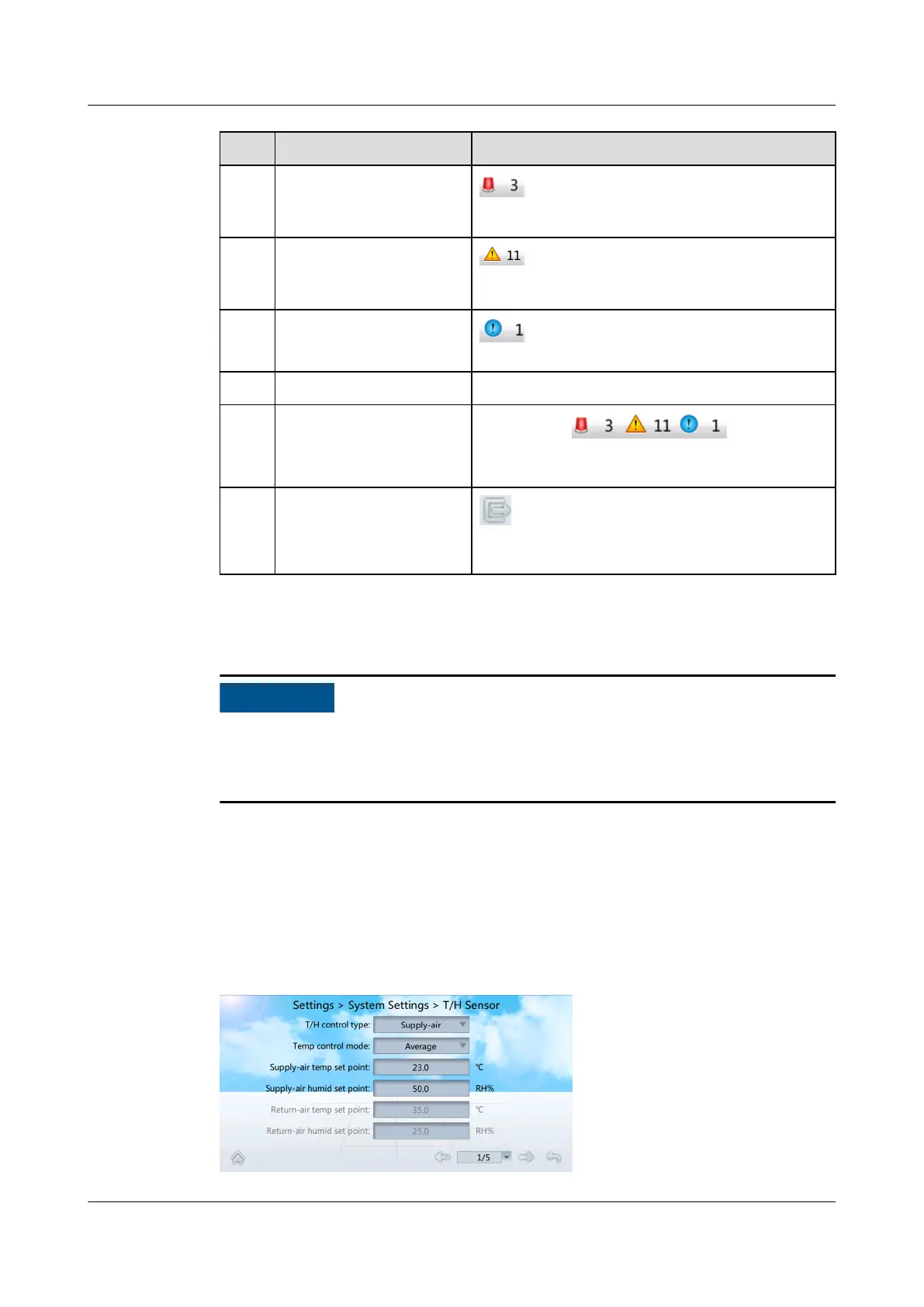
Step 1 On the home screen, choose Settings > System Settings > T/H Sensor. Figure
4-7 is displayed.
Figure 4-7 Setting temperature and humidity values
NetCol5000-A025 In-row Air Cooled Smart Cooling
Product
User Manual (300 mm Width) 4 Power-On Commissioning
Issue 15 (2020-12-10) Copyright © Huawei Technologies Co., Ltd. 110







 To Next Page