Step 3 Tap Start and choose Maint > Diagnostic Mode > Enter.
If no manual operation is performed within 25s after you tap Start, the equipment will
automatically run following the preset logic, and the compressor and indoor and outdoor
fans will also run according to the environment.
After the compressor is powered on, ensure that the electric heating belt of the
crankcase has been heated for more than 12 hours before starting the compressor.
Step 4 (This step is required only when the signal cable connects to the RS485 port.)
Modify the input value of Outdoor fan to 50%. Then modify it to 0% after
checking that the outdoor fan runs properly and no alarm is generated.
Step 5 On the Diagnostic Mode screen, change the value for Indoor fan to 50% and tap
On for the electric heater.
1. Check whether the indoor fans run properly and no alarm is generated.
2. If hot air blows out from the exhaust vent of the fan after a period, the
electric heater runs properly. In this case, tap OFF for the electric heater and
set the value for Indoor fan to 0%.
Step 6 Commission the compressor by setting the compressor rotational speed to 3000
rpm.
1. On the home screen, choose Running > Device Details > Compressor and
check that the value of Suction pressure is in the range of 0.7–1.2 MPa and
the value of Discharge pressure is in a range listed in the following table.
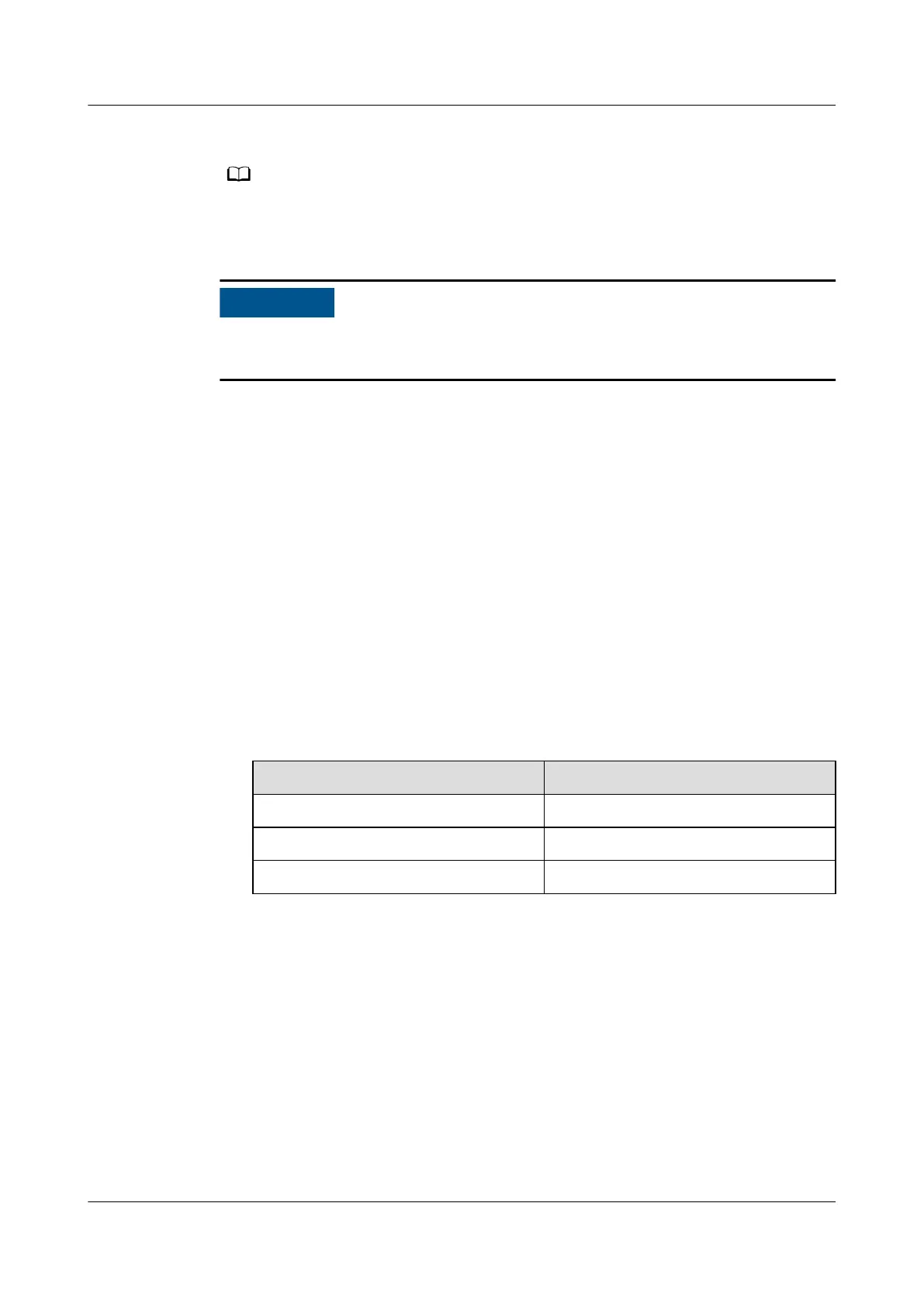
Table 4-10 Normal discharge pressure ranges
Outdoor Ambient Temperature
Normal Discharge Pressure Range
Below 15°C 1.5–2.5 MPa
15–35°C 1.5–3.1 MPa
35–45°C 2.5–3.8 MPa
2. On the home screen, choose Running > Device Details > EEV and check that
the value of EEV suction superheat degree is in the range of 8–15°C.
3. Charge the rest of the refrigerant from the low-pressure pipe needle valve in
small
ow or intermittently if possible.
4. Choose Maint > Diagnostic Mode > Enter, set the input volume for the
compressor to 0 rpm.
NetCol5000-A025 In-row Air Cooled Smart Cooling
Product
User Manual (300 mm Width) 4 Power-On Commissioning
Issue 15 (2020-12-10) Copyright © Huawei Technologies Co., Ltd. 123







 To Next Page