ifm Vision Assistant O3M
46
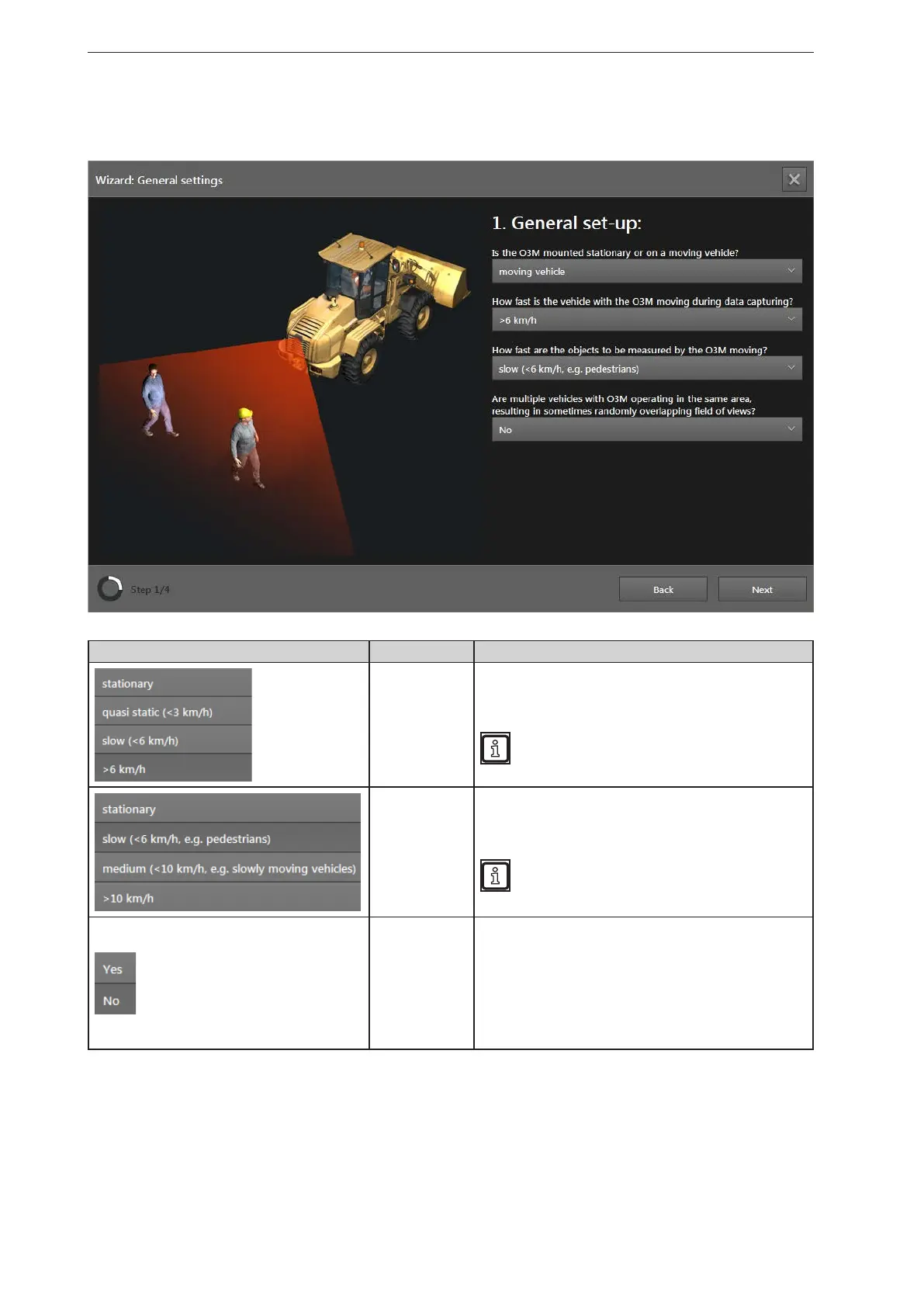
The "moving vehicle" setting
In the following, the general setting "moving vehicle" is described.
Button Name Description
Vehicle speed
Set the speed of the vehicle.
The setting affects the: Intelligent data averaging (→ „10.9
Intelligent data averaging“).
In case of high vehicle speeds, it is recommended
to reduce the value of the intelligent data averaging
(→ „10.9 Intelligent data averaging“).
Object speed
Setting the speed of the objects.
The setting affects the: Intelligent data averaging (→ „10.9
Intelligent data averaging“).
In case of high object speeds, it is recommended
to reduce the value of the intelligent data averaging
(→ „10.9 Intelligent data averaging“).
Several vehicles
If several vehicles with devices move in the working area,
this may produce measurement errors.
The "Yes" setting applies random modulation frequencies for
the devices.
The "Yes" setting affects the: Modulation frequency mode
(→ „10.8 Modulation frequency mode“)
The setting "no" affects: Intelligent data averaging (→ „10.9
Intelligent data averaging“)
► Click on [Next].



 To Next Page