Invacare®LiNX
ChangingMotionName
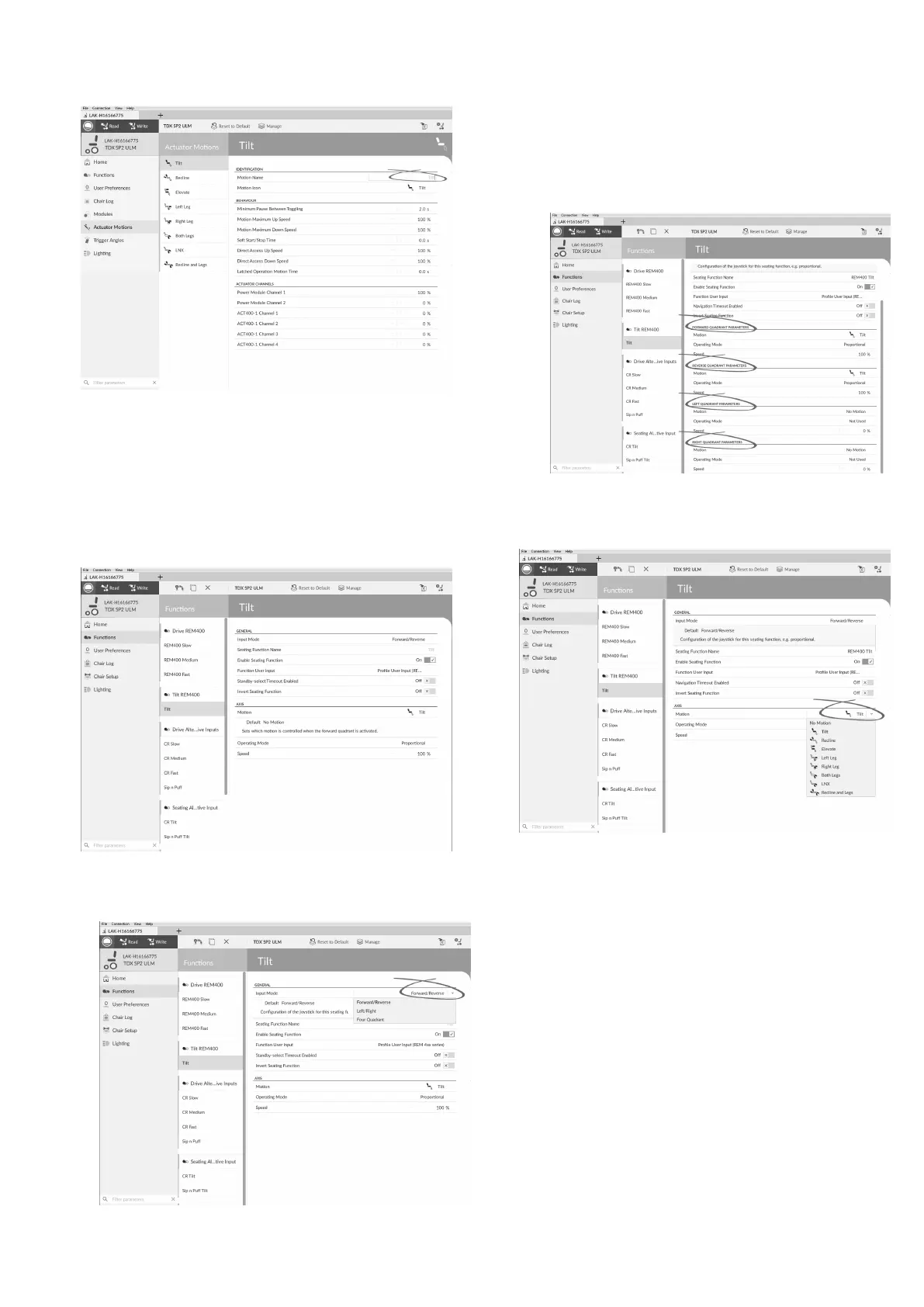
1.
Fig.10-9
ClickonMotionName.
2.Enternewmotionname.
SeatingFunction
Thisparametersetshowthejoystickoperatesamotion.
Thejoystickcancontrolthemotionasaswitchorasa
proportionalcontroller.Therearefourswitch-typemodes
andoneproportional-typemode.
1.
Fig.10-10
ClickonFunctions.
2.Clickonseatingfunctionyouwanttoedit.
a.
Fig.10-11
InputMode:Congurationofuserinputforthis
seatingfunction.
•Forward/Reverse:Movingjoystickforwardor
reversetocontrolmotion.
•Left/Right:Movingjoystickleftorrightto
controlmotion.
•FourQuadrant:Usingallfourjoystick
quadrantstocontrolmotions.
Fig.10-12
IfFourQuadrantisselected,allquadrant
parameterscanbeeditedindividually.
b.
Fig.10-13
Motion:Ifthejoystickisusedtocontrolamotion,
thenselectthemotionfromthelistofavailable
motions.
Ifthejoystickisnotusedtocontrolamotion,then
selectNoMotionfromthelist.
c.OperatingMode:
124
1605129-G












 To Next Page