14 Configuration – in setup program only
244
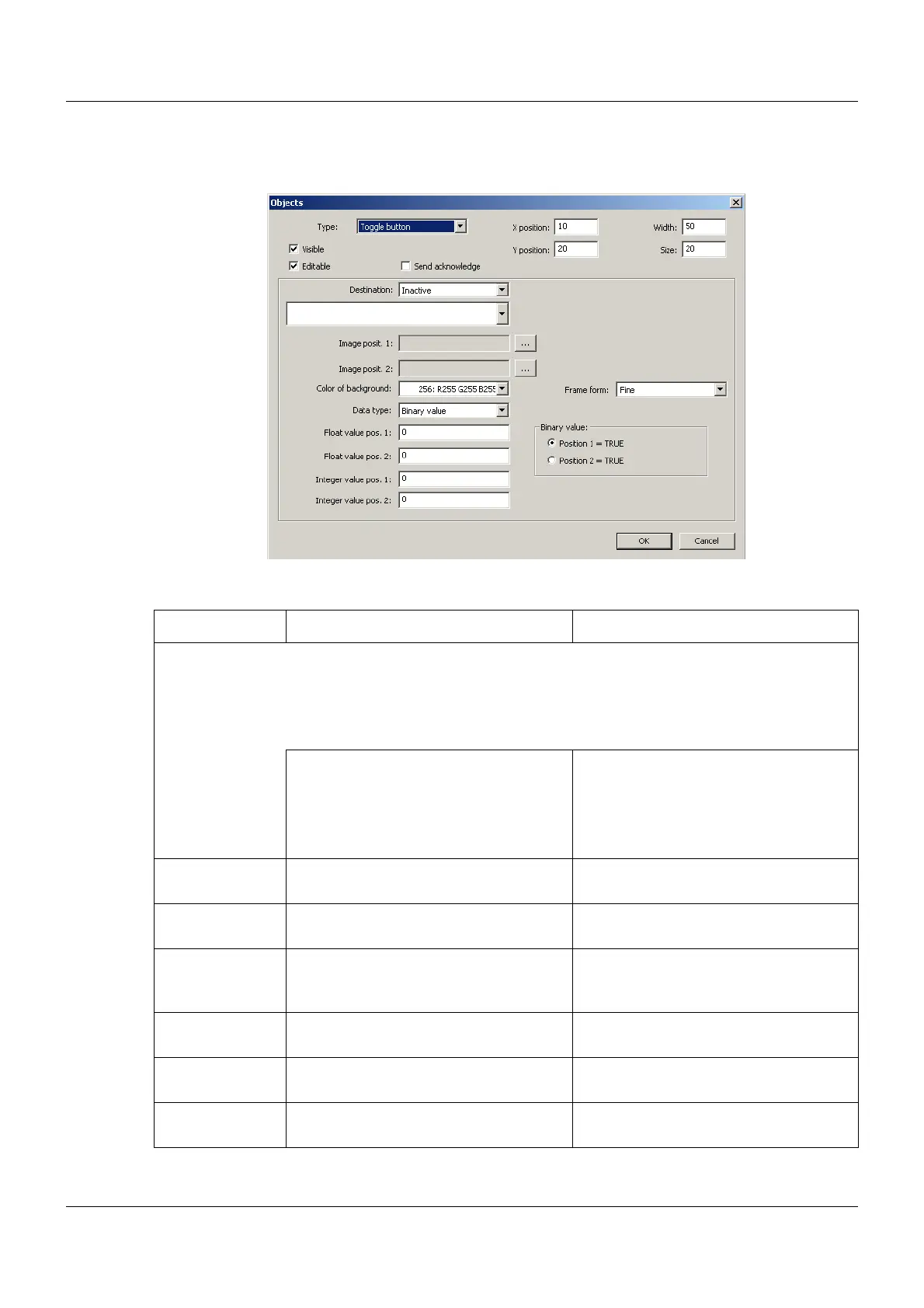
Toggle button
Setup dialog
Parameter
Parameter Selection/settings Description
Destination Variable to which the value is written.
The value changes between position 1 and position 2 each time the object is
touched; the setting is displayed via the corresponding image. Each position can
be allocated to a float value, an integer value, or a binary value; the user should
observe the selected data type.
Inactive No variable selected.
Select module and corresponding vari-
able.
The data type of the variable must corre-
spond with the selection of the "Data
type" parameter (for "Analog value", the
variable type must be "Float").
Image posit. 1, 2 Touch the "..." button and select the
image from the list.
Images (icons) for displaying position 1
and position 2.
Color of back-
ground
Select color (drop-down menu). Background color of the object
Data type Select data type (drop-down menu). The data type determines which values
(float, integer, or binary values) are used
in the product.
Float value
pos. 1, 2
Enter value Values for position 1 and position 2
(for "Analog value" data type)
Integer value
pos. 1, 2
Enter value Values for position 1 and position 2
(for "Integer value" data type)
Binary value Select which setting corresponds to the
condition "High" (TRUE).
Conditions for position 1 and position 2
(for "Binary value" data type)



 To Next Page