80
Measurement
5
5.4. Measurement in sequential mode
POINT
- Refer to "5.11.5. Stable detection
settings" for more information about the
conditions of stability.
2. Tap [OK].
[JUDGE CONDITION] has been set, and
>6(48(1&(&21752/@ZLOOEHGLVSOD\HG
&RQ¿UPWKHVHWWLQJV
&RQ¿UP>-8'*(&21',7,21@
The setting is completed if the value set by the step
2) appears under [JUDGE CONDITION].
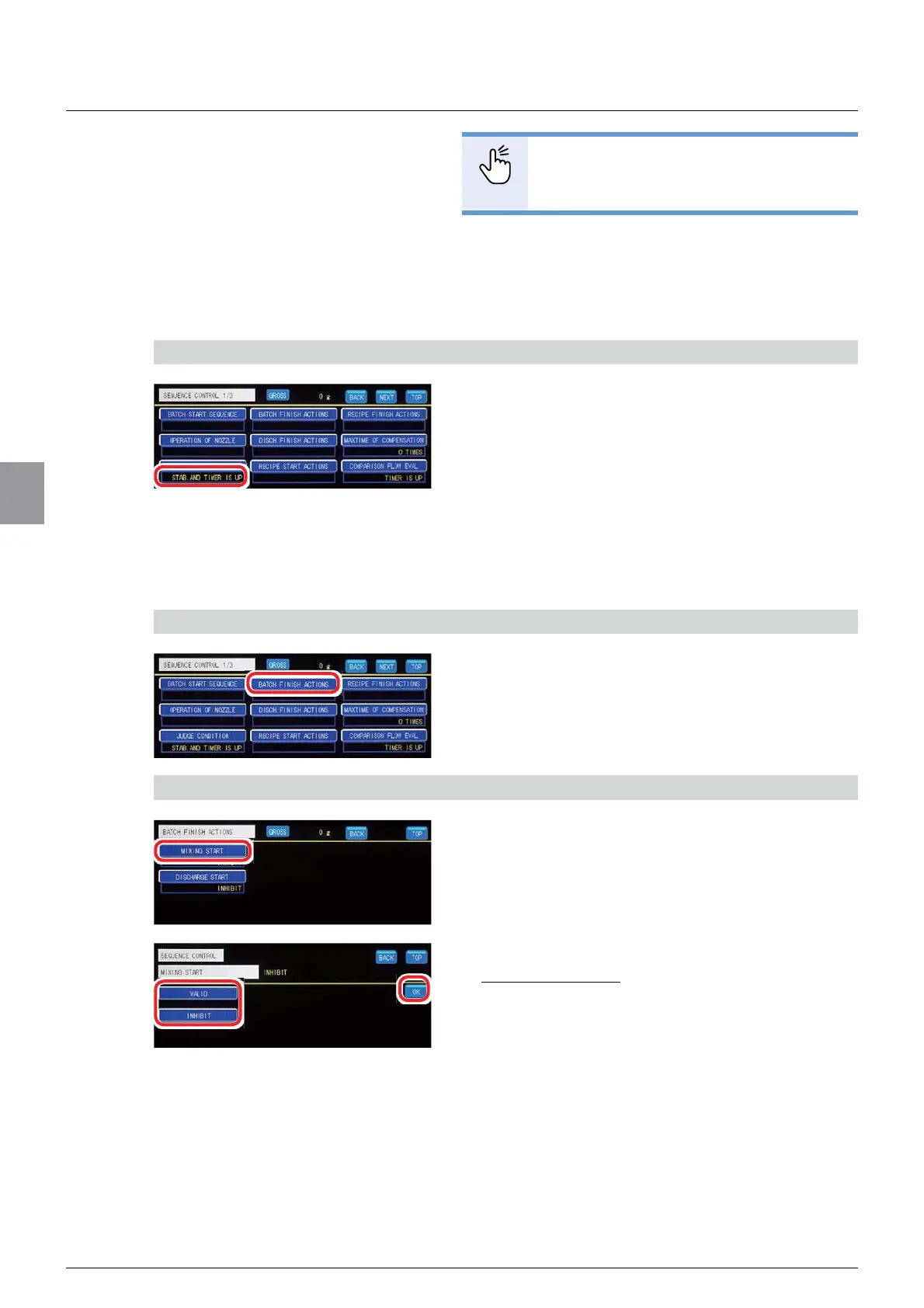
(9) [BATCH FINISH ACTIONS] settings
6HWZKHWKHUWRPL[WKHPHDVXUHGREMHFWV>0,;,1*67$57@DQGZKHWKHUWRGLVFKDUJHWKH
measured objects ([DISCHARGE START]) on completion of measurement.
1) Display the screen to set [BATCH FINISH ACTIONS]
1. Tap [BATCH FINISH ACTIONS] on
[SEQUENCE CONTROL 1/3].
7KHVFUHHQWRVHW>%$7&+),1,6+$&7,216@ZLOO
be displayed.
2) Set the mixing operation on completion of measurement
1. Tap [MIXING START].
7KHVFUHHQWRVHWWKHPL[LQJRSHUDWLRQZLOOEH
displayed.
2. Tap [VALID]/[INHIBIT].
Default: [INHIBIT]
3. Tap [OK].
The mixing operation on completion of
measurement has been set, and the screen to set
>%$7&+),1,6+$&7,216@ZLOOEHGLVSOD\HG



 To Next Page