132
Measurement
5
5.9. Measurement in 4 steps comparator mode
2) Set the comparative target
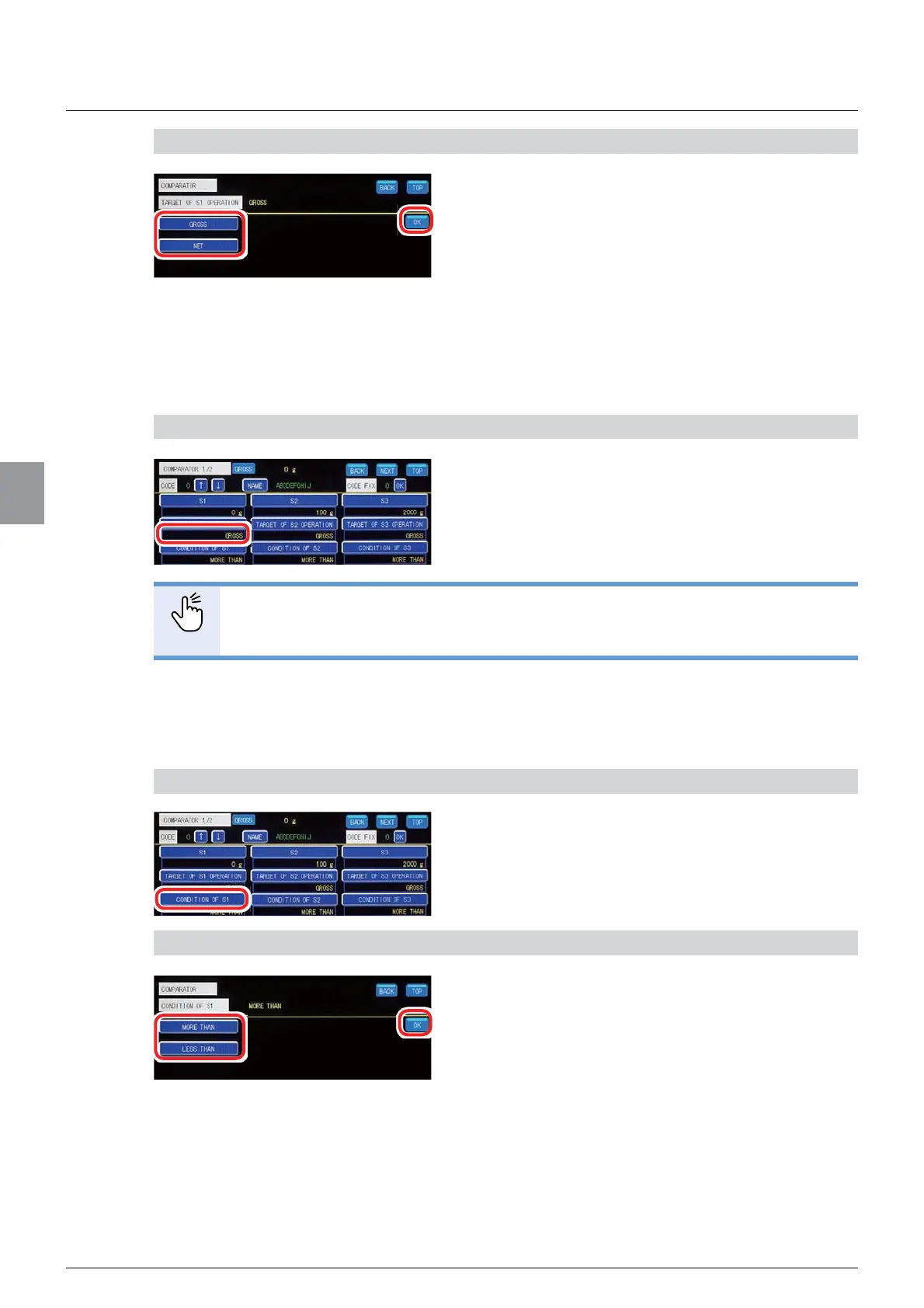
1. Select the comparative target.
[GROSS]*URVVZHLJKWVEHFRPHWKH
comparative target.
[NET]1HWZHLJKWVEHFRPHWKHFRPSDUDWLYH
target.
2. Tap [OK].
The comparative target for Condition1 has been set,
DQG>&203$5$725@ZLOOEHGLVSOD\HG
&RQ¿UPWKHVHWWLQJV
&RQ¿UPWKHFRPSDUDWLYHWDUJHW
The setting is completed if the item set by the step
2) appears under [TARGET OF S1 OPERATION].
POINT
- To set comparative targets for Condition2 to Condition4, tap [TARGET OF S2
OPERATION] to [TARGET OF S4 OPERATION] and repeat the same operation.
(3) Settings of comparison condition
Set "equal to or more than" or"equal to or less than" the setting value of the comparison value.
1) Display the screen to set the comparison condition for Condition1
1. Tap [CONDITION OF S1] on [COMPARATOR
1/2].
The screen to set the comparison condition for
&RQGLWLRQZLOOEHGLVSOD\HG
2) Set the comparison condition
1. Select the comparison condition.
[MORE THAN]: Determined that the condition is
PHWLIWKHZHLJKLQJYDOXHLVWKHFRPSDULVRQYDOXH
or more.
[LESS THAN]: Determined that the condition is
PHWLIWKHZHLJKLQJYDOXHLVWKHFRPSDULVRQYDOXH
or less.
2. Tap [OK].
The comparison condition for Condition1 has been
VHWDQG>&203$5$725@ZLOOEHGLVSOD\HG



 To Next Page