9.1.Standard RS-485 interface
209
External equipment
9
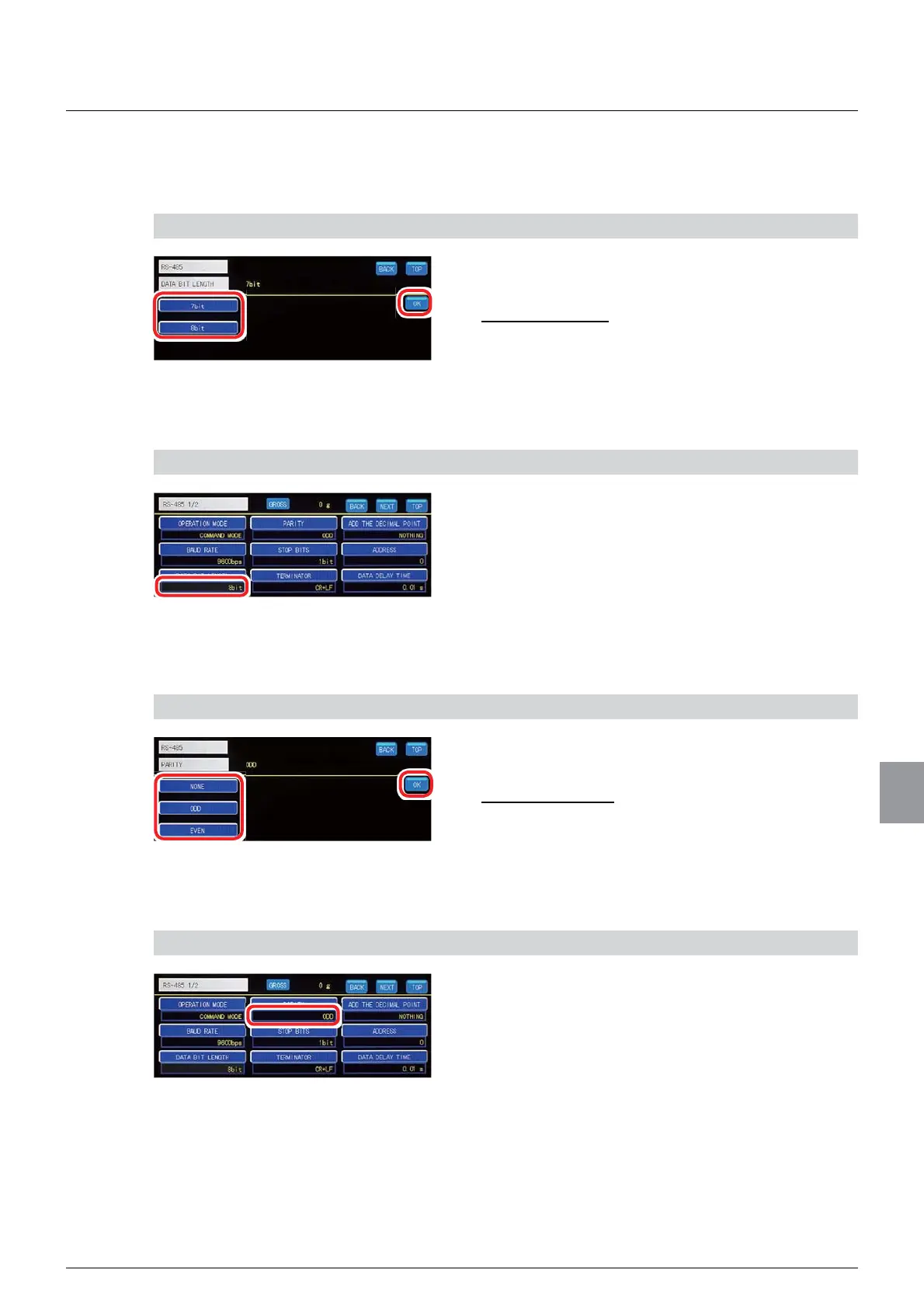
(3) Data bit length setting
Sets the data bit length of the standard RS-485 interface.
1) Set a data bit length
1. Select a data bit length.
6HOHFWLRQVELWELW
,QLWLDOYDOXHELW
2. Tap [OK].
The data bit length will be set, and [RS485 1/2] will
be displayed.
2) Check the setting that you set
1. Check the data bit length setting.
The setting is completed if the item set by the step
1) above appears under [DATA BIT LENGTH].
(4) Parity setting
Sets the parity bit of the standard RS-485 interface.
1) Set a parity bit
1. Select a parity bit.
6HOHFWLRQV121(2''(9(1
,QLWLDOYDOXH2''
2. Tap [OK].
The parity bit will be set, and [RS485 1/2] will be
displayed.
2) Check the setting that you set
1. Check the parity bit setting.
The setting is completed if the item set by the step
1) above appears under [PARITY].



 To Next Page