12. Commissioning
MiR250 Hook User Guide (en) 01/2023 - v.1.2 ©Copyright 2021-2023: Mobile Industrial Robots A/S. 175
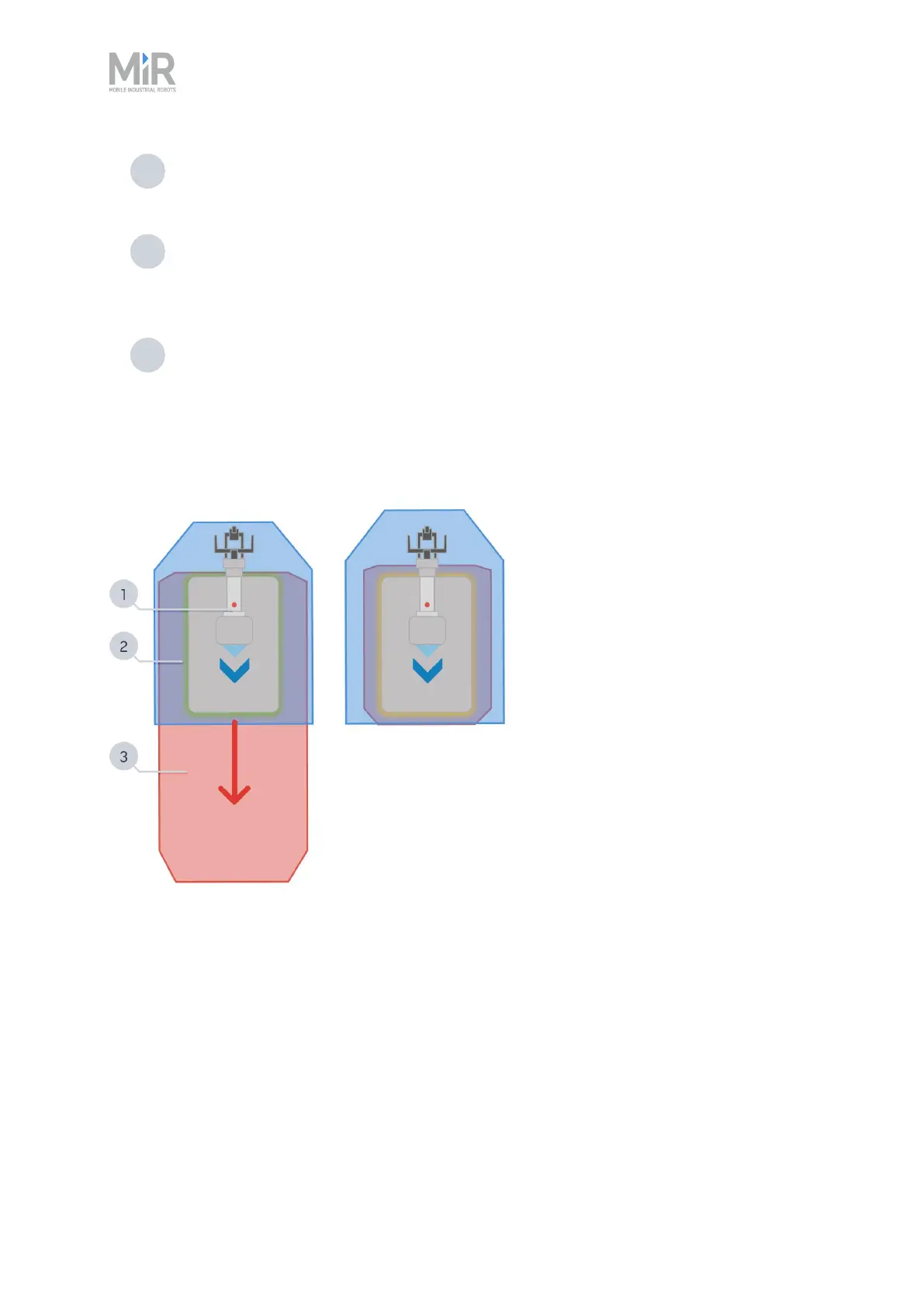
1 Physical dimensions: Adjust the length, width, and height of the footprint to match
the physical footprint of the top module and its expected payload.
2 Navigation: Adjust the length and width of the footprint to be as small as possible for
both safe and agile autonomous driving. The footprint should not be too small, or the
robot will navigate too close to a person or an object and go into Protective stop.
3 Protective field: Adjust the width of the footprint to approximately the width of the
largest Protective field to prevent the robot from going into a Protective stop when
pivoting.
Figure 12.22 Examples showing the size of the Protective field and robot footprint relative to the physical
dimensions of the top module. (left) Robot driving forward (right) Robot at standstill.
Setting the active footprint
If you want to change the footprint in a mission, use the Set footprint action found under the
Move action group. This is used to change the footprint when the robot picks up a load that
extends the footprint or places a load and the footprint returns to the default.



 To Next Page