13. Usage
MiR250 Hook User Guide (en) 01/2023 - v.1.2 ©Copyright 2021-2023: Mobile Industrial Robots A/S. 194
13. Usage
The main way to use MiR250 Hook is through missions that you create.
In the following sections you will find practical examples of how missions can be tailored to
different tasks. The examples include:
• Setting markers and positions on the map.
• Defining carts that the robot can pick up from cart positions.
• Creating a mission that uses a Prompt user action. The example mission is titled Prompt user.
• Creating a mission that uses a Try/Catch action. The example mission is titled Try/Catch.
• Creating a mission that uses variables.The example mission is titled Variable docking.
• Creating a mission that makes the robot pick up a cart, drive to another position and then place
the cart back in the original position. The example mission is titled Cart mission.
13.1 Creating markers
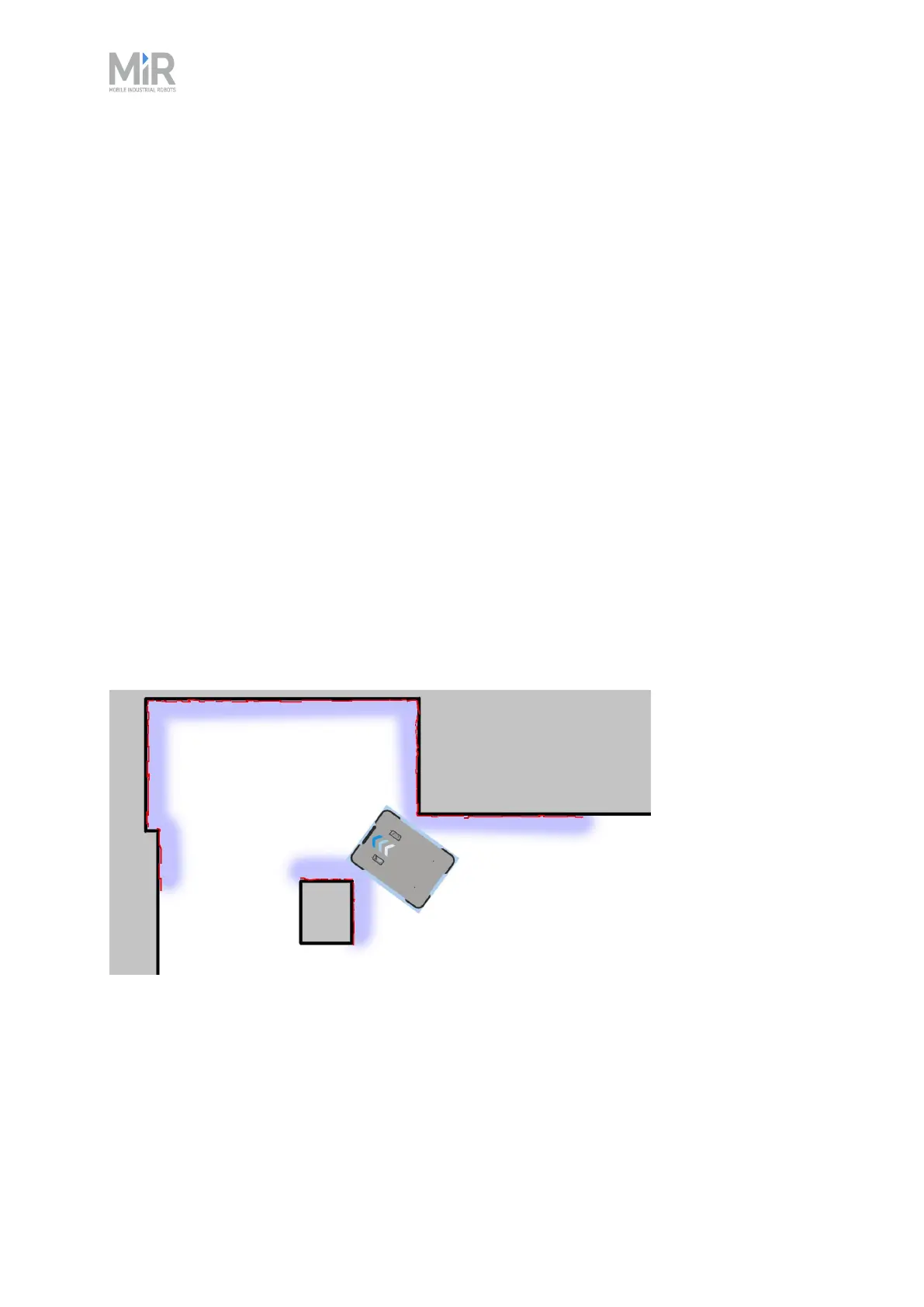
Before creating a marker, you must ensure that the robot is localized correctly on an active map.
If in doubt, you can check if the red lines representing the laser scanner view match the black
lines on the map, as shown in Figure 13.1.
Figure 13.1 The red lines represent the obstacles the laser scanners detect. The robot is localized correctly
when the red lines align with the black lines that represent walls.



 To Next Page