7 Operation
Maschinenfabrik Reinhausen GmbH 2019214 5163667/06 ENETOS
®
IM
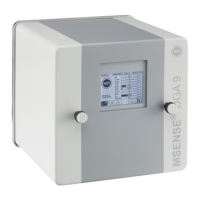
Figure161: Configuring bushing monitoring
F1/F2-C: Activate capacitance monitoring
You can use this parameter to activate or deactivate capacitance monitoring
in field 1 or field 2.
After being switched on, capacitance monitoring only becomes active once
a delay time has elapsed (factory setting of 2minutes) in order to avoid er-
rors resulting from transients.
To activate/deactivate capacitance monitoring, proceed as follows:
1. Go to Settings > Parameters > Bushing monitoring field1/field2 > F1/
F2-C: Activate capacitance monitoring.
2. Select the desired option.
3. Press the Accept button to save the modified parameter.
F1/F2-C: C1 Phase L1/L2/L3
You can use these parameters to set the reference capacitance C1 for the
bushings of phases L1, L2 and L3 in field 1 and field 2. The reference value
is the value you have measured with an external measuring device for com-
missioning.
To set the reference capacitance, proceed as follows:
1. Go to Settings > Parameters > Bushing monitoring field1/field2 > C:
C1 phase L1/L2/L3.
2. Enter the desired value.
3. Press the Accept button to save the modified parameter.


 To Next Page