8 Fault elimination
Maschinenfabrik Reinhausen GmbH 2019 3335163667/06 EN ETOS
®
IM
8 Fault elimination
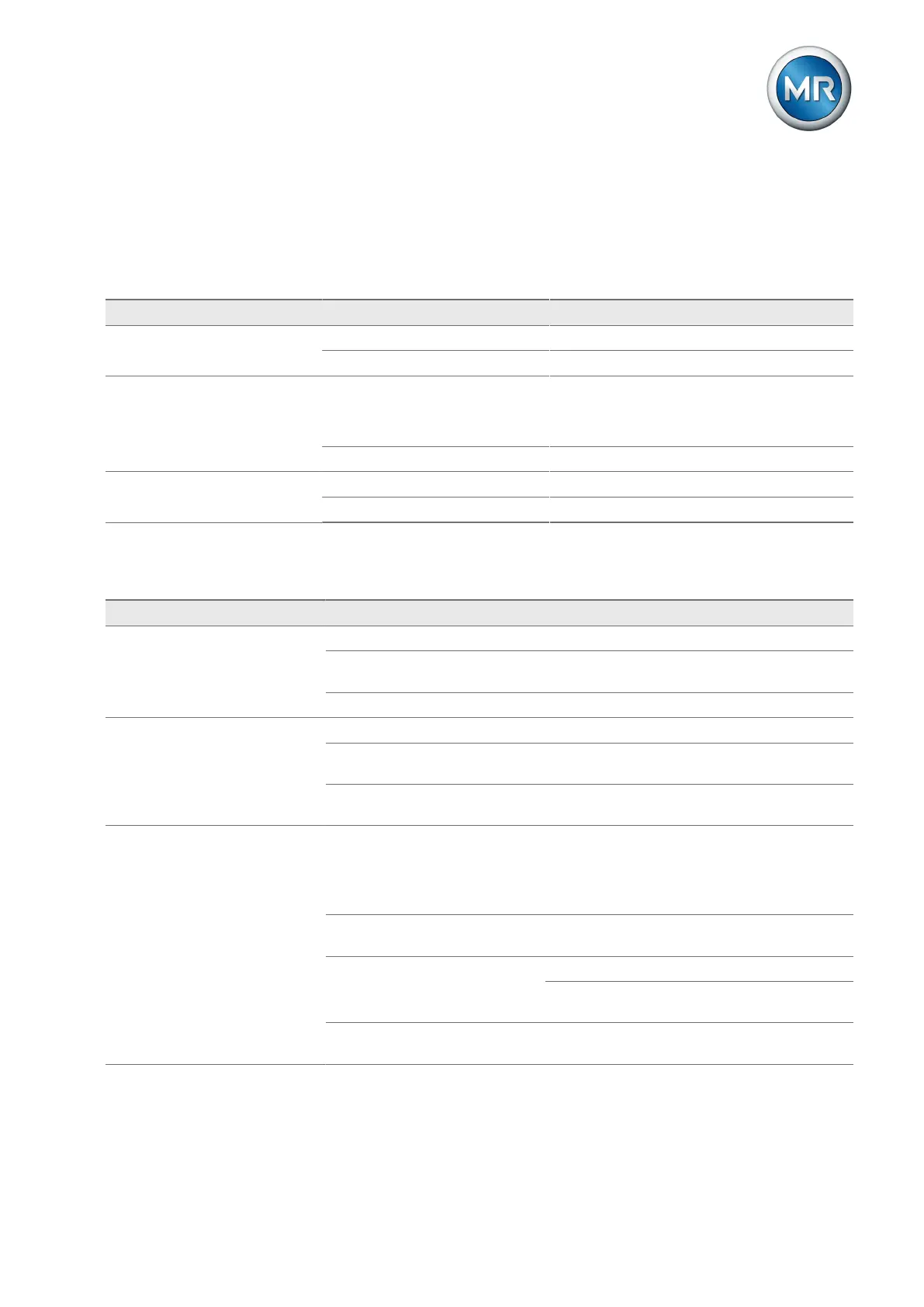
This chapter describes how to rectify simple operating faults.
8.1 General faults
Characteristics/details Cause Remedy
No function
▪ Device not starting
No voltage supply Check the voltage supply
Fuse tripped Contact Maschinenfabrik Reinhausen GmbH
No function
▪ ERR LED of the CPU assem-
bly lights up
Rotary switch of CPU assembly
moved
Correct position of rotary switch:
▪ 0 position
▪ RUN position
Configuration error Contact Maschinenfabrik Reinhausen GmbH
Relays chatter High EMC load Use shielded cables or external filters
Poor grounding Check the functional ground
Table119: General faults
8.2 Human-machine interface
Characteristics/details Cause Remedy
No display/screen is loaded Power supply interrupted. Check the voltage supply.
Error when loading the current
screen in the browser.
Press [F5] key to update the screen.
Fuse faulty. Contact Maschinenfabrik Reinhausen.
Connection cannot be established
with visualization
Connection cable defective. Check connection cable.
IP addresses of visualization and
SCADA are in the same subnet.
Check the setting of the IP addresses of the de-
vice and correct where necessary.
PC not in same subnet as visual-
ization.
Check the setting of the IP addresses of the de-
vice and PC and correct where necessary.
Browser displays an SSL warning
when establishing a connection to
the visualization.
The browser does not accept an
SSL connection with a signed
certificate that is non-public (this
is the default status of the de-
vice).
Import signed SSL certificate or adjust browser
settings.
The device SSL certificate has
expired.
Import SSL certificate.
The device date/time is set incor-
rectly.
Set the date and time.
When using time synchronization via SNTP:
check SNTP server.
IP address of interface ETH2.2
has changed.
Import SSL certificate with new IP address ("Al-
ternative applicant name").
Table120: Human-machine interface



 To Next Page