7 Operation
Maschinenfabrik Reinhausen GmbH 2019254 5163667/06 ENETOS
®
IM
Property Description
Acknowledgeable
(not configurable)
Acknowledgeable events must be acknowledged in the
event overview so that they are no longer displayed. All
other events are automatically removed once the cause is
remedied (e.g. limit value no longer infringed).
Event name Brief name of event. If you delete all of the text, the stan-
dard text is displayed.
Event description Description of event. If you delete all of the text, the stan-
dard text is displayed.
Event remedy Troubleshooting information for cause of event. If you
delete all of the text, the standard text is displayed.
Category ▪ Error (red)
▪ Warning (yellow)
▪ Info (grey)
This setting affects the color of the Alarm LED and the
event symbol in the primary navigation.
Message If you activate this option, the event is shown on the dis-
play and, if configured accordingly, issued via an output
and the control system protocol.
Storage If you activate this option, the event is stored in the event
memory.
Table67: Properties of events
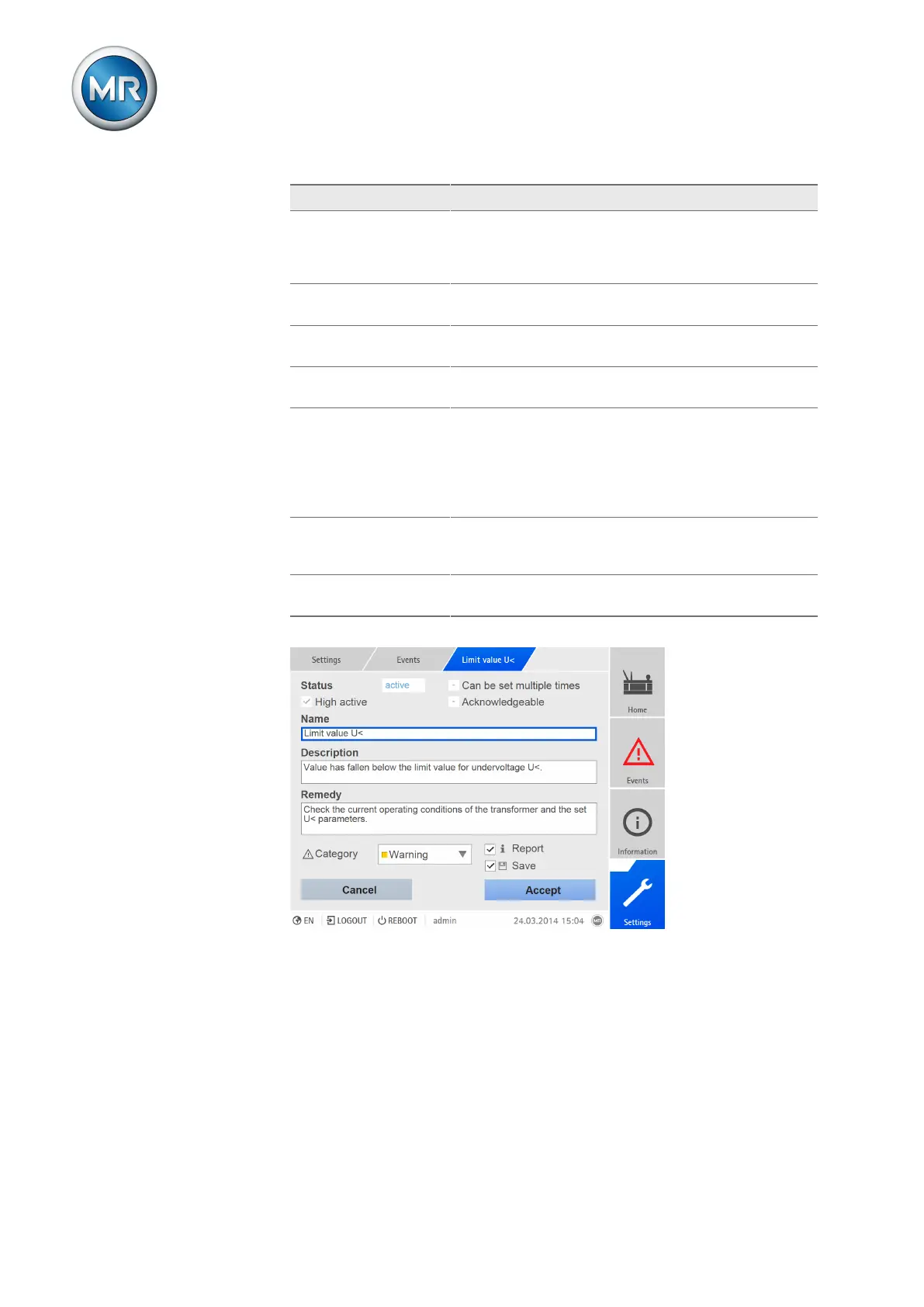
Figure194: Configuring events
To configure an event, proceed as follows:
1. Go to Settings > Events.
2. Select the event to be changed in the list.
3. Select the options you want.
4. Press the Accept button to save the change.


 To Next Page