PTS 400.3 PLUS Operation Manual_R02 Page 61/306
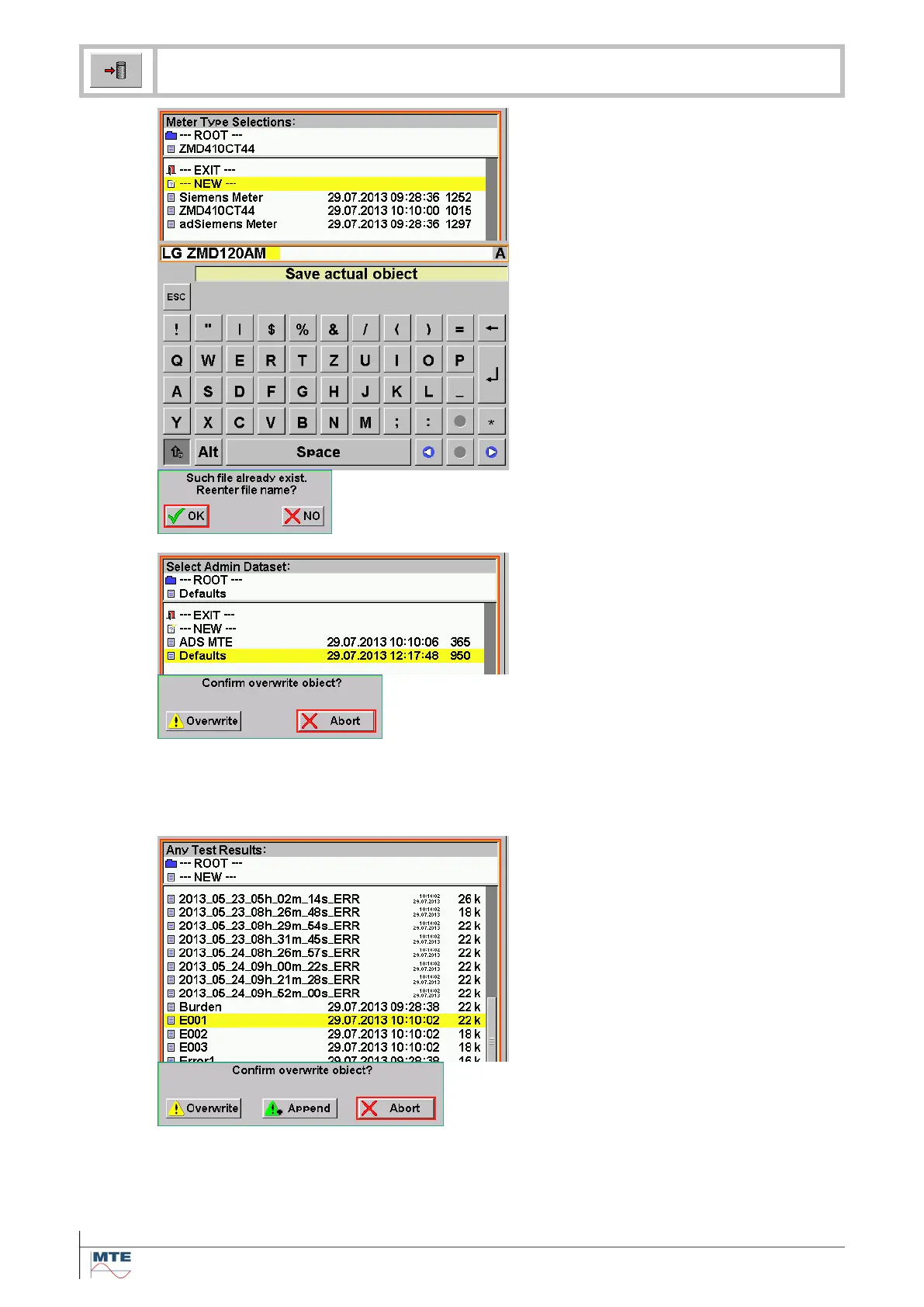
Save as new file
Press on ---NEW--- to save dataset as
new file.
Enter / change name
The input of a name is required.
The name can be entered/changed with
the virtual keyboard. [4.3].
Press the Enter key to terminate the
save function.
Warning file exists, re-enter name?
OK: Re-enter different file name and
press Enter key to terminate.
NO: The rename function is cancelled.
Save as defaults
Select file named Defaults in root direc-
tory (e.g. Admin Dataset). A confirma-
tion is required, because an existing file
will be overwritten.
Confirm overwriting
Overwrite: Overwrite Defaults with new
settings. At next power on these set-
tings will be loaded as default. The
save function is terminated.
Abort: Cancel save function. The ac-
tual defaults settings remain un-
changed.
Save to existing result file
With this function several measurement
data sets can be saved in the same re-
sult file.
Confirm overwriting / append
Overwrite: The old measurement data
set will be overwritten with the new data
set.
Append: The new measurement data
set will be appended to the existing file.
This option is only available at meas-
urement result files.
Abort: Cancel save function.


 To Next Page