68 Chapter 3 Prepare the Océ TCS500 for use
Configure the network settings of the Océ TCS500
After you have completed all dialogs, the screen shows an overview of all the
network settings.
Press the key for 'Apply' to confirm the settings and to exit the wizard
The system indicates whether you have to reboot the Océ Power logic controller to
apply the new network settings. This can, for example, be the case when settings are
received through DHCP. When no indication appears, you do not need to reboot the
Océ Power logic controller.
Note: When 'Synchronize controller power on / off' is set to 'On', you must turn the
printer off and on to reboot the Océ Power Logic controller.
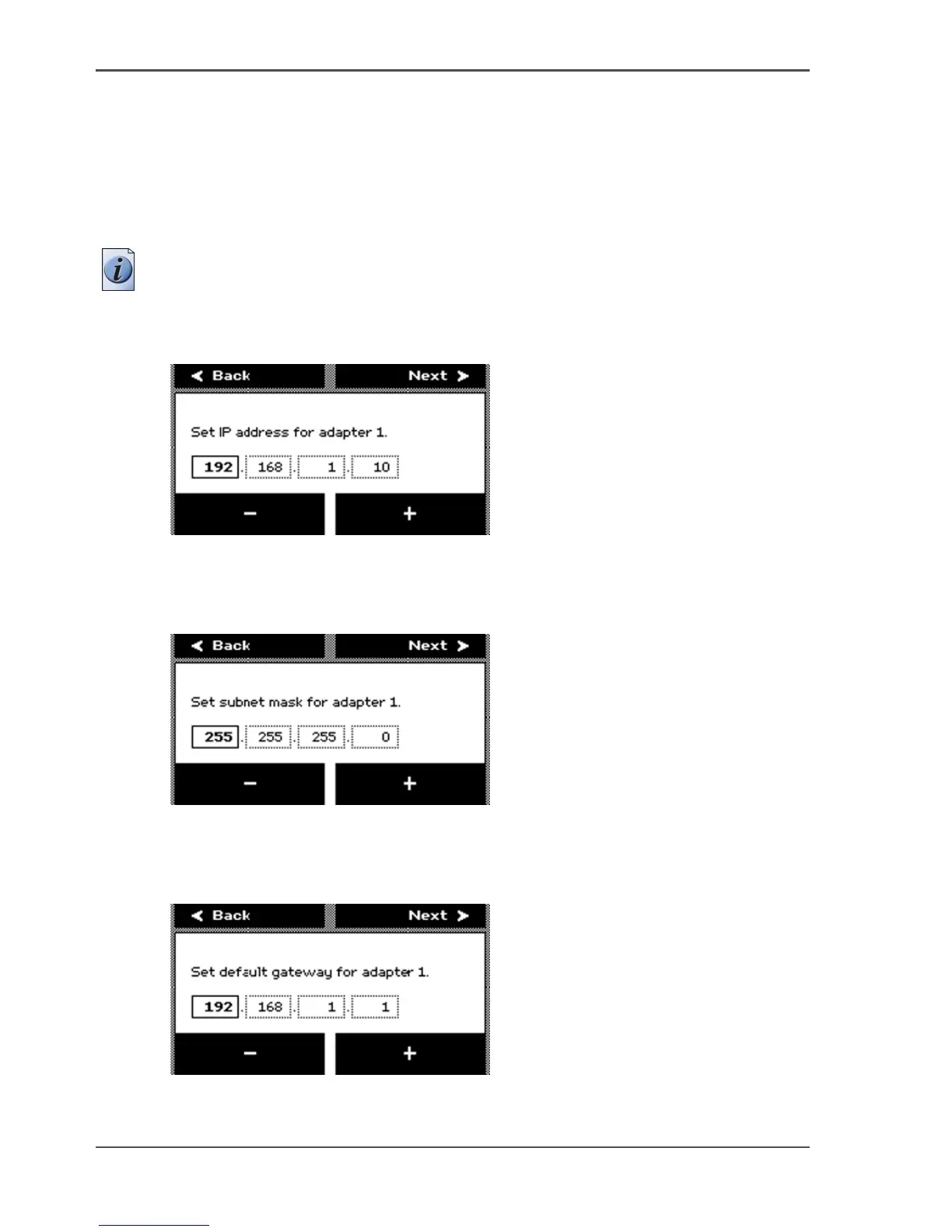
10. After you select 'No', press the key for 'Next' to manually define the network settings.
11. The screen displays 'Set IP address for adapter 1'.
[43]
Press the keys for '-' and '+' to define the IP address.
After you finish an octet, press the key for 'Next' to go to the next octet.
12. Press the key for 'Next' after you finish the last octet. The screen displays 'Set subnet
mask for adapter 1'.
[44]
Press the keys for '-' and '+' to define the subnet mask.
After you finish an octet, press the key for 'Next' to go to the next octet.
13. Press the key for 'Next' after you finish the last octet. The screen displays 'Set default
gateway for adapter 1'.
[45]
Press the keys for '-' and '+' to define the default gateway.



 To Next Page