radEAGLE User Manual Powering the radEAGLE
You can fill the pack with rechargeable batteries, however, they won’t be recharged in
the instrument.
8.2 Replacing Batteries of the radEAGLE
The procedure of replacing batteries depends on the type of enclosure of your radEAGLE.
The following sections provide information about different enclosure types. Please
refer to the section for the enclosure of your radEAGLE.
8.2.1 Standard Enclosure
Ü To remove the powerCELL…
1. Remove the USB and power cables, if any, from the instrument.
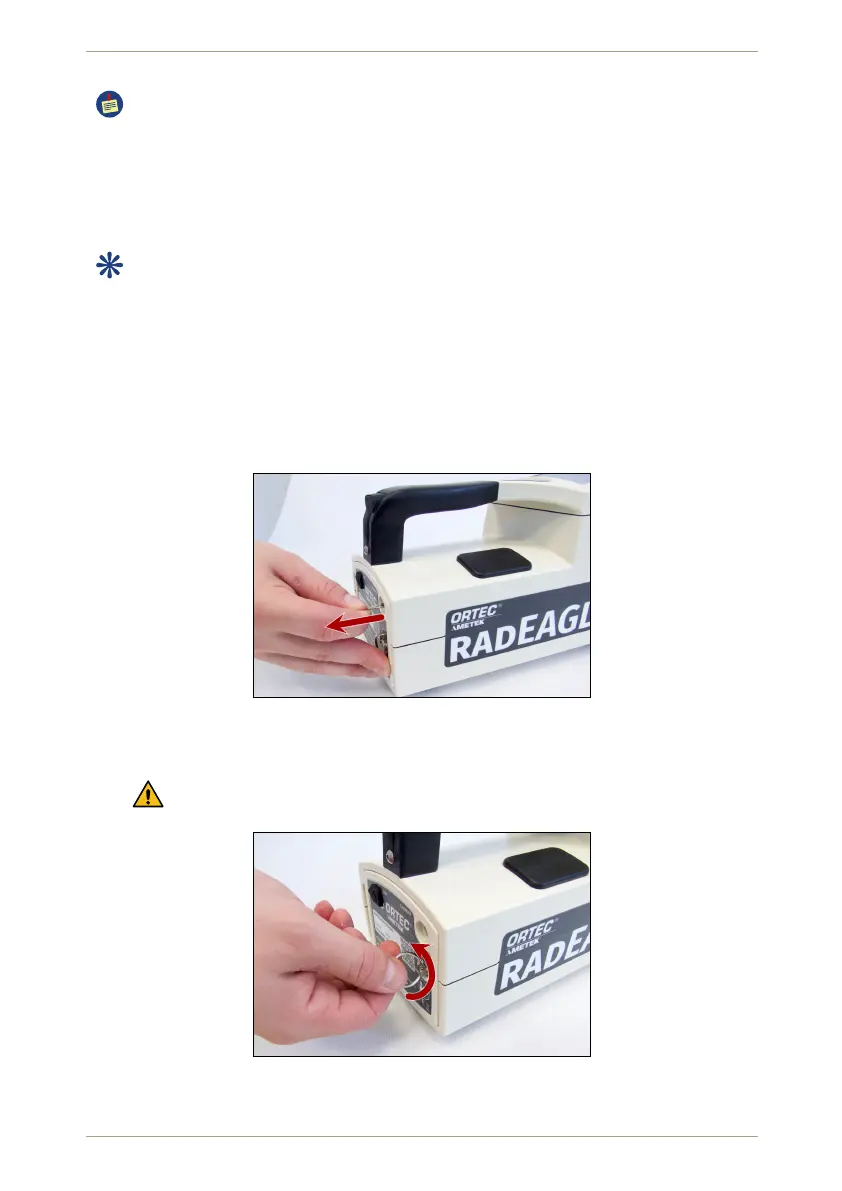
2. Pull the bung from the power connector plug (Fig. 129, p. 109).
Figure 129: Pulling the protection of the power connector
3. Unscrew the lock of the latch by turning it counter-clockwise (Fig. 130, p. 109).
You don’t need to remove the screw completely, just turn it until the latch opens.
Figure 130: Opening the rear latch of the radEAGLE
© innoRIID GmbH • 2019-04-11 Software 3.2.12 • Document 3.3.0o 109/147



 To Next Page